A version number helps developers assess what to expect from an update, including whether it may introduce breaking changes. When versioning conventions aren’t followed, an update can break existing functionality and leave teams troubleshooting unexpected issues.
That risk isn’t theoretical. A 2022 study of nearly 120,000 library upgrades found that about one in six did not comply with semantic versioning conventions.
Clear software release versioning helps set the right expectations. This guide explains the common versioning schemes, which number to bump and when, how to write release notes people actually read, and how feature flags help teams that ship often keep their version numbers meaningful.

What is software release versioning?
Software release versioning is the practice of giving every release of a software product a unique, ordered identifier. The version number tells people and machines what changed and whether upgrading is safe.
A good versioning scheme turns a string like 3.4.1 into a contract. Developers read it to decide whether to upgrade, package managers read it during dependency resolution, and support teams read it to reproduce a bug reported against a specific version.
Common software release versioning schemes
Teams can pick from five versioning schemes, or combine two of them:
- Semantic versioning (SemVer): MAJOR.MINOR.PATCH, such as 4.2.1. Best for libraries, APIs, and SDKs.
- Calendar versioning (CalVer): the release date as the version, such as 2026.10. Best for apps on a fixed release schedule.
- Sequential numbering: a single counter, such as build 1482. Best for internal builds.
- Marketing versions: a name or headline number for customers, such as “Version 7”. Best for product launches.
- Hybrid schemes: a public version plus an internal build number. Standard for mobile apps.
1. Semantic versioning
Semantic versioning uses a three-part numbering system to indicate the nature of a software release. Increase the major number when introducing breaking changes, the minor number when adding new features without affecting backward compatibility, and the patch number when fixing bugs without disrupting existing functionality. When a higher number goes up, the lower ones reset, so 2.7.3 becomes 3.0.0, not 3.7.3.
2. Calendar versioning
Calendar versioning uses the release date, in formats like YYYY.MM, YY.MM, or YYYY.MM.MICRO. Ubuntu’s 24.04 (April 2024) is a familiar example. A version like 2026.10.2 tells people how current the software is at a glance, which suits products where “how old is this?” matters more than “will this break my integration?”.
3. Sequential numbering
A sequential scheme increments one number per build or release: 1481, 1482, 1483. It’s simple, impossible to misread, and ideal for CI artifacts. It’s also silent about the size of a change, so it rarely works as the only public version.
4. Marketing versions
Some software vendors give customers a headline number or name for a major release, while engineering keeps a precise internal version. The rule of thumb is names for customers, numbers for machines. Never let a marketing version drive dependency management.
5. Hybrid schemes for mobile apps
Mobile platforms require two identifiers. On iOS, the user-facing version (CFBundleShortVersionString) sits alongside a build number (CFBundleVersion). On Android, the equivalents are versionName and versionCode, where versionCode must be an integer that increases with every upload. A common pattern is 5.3.0 for people and 50300 for the store.
Pre-release versions and build metadata
A pre-release version adds a hyphen and a label, such as 2.0.0-beta.1, to mark a release that isn’t ready for production. Build metadata adds a plus sign and build details, such as 2.0.0+20261021.5114f85, and never changes which version counts as newer.
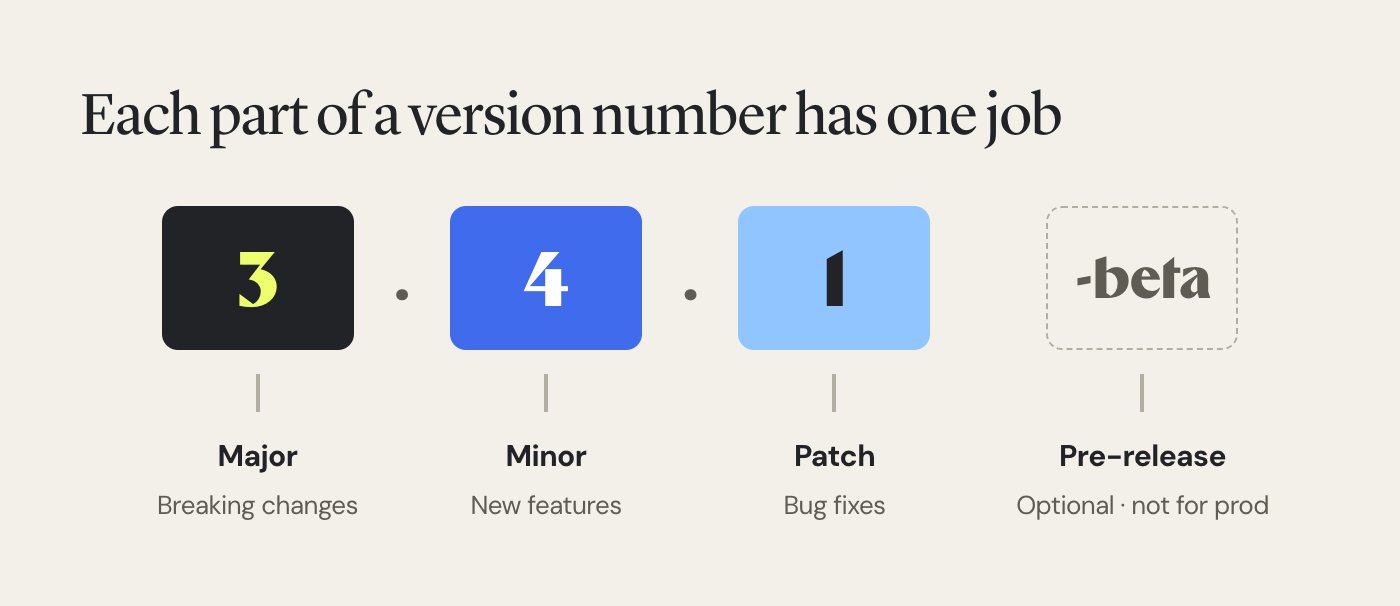
The major, minor, and patch numbers carry the compatibility promise. The pre-release label and build metadata are optional add-ons.
1. Pre-release versions
Pre-release labels let you ship to early adopters without promising stability. The usual progression runs from alpha (incomplete, expect breakage) to beta releases (feature-complete, still being tested) to a release candidate (the build you’ll ship unless something goes wrong), and then the final release.
A pre-release has lower precedence than its final version, so 2.0.0-rc.1 sorts before 2.0.0. Most package managers also skip pre-releases unless someone asks for them explicitly, which is exactly what you want for a release that isn’t production-ready.
2. Build metadata
Use build metadata to record the CI build ID, commit hash, or build date: 1.4.2+build.381 or 1.4.2+sha.5114f85. Because it’s ignored for version precedence, two artifacts that differ only in build metadata count as the same version. Some registries strip it entirely, so never use it to tell two different releases apart.
3. How version precedence works
Tools compare versions part by part, numerically, from left to right. That means 1.10.0 is newer than 1.9.0, even though a plain string sort puts it first.
Pre-release labels follow their own rules. Dot-separated identifiers are compared one at a time, numbers numerically and text alphabetically, and a numeric identifier always ranks below a text one. Here’s the full order for one release:
1.0.0-alpha < 1.0.0-alpha.1 < 1.0.0-beta < 1.0.0-beta.2 < 1.0.0-beta.11 < 1.0.0-rc.1 < 1.0.0
One trap catches many teams. A label written as beta11, with no dot, is compared as text, so beta11 sorts before beta2. Always separate the counter with a dot.
Every pre-release sorts before 1.0.0, and the dot decides whether a counter is compared as a number or as text.
Deciding which part of the software version number to increment
| Type of change | Number to bump | Example |
| Incompatible API changes, such as removing an endpoint or renaming a field | Major | 2.4.1 → 3.0.0 |
| New functionality that’s backward compatible, such as an optional parameter | Minor | 2.4.1 → 2.5.0 |
| Backward compatible bug fixes | Patch | 2.4.1 → 2.4.2 |
The table covers most releases. The edge cases below are where teams usually argue.
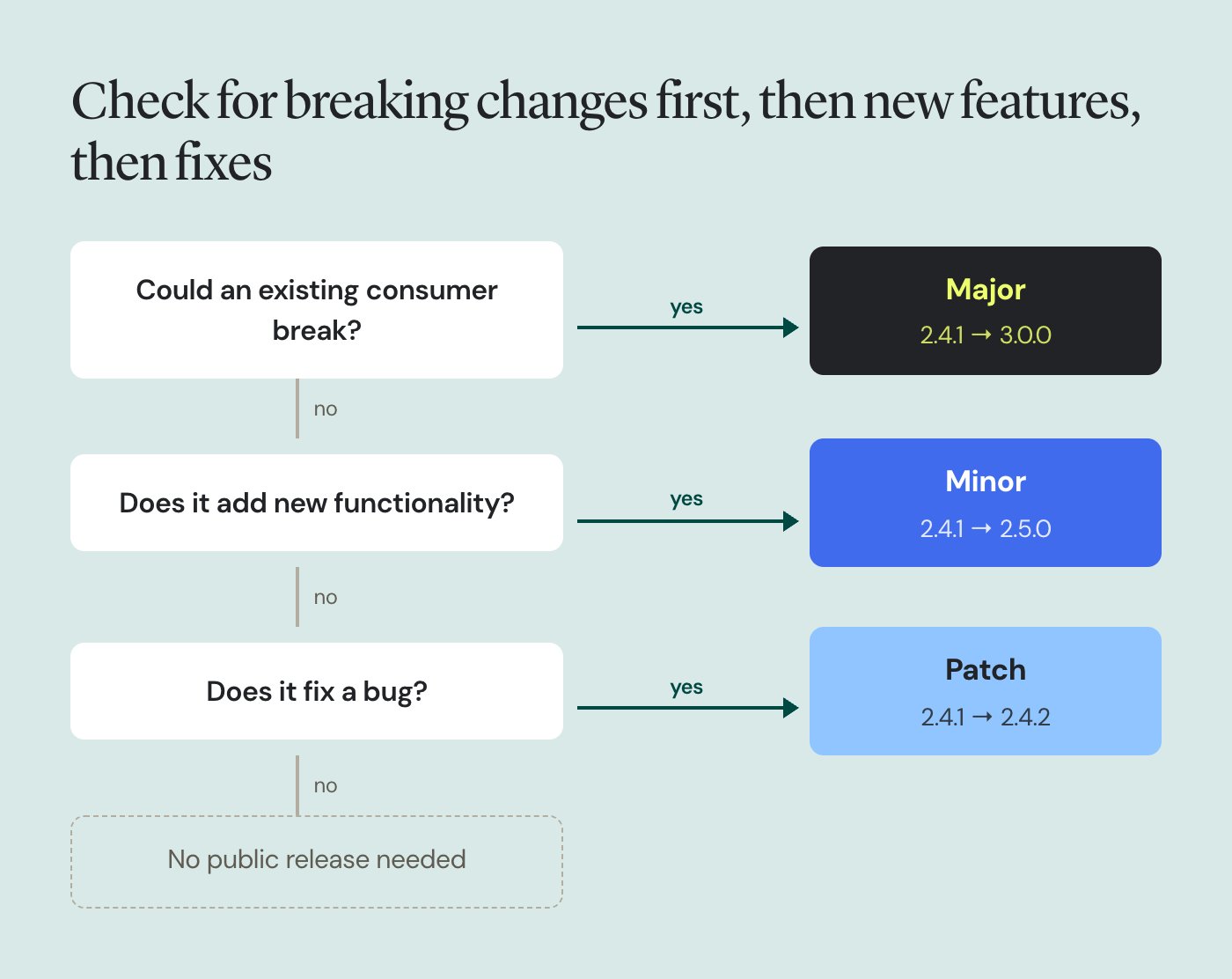
Ask the questions in order and stop at the first yes. A change that could break any existing consumer is always major, even if it also adds features.
1. A bug fix that changes behavior people rely on
If the fix restores documented behavior, it’s a patch, even if a few callers depended on the bug. If callers will see a different result for the same input and many of them rely on it, treat it as a major change, or ship the fix behind a flag so consumers can opt in first.
2. Deprecating versus removing
Marking something as deprecated is a minor version bump, because existing functionality still works. Removing it is a major version bump. Give people at least one minor release with the deprecation warning before the removal lands.
3. Security fixes that need a breaking change
A security fix doesn’t change the rules. If it breaks compatibility, it’s a new major version. Where you still support older lines, backport a compatible patch, so a fix might ship as 3.0.0, 2.4.3, and 1.9.8 on the same day.
4. Dependency and platform changes
Upgrading a dependency without touching your public API is a patch or minor update. Dropping support for a runtime, operating system, or browser version that people use today is a breaking change, so it needs a major release.
Pro Tip!
Remove stale feature flags once they’re no longer needed to prevent technical debt from accumulating. Wingify Feature Management provides technical debt recommendations that identify unused flags and show where they appear in your codebase, helping your team clean them up. When removing the associated code, choose the patch, minor, or major version based on the change’s compatibility impact.
Software release versioning best practices
These eight practices keep version numbers trustworthy as your team and release cadence grow:
- Write down one versioning policy per product
- Define exactly what your public API includes
- Never reuse or edit a released version number
- Tag every release in version control
- Keep one source of truth for the current version
- Ship anything risky as a pre-release first
- Publish release notes with every version
- Set a support window for previous versions
1. Write down one versioning policy per product
Agree on the scheme, the bump rules, and who decides, then document it in the repository. Without a written versioning policy, two engineers will bump the same change differently, and your version history becomes a record of opinions. A one-page VERSIONING.md beside the README is enough.
2. Define exactly what your public API includes
A version number only promises compatibility for what you’ve declared public. List the endpoints, functions, configuration keys, CLI flags, and events that consumers may depend on, and mark everything else internal. That list turns “is this breaking?” from a debate into a lookup.
3. Never reuse or edit a released version number
Once 2.5.0 is published, it means one exact set of code changes forever. If something is wrong, ship 2.5.1. Most public registries enforce this already, and internal teams should too, because a silently replaced artifact is almost impossible to debug.
4. Tag every release in version control
Create an annotated version tag, such as v2.5.0, on the exact commit you built from. Tags make it trivial to check out the previous version, compare two releases, or rebuild an old artifact when a customer reports a bug against a specific version.
5. Keep one source of truth for the current version
The version should live in exactly one place, such as the tag or a single manifest, and every other file should read from it. When package.json says 2.5.0, the about screen says 2.4.9, and the Docker image says latest, keeping track of what’s deployed becomes guesswork.
6. Ship anything risky as a pre-release first
Publish a beta or release candidate before any major release and collect user feedback from the teams who opt in. A 3.0.0-rc.1 that breaks one early adopter costs far less than a 3.0.0 that breaks everyone.
7. Publish release notes with every version
A version number tells people how big a change is. Release notes tell them what changed and what to do about it. Even a patch release deserves one line explaining the fix.
8. Set a support window for previous versions
State how long you’ll ship fixes for older major versions, for example “the current major plus one previous major for 12 months”. A clear window lets customers plan upgrades and stops your team from patching five release lines at once.
Writing release notes and changelogs for versioned releases
The most widely used changelog format groups every change into six categories. Readers scan for the category that affects them, so the structure matters as much as the wording.
| Category | What goes here | Usually implies |
| Added | New features and new functionality | Minor |
| Changed | Changes to existing functionality | Minor or major |
| Deprecated | Features that still work but will be removed | Minor |
| Removed | Features taken out in this release | Major |
| Fixed | Bug fixes | Patch |
| Security | Fixes for vulnerabilities | Patch, or major if breaking |
Here’s what a short, useful entry looks like:
2.5.0 (October 21, 2026)
Added
- Export reports as CSV from the dashboard (#412)
Deprecated
- The
legacy_exportendpoint. It will be removed in 3.0.0. Use/v2/exportsinstead.
Fixed
- Timezone offset in scheduled reports for UTC+5:30 accounts (#418)
Write each line from the reader’s side (what they can now do, or what they must change) rather than the commit message. Link a migration guide from every major release, and keep an Unreleased section at the top so notes are written as work merges, not the night before the final release.
Automating software release versioning
Manual bumps invite human error, so most teams automate versioning with a three-step flow:
- Commit: developers label each commit by type. With the Conventional Commits format, fix: maps to a patch, feat: maps to a minor, and a BREAKING CHANGE footer maps to a major.
- Tag: on merge to the release branch, CI reads the commits since the last version tag, calculates the next version number, and creates the new tag.
- Bump: the pipeline writes the new version into manifests, generates the changelog from the same commits, and publishes the artifact.
The commit label decides the bump, CI does the arithmetic, and an API diff check stops a breaking change from slipping out as a minor release.
Popular options by ecosystem include:
- semantic-release for JavaScript and general Git workflows
- release-please for GitHub-based projects in many languages
- Changesets for JavaScript monorepos with many packages
- setuptools-scm or bump-my-version for Python
- GoReleaser for Go and cargo-release for Rust
Add one more guardrail. API diff checkers, such as cargo-semver-checks for Rust or japicmp for Java, fail the build when a backward incompatible change ships without a major bump. That catches the one-in-six problem from the introduction before it reaches anyone.
Software release versioning and dependency management
Every version constraint you write is a bet on how carefully the other team versions their code. The four constraint types below cover almost every package manager:
| Constraint type | What it allows | Example (from 1.4.2) | Use it when |
| Exact | Only that specific version | =1.4.2 | You need fully reproducible builds |
| Minimum | That version or anything newer | >=1.4.2 | Rarely, since it accepts future major releases |
| Range | Anything between two bounds | >=1.4.2, <2.0.0 | You want fixes and features but no breaking changes |
| Compatible | Newer minor and patch releases of the same major | ^1.4.2 or ~=1.4 | The dependency follows SemVer reliably |
Compatible and range constraints stop at the next major version. A bare minimum keeps going and pulls in breaking releases.
Applications and libraries need different defaults. Libraries should use compatible or range constraints, so they don’t force an exact version on everyone downstream. Applications should commit a lock file, which pins every direct and transitive dependency to a specific version while the manifest still describes the acceptable range.
Conflicts in dependency resolution usually trace back to a major version. If one package needs 2.x of a shared library and another needs 3.x, no constraint can satisfy both, which is why every major release should come with a deprecation period long enough for the ecosystem to catch up.
Software release versioning for frequent releases and feature flags
Feature flags let you deploy code for a feature without releasing the feature, so you don’t need a new version for every change people see. The code ships inside whatever version comes next, and the flag decides who gets the feature and when. That keeps the version number tied to code changes, which is the only thing it should describe.
Without that separation, frequent releases turn version history into noise. A team that ships daily and bumps for every customer-facing tweak can reach 4.212.0 within a year, and the numbers stop telling anyone anything. To keep versions meaningful with flags in the mix:
- Version the code, flag the experience. Bump the version when code ships. Turning a flag on for 20% of users is a release decision, not a new version.
- Gate features by app version. Older mobile builds stay installed for months. Target a feature only at versions that contain its code, such as 5.3.0 and above, so older clients never request it.
- Treat flag cleanup as a code change. Removing a fully rolled-out flag changes the codebase, so it goes into the next patch or minor release like any other change.
- Keep breaking changes in major releases. A flag can control when people see a new API behavior, but consumers still need a major version to know their integration will break.
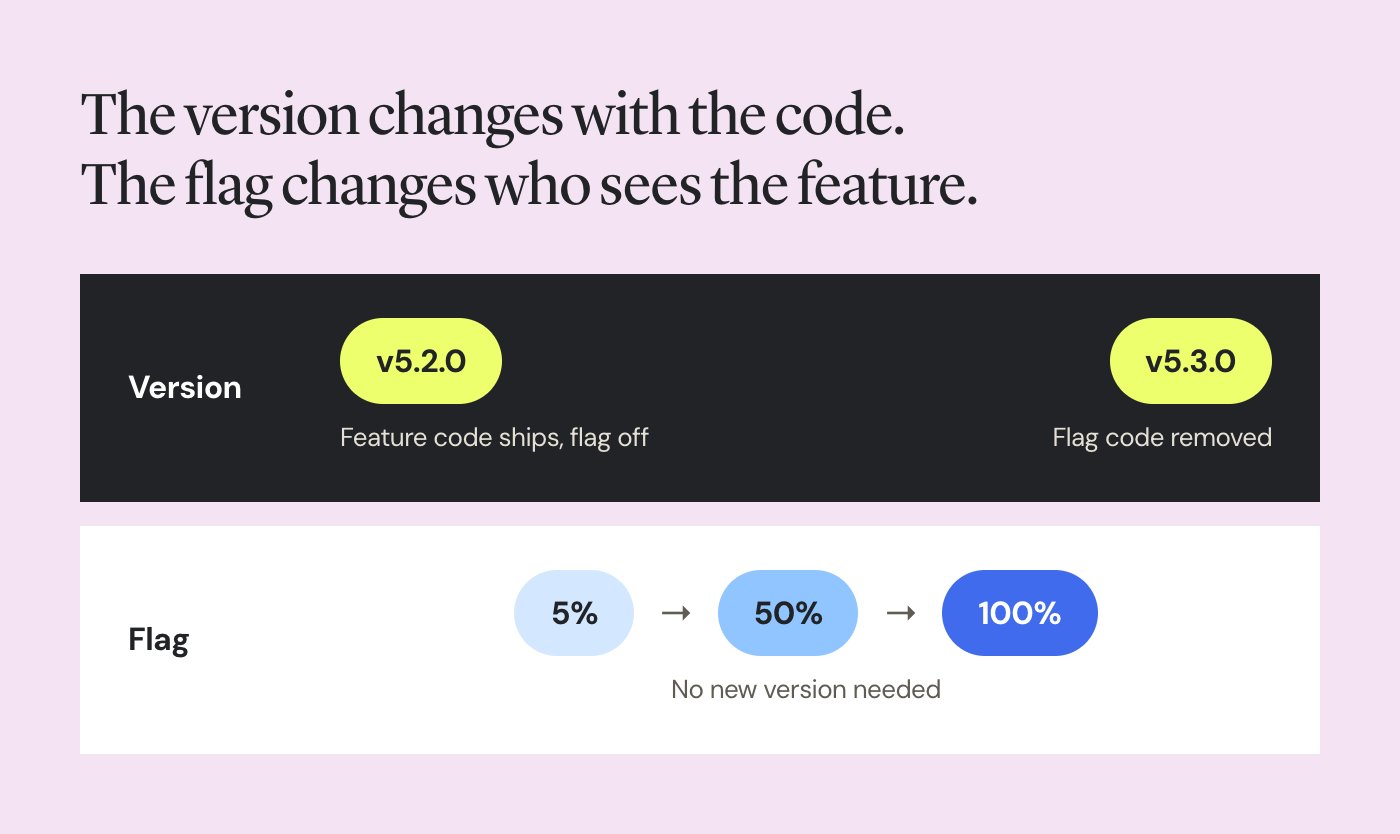
The feature’s code ships in v5.2.0 with the flag off. Exposure then grows through the flag, and the next version bump only happens when the code itself changes again.
How Wingify Feature Management supports this
Rolling back to a previous version means a redeploy. On mobile, it also means app store review and waiting for people to update. Once code ships, feature flags let teams control when and to whom functionality is released, without requiring another app version. Wingify Feature Management gives product and engineering teams a faster way to manage feature exposure within the app version users already have.
With Feature Rollouts, you can progressively roll out a feature, automate the rollout based on its impact on key metrics, and configure kill switches that instantly roll a feature back when a metric dips. Targeting includes inbuilt attributes such as device, browser, location, and app version, so a mobile feature reaches only builds that contain its code. Engineers keep control through approval workflows and access control, and a dedicated module helps prevent the flag-related tech debt that piles up when flags never get removed.
Define the parts of a feature you expect to tune, such as copy, thresholds, or the algorithm in use, as number or JSON variables on the flag. You can then change them from the Wingify platform without shipping a new app version. The Getting Started with Wingify Feature Management guide walks through setting up variables and variations.
For a wider view of how versioning fits alongside deployment and release decisions, see Release Management 101. To learn how to release features gradually while minimizing risk, read A Product Team Guide to Safe Feature Releases Using Progressive Rollouts.
Common software release versioning mistakes
| Mistake | How to avoid it |
| Shipping a breaking change in a minor or patch release | Define your public API and add an API diff check to CI |
| Overwriting a published version to fix a bad build | Treat every version as immutable and fix forward with a patch |
| Sorting versions as strings, so 1.10.0 lands before 1.9.0 | Use a SemVer-aware comparison library everywhere you sort |
| Writing pre-release labels like beta11 | Separate the counter with a dot, as in beta.11 |
| Staying on 0.x after production users depend on you | Release 1.0.0 as soon as people build on your API |
| Storing the version in several files that drift apart | Generate every copy from one source of truth |
| Bumping the major version for a marketing launch | Keep marketing names separate from the version number |
| Creating a new version for every flag change | Version code changes and manage releases through flags |
| Pasting raw commit messages into release notes | Group changes by category and write from the reader’s side |
From version chaos to a release history that makes sense
A version number is a promise about compatibility, and every release either keeps it or quietly spends the trust behind it. The teams that keep that promise treat versioning as part of how they release, with a written policy, automated bumps, honest release notes, and a clean line between shipping code and exposing features.
That last line is where most fast-moving teams struggle, because every feature launch tempts someone to cut a new version. If you want to see how progressive rollouts, kill switches, and version-based targeting keep your releases fast and your version numbers meaningful, request a demo of Wingify Feature Management.
FAQs
No, once a version number has been published, it should always point to the same code, even if you withdraw it. Mark the bad release as withdrawn (registries call this yanking or deprecating), then ship the fix as a new patch version. Public registries such as npm, PyPI, and crates.io block reuse of a published version number for this reason.
A version is an identifier for one specific state of the code, such as 2.5.0. A release is the act of making that version, or a feature inside it, available to people. With feature flags, the two can happen at different times, since a feature can ship in version 2.5.0 and reach users weeks later.
Categories:

Hi, I’m Pratyusha Guha, manager - content marketing at Wingify. For the past 7 years, I’ve written B2B content for various brands, but my journey into the world of experimentation began with writing about eCommerce optimization. Since then, I’ve dived deep into A/B testing and conversion rate optimization, translating complex concepts into content that’s clear, actionable, and human. At Wingify, I now write extensively about building a culture of experimentation, using data to drive UX decisions, and optimizing digital experiences across industries like SaaS, travel, and e-learning.