Define the key attributes for your campaigns
Select the fields that serve as profile attributes; Data Studio highlights unmapped fields early to ensure your data stays clean before launching campaigns.
Wingify Personalization Suite > Data Studio
With Wingify Data Studio, your CRM contact and account records are housed directly within the same platform. Seamlessly extract CRM records, apply targeted audience filters, and deploy personalized campaigns.
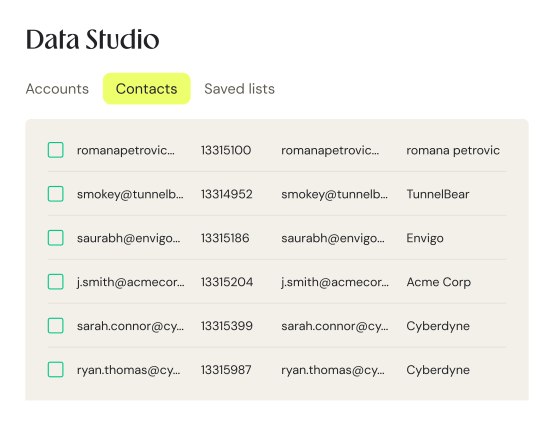
























As part of Wingify Data Platform, Data Studio serves as your main hub for organizing contacts and account data. It provides instant access to three key sections: imported accounts, contact entries, and your saved custom lists.
Select the fields that serve as profile attributes; Data Studio highlights unmapped fields early to ensure your data stays clean before launching campaigns.
Automated lists refresh alongside your CRM syncs, instantly adding matching accounts without requiring manual re-runs.
Since your audience records and experiments exist within the same platform, you can run tests directly on the exact lists you create.
While CRM data covers prospects already in your funnel, integrating Clearbit or 6sense allows you to engage new prospects based on firmographic attributes.
Send a named-account campaign to an experience built for that industry.
Exclude converted accounts from acquisition campaigns to save budget.
Measure personalized experiences against the baseline to highlight performance gains. Test the targeted experience against the control, and report the difference.
Tailor headlines based on industry vertical, so travel prospects view relevant social proof.
Focus on accounts nearing contract expiration by presenting migration case studies.
Deploy a unified list across all marketing initiatives active during the quarter.
Easily update attribute mappings whenever your CRM schema changes, then trigger a quick resync.
Modify, rename, add, or archive lists seamlessly without starting from scratch.
Assign owner or admin roles for managing CRM integrations, and publish or admin rights for CSV uploads.
Import subscription statuses to run targeted experiments exclusively for premium clients.
Create lists based on contract end dates to refine user experiences prior to sales discussions.
Conduct tests with the exact user base the outcomes are intended to represent.
Start with what you need today and add more as you grow, all on one connected platform.
Explore Wingify PersonalizationRead real-time signals to understand who your users are and what they want, the moment they arrive.
Understand the emotional drivers behind customer decisions and create experiences that resonate with how different audiences think, feel, and act.
Create, manage, and activate customer segments across experiences so teams can target the right audiences with more relevant journeys.
Wingify meets the highest security and data privacy standards across the globe, with 24/7 priority support.
We carry industry-leading certifications. Your data stays protected while helping you meet global and regional regulatory requirements with confidence.







Data centers in the US, the EU, and India.
A dedicated success manager and technical experts, with 24/7 support and a consistent CSAT of 99%.

Here is what teams usually ask before they start
To use Wingify Data Studio, you require an Enterprise account with the Data Studio add-on, an operational CRM integration, administrator privileges for managing integrations and the Data Studio module, as well as Publish or Admin rights for CSV file uploads. Additionally, identifying anonymous visitors requires an active account with Clearbit or 6sense.
Wingify Data Studio natively synchronizes with HubSpot, Salesforce, and Marketo. For other CRM systems, visitor identification can be achieved by deploying a custom script on your website or by importing data via CSV files.
An Account represents a business entity identified by its domain name, whereas a Contact represents an individual identified by an email address. In Marketo integrations, leads are brought in under Contacts and associated with their respective accounts through lead records.
Following the initial synchronization, data within Wingify Data Studio updates automatically every 24 hours. Immediate updates can be triggered manually at any time from the Integrations page.
Yes, dynamic lists defined by filter conditions automatically incorporate newly matching records upon each sync cycle. Conversely, static lists imported via CSV remain unchanged unless updated manually.
Yes, once data is imported into Data Studio, a single list can filter and aggregate attributes across multiple sources, such as pairing a Salesforce industry attribute with contract details uploaded via CSV.
Wingify Data Studio supports CSV uploads containing up to 5,000 unique rows, with no blank or duplicate entries permitted. Uploads for accounts must include a Domain column, while contact uploads require an Email column. Any invalid entries are flagged prior to ingestion for easy removal.
Yes, integrating Wingify Data Studio with Clearbit or 6sense enables targeting based on firmographic attributes, such as revenue or industry tier, even for accounts without a corresponding CRM record.

Free for 30 days. No credit card required.
Talk to a sales representative
Your dedicated Wingify representative will be in touch shortly to set up a time.
at

Increase in Trial activation





