
Engineering teams working in Python usually add their first feature flag the same way: an if statement and a dictionary. It works, and for a while it is all you need.
Then the questions get harder. Can you turn this on for 10% of users? Can product change it without a deploy? Can you tell whether the new version actually performs better? A dictionary can’t answer any of those.
This feature flag Python guide walks you from the simplest version to a production setup. It covers what flags are, why they are worth using, six ways to implement them, best practices, A/B testing, and performance.

What are feature flags in Python?
A feature flag in Python is a conditional check that decides at runtime whether a block of code runs, without changing or redeploying that code. It lets you ship a feature turned off, then turn it on when you are ready, for everyone or for selected users.
At runtime, a feature flag works like this:
- Your code asks a question. Before running a feature, the application checks a flag, such as if wingify_client.get_flag(“new_checkout”, user):.
- The flag returns an answer. The answer comes from a source you control: a dictionary, an environment variable, a database, or a feature management service.
- The answer can depend on the user. More advanced flags evaluate user attributes, such as plan, country, or user ID, before deciding.
- The code takes one path or the other. If the flag is on, the new code runs. If it is off, the existing behavior stays in place.
- The answer can change without a deploy. Update the flag’s value at the source, and the next check picks it up.
Why use feature flags in Python?
Feature flags give Python teams control over when and to whom a feature is released, separate from when the code ships. The main benefits:
- Separate deployment from release. Merge and deploy code to production with the feature switched off, then release it on your schedule, independent of code deployments. This supports continuous delivery and keeps long-lived branches and painful merges to a minimum.
- Test in production safely. Toggle features on for internal users or a test account and see how it behaves with real data, real traffic, and real integrations.
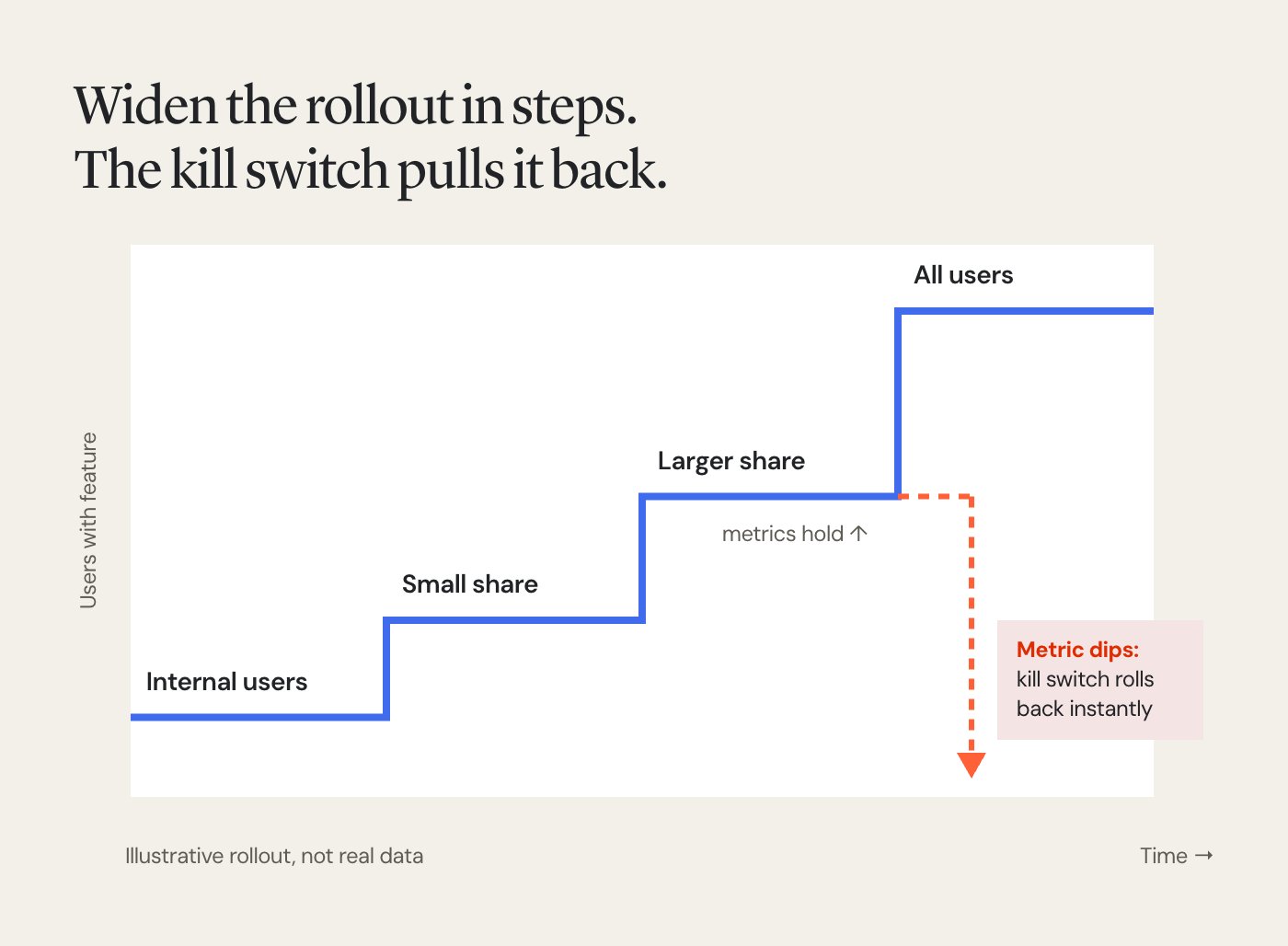
- Roll out gradually. Release to a small share of your user base first, watch error rates and key metrics, then widen the rollout step by step.
- Get an instant kill switch. If a feature causes errors or slows a service down, turn the flag off and the feature disappears, with no rollback or redeploy.
Pro Tip!
Automate your rollouts in Wingify Feature Management based on how key metrics respond, and configure a kill switch on each flag so the feature rolls back instantly if metrics suddenly dip.
How to implement feature flags in Python
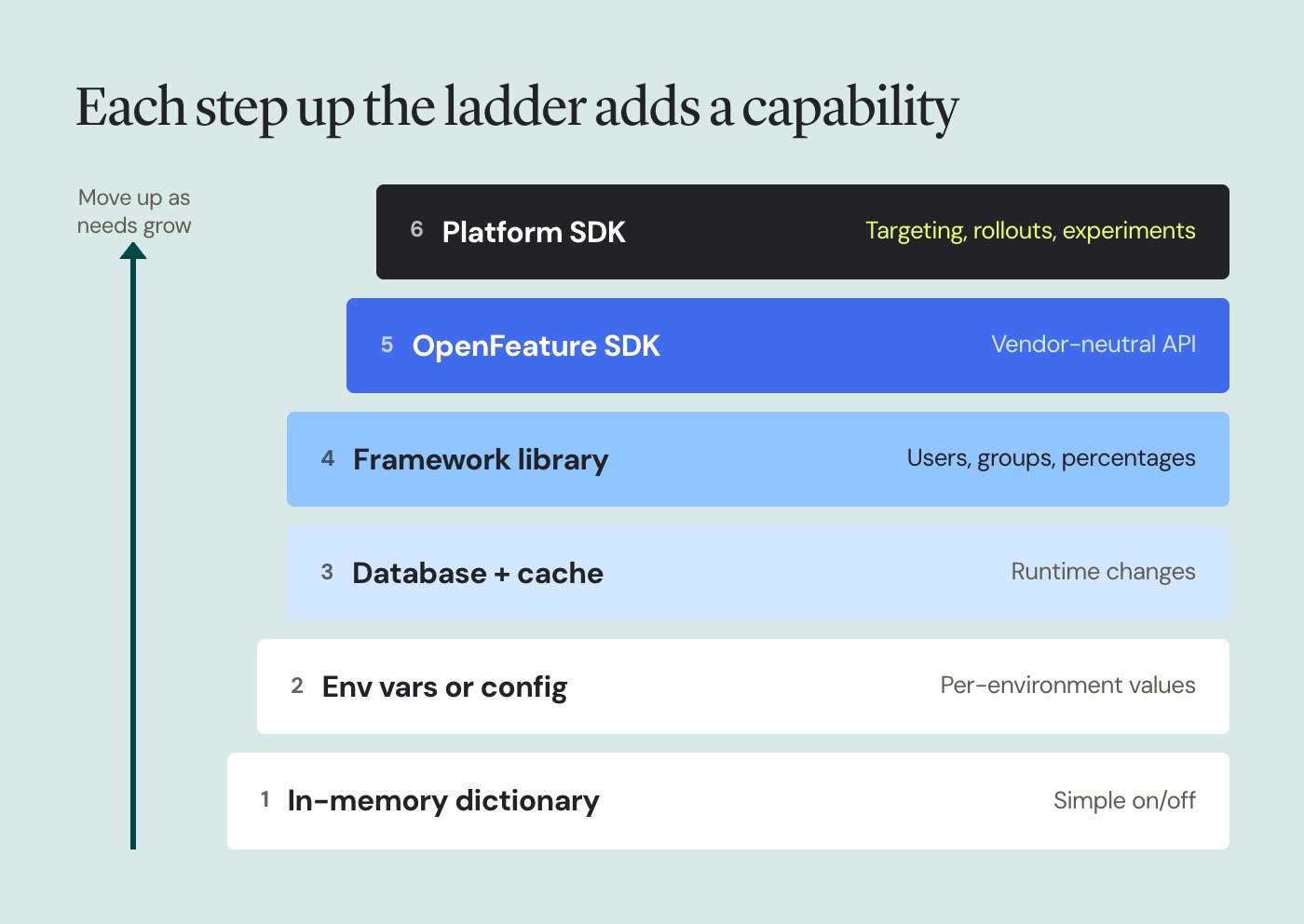
There are six common ways to implement feature flags in Python, from a few lines of code to a full platform. At a glance:
- In-memory dictionary. Best for prototypes, scripts, and local development. No runtime changes or per-user targeting.
- Environment variables or config files. Best for per-environment switches. Values change on restart or config reload, with no per-user targeting.
- Database or remote config with a cache. Best for small teams that want runtime control. Targeting is limited to what you build.
- Framework-specific libraries. Best for Django or Flask apps that need more than config. Supports basic targeting by users, groups, and percentages.
- OpenFeature SDK. Best for teams that want a vendor-neutral API. Runtime changes and targeting depend on the provider.
- Feature management platform SDK. Best for production rollouts, experiments, and multi-team use. Supports runtime changes and per-user targeting with segments and rules.
1. In-memory dictionary
The simplest way to define feature flags is a dictionary of flag names and Boolean values. Wrap the lookup in a function so every check goes through one place.
It has no dependencies and is easy to read. The catch: changing a value means editing code and redeploying, and every user gets the same answer.
2. Environment variables or config files
Reading flags from environment variables lets each environment carry its own flag configuration. A feature can be on in staging and off in production, without code changes.
For example, start the app with FEATURE_NEW_CHECKOUT=true python app.py. During local development, you can keep these values in a .env file. The same pattern works with a JSON, YAML, or TOML file loaded at startup into a configuration object that the rest of your Python app reads from. Values usually change only after a restart or a config reload, and there is still no per-user logic.
3. Database or remote config with a cache
Storing flags in a database or a key-value store such as Redis lets you change them at runtime. Add a short cache so every request doesn’t hit the store.
To release to a percentage of users, hash the flag name and user ID into a number from 0 to 99 and compare it to your rollout percentage. Each user then lands in the same bucket every time.
This gets you runtime control and basic rollouts. You also take on everything around it: an admin UI, audit history, access control, targeting rules, and measurement.
4. Framework-specific libraries
Python web frameworks have their own options. In Django, django-waffle is a widely used library that supports flags for specific users, groups, and percentages of traffic.
In a Python Flask app, a small decorator built on app config keeps flag checks out of your view logic, for example by returning a 404 when a flag is off.
Framework libraries are convenient, but they tie your flags to one framework. Background workers, scripts, and other services can’t easily share them.
5. OpenFeature SDK
OpenFeature is an open standard that gives you one feature flag API in your code, with a swappable provider behind it. You write the evaluation calls once and can change the backing service later without rewriting them.
OpenFeature defines the API, not the flag management. You still need a provider that stores flags, applies rules, and serves decisions.
6. Feature management platform SDK
A feature management platform gives you a hosted dashboard for flags, targeting rules, rollouts, and experiments, plus an SDK that evaluates them in your code. Wingify Feature Management offers a Python SDK that works with Python 3.6 onwards.
With the Python SDK, you initialize the client once when your Python application starts, then check each flag by passing a context that identifies the user by a user ID or session ID and can carry attributes, such as plan or country, for targeting. Flags can hold variables, so you can change values such as copy, layouts, or thresholds from the dashboard without a deploy. Feature flag configuration, including rollout rules, A/B tests, and personalization, lives on the same flag in the dashboard, not in your code.
Feature flag best practices in Python
Whichever approach you choose, these practices keep flags reliable and easy to clean up:
- Put all flag checks behind one interface
- Keep flag logic out of business logic
- Always define a safe default
- Use clear, consistent names
- Categorize flags by purpose
- Evaluate once per request
- Test both code paths
- Give every flag an owner and an end date
1. Put all flag checks behind one interface
Call flags through a single module, such as flags.py, instead of reading dictionaries, environment variables, or SDK clients directly across your codebase. When you switch from a dictionary to a platform SDK, you change one file instead of hundreds of call sites. Expose a single method, such as is_enabled(), and have every part of the codebase call it.
2. Keep flag logic out of business logic
As flags multiply, conditional statements spread through your functions and make them hard to read. Instead, check the flag once and choose an implementation. This is the strategy pattern, and it keeps each version of the feature in its own class.
For example, a get_recommender() function can return either a legacy or an ML-based recommender depending on the flag, and the rest of your code simply calls recommend() on whatever it gets back. When the rollout is done, you delete one class and one if condition, not scattered checks across the codebase.
3. Always define a safe default
If a flag is missing, the store is unreachable, or a value is malformed, your code should fall back to known behavior. For a new feature, the safe default is usually off. Pass defaults explicitly, as in get_variable(“layout”, “single_page”), so a missing variable never breaks a page.
4. Use clear, consistent names
When you create a new feature flag, give it a descriptive name. A name like checkout_one_click_2026q4 tells you what the flag controls and roughly when it appeared. Avoid vague names like test_flag or new_feature, which become impossible to audit later. Pick one style, such as snake_case, and use it everywhere.
5. Categorize flags by purpose
Not every flag has the same job or lifespan. Pete Hodgson’s guide to feature toggles groups them into four types, and tagging each flag with one makes cleanup decisions obvious:
| Type | Example in a Python app | Lifespan |
| Release | Hide a new Django view until launch | Days to weeks, then delete |
| Experiment | Compare two ranking algorithms in a search API | Until the test concludes |
| Operational | Switch off a slow third-party call during an incident | Long-lived |
| Permission | Enable bulk export for enterprise plans only | Permanent |
6. Evaluate once per request
Check a flag once at the start of a request or job and pass the result down, rather than checking it repeatedly inside loops or helper functions. This keeps behavior consistent within one request and avoids unnecessary evaluations.
7. Test both code paths
Every flag creates at least two paths through your code, and both need tests. With pytest, parametrize the flag value so the same test runs once with the flag on and once with it off.
Mocking the flag interface, not the underlying store, keeps tests fast and independent of any external service.
8. Give every flag an owner and an end date
Temporary flags for releases and experiments should be removed once they are fully rolled out, along with the old code path. Permanent flags, such as kill switches and plan-based access, need a named owner. A regular review of active flags stops them from piling up into technical debt. Wingify Feature Management includes a dedicated module for preventing flag-related tech debt. For more, see our guide to feature flag best practices.
Feature flags for experimentation and A/B testing in Python
Feature flags enable A/B tests by serving different variations of a feature to different groups of users, then connecting each group’s behavior to a metric. The steps:
- Segment users. Choose who enters the experiment, such as all users, a region, or one plan. Pass those attributes in the user context.
- Serve variants consistently. Assign each user a variation and keep them in it across requests. Hashing a stable user ID, or using a platform’s bucketing, ensures this.
- Measure key metrics. Record the events tied to your goal, such as checkout completion or click-through rate, for every user in the experiment.
With the Wingify Python SDK, a variation lives in a flag variable that your code reads with get_variable(), and conversions are recorded with track_event().
The experiment itself, including traffic split, targeting, and goal metrics, is set up in the dashboard. On the analysis side, Wingify Feature Management runs experiments in fixed-horizon or sequential mode. It also applies peeking correction and Bonferroni or Šidák corrections to limit false positives, and auto-detects sample ratio mismatch (SRM) and data quality anomalies.
Pro Tip!
Import your custom attributes into Wingify Feature Management, such as plan or account tier, so you can segment experiments by the cohorts that matter most to your product.
Optimizing feature flag performance in Python
A flag check sits on your request path, so it should cost almost nothing. These tactics keep it that way:
- Evaluate locally, not remotely. Calling a remote API for every flag evaluation adds a network round trip to each request. Prefer SDKs that download flag settings and evaluate them in memory. Wingify Feature Management uses in-memory, local SDK evaluation, which returns decisions in under a millisecond with zero network calls.
- Use dynamic configs instead of new deploys. Store tunable values, such as limits, timeouts, or copy, as flag variables. You can adjust them from the dashboard without shipping code.
- Cache decisions when consistency matters. The Wingify Python SDK is stateless by default and evaluates each get_flag call fresh. A custom storage connector, backed by Redis or another data store, can persist decisions so users get the same experience across sessions.
Pro Tip!
Implement a storage service when you initialize the Wingify Python SDK, so each user keeps the same variation even if you change campaign settings mid-test.
Final thoughts
Feature flags in Python can start as a dictionary and an if statement, and that is a perfectly good place to begin. The right approach depends on what you need to control. Per-environment switches can live in config. Runtime changes need a store. Targeting, staged rollouts, and experiments need a platform.
Whatever you start with, put flag checks behind one interface, set safe defaults, test both paths, and remove flags once they have done their job. Those habits make it easy to move up when your needs grow.
When you are ready for rollouts, experiments, and kill switches in one place, Wingify Feature Management and its Python SDK let you manage them from a dashboard while your code stays the same. Request a demo now.
FAQs
Yes, in most Python projects the terms are interchangeable. Both describe a conditional check that turns code on or off at runtime. “Toggle” usually refers to a simple on/off switch, while “flag” often implies extras like user targeting, gradual rollouts, or experiments. For a deeper look, see feature flag vs feature toggle.
No, the Python standard library has no feature flag module. You can build simple flags with built-in tools such as dictionaries, os.environ, or configparser. For runtime changes, targeting, or experiments, you need a library such as django-waffle, the OpenFeature SDK, or a feature management platform’s SDK.
Move past a dictionary when you need to change a flag without redeploying, or show a feature to some users but not others. The same goes for releasing to a percentage of traffic, measuring a feature’s impact, or letting non-engineers control releases. A dictionary works well for prototypes, scripts, and local development. Once flags affect real users in production, a library or platform saves you from rebuilding those capabilities yourself.
Categories:

Hi, I’m Pratyusha Guha, manager - content marketing at Wingify. For the past 7 years, I’ve written B2B content for various brands, but my journey into the world of experimentation began with writing about eCommerce optimization. Since then, I’ve dived deep into A/B testing and conversion rate optimization, translating complex concepts into content that’s clear, actionable, and human. At Wingify, I now write extensively about building a culture of experimentation, using data to drive UX decisions, and optimizing digital experiences across industries like SaaS, travel, and e-learning.