Ask five engineers about feature flag vs feature toggle and you will likely hear two answers. Some will say they are the same thing with different names. Others reserve “toggle” for a basic on/off control and use “flag” for a mechanism that can govern which users see a feature and when.
In fact, both answers hold up. At the implementation level, each relies on conditional logic to determine which code path executes. This shared foundation explains why technical teams and documentation often use the terms as synonyms.
Knowing how teams use these terms helps when planning a release. This guide explains their shared foundation, the ways their usage differs, and how to choose a control that fits the release requirements.
What is a feature toggle?
A feature toggle is a conditional switch in your code that lets you enable or disable a feature without deploying new code. The switch usually presents a single true or false value, and that value applies to everyone in a given environment.
Teams typically use feature toggles to:
Hide unfinished code. Developers merge incomplete work into the main branch and keep it switched off, which supports trunk-based development.
Act as a kill switch. If a feature misbehaves in production, teams can turn the toggle off to disable it without a rollback or redeploy.
Control features by environment. A feature can be on in staging for QA and off in production until it is ready.
Change simple behavior quickly. Enabling verbose logging or a maintenance banner becomes a config change instead of a code change.
What is a feature flag?
A feature flag is a decision point in your code that determines which users see which version of a feature, based on rules you can change at runtime. Like a toggle, it separates deploying code from releasing it, enabling teams to release on their own schedule. Unlike a basic toggle, it can return different answers for different users.
Feature flags typically let teams:
Target specific user segments. Limit access to selected groups, such as employees, beta participants, customers in a particular region, or users on a specific plan.
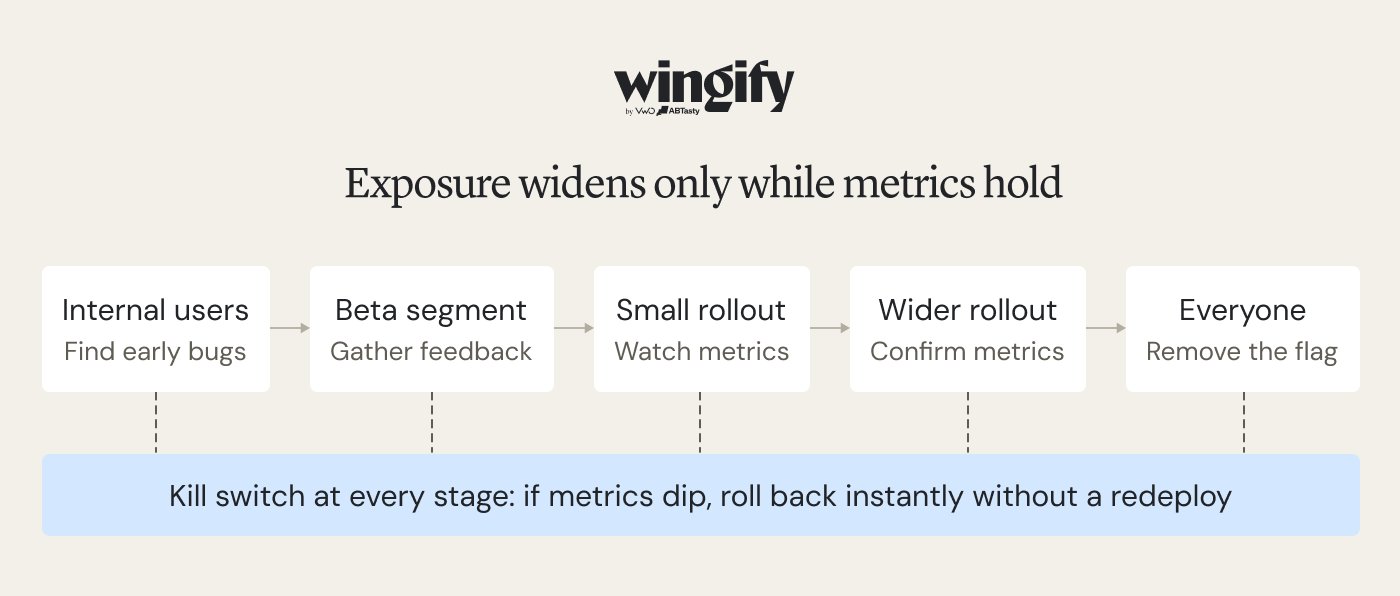
Progressive rollout. Begin with a small percentage of users, monitor errors and business metrics, and widen exposure when the results support it.
Support multiple outcomes. Depending on the implementation, a flag can return a variation or configuration value, such as a layout identifier, number, or JSON object
Run experiments. Assign users to different versions and compare their results against a defined success metric.
Manage access over time. Use a customer’s plan or permissions to decide whether premium functionality should be available, rather than embedding access rules throughout the code.
Turn features off instantly. A flag can also provide a global control for disabling a feature when needed.
Feature flag vs feature toggle: What’s the actual difference?
The primary difference between a feature flag and a feature toggle is scope. A feature toggle commonly represents a shared on/off setting, while a feature flag can add audience targeting, staged exposure, and measurement. Since both use conditional logic, teams often use the terms as synonyms. The terminology overlaps in established software-development literature. Pete Hodgson’s guide on Martin Fowler’s website is titled “Feature Toggles (aka Feature Flags),” reflecting the close relationship between the terms. In everyday use, “toggle” is often associated with a simple code-level switch, while “flag” is common in discussions of broader feature-management workflows.
So, what is worth asking is that how much control the release needs: a global switch, or a decision that changes by different user segments and stages.
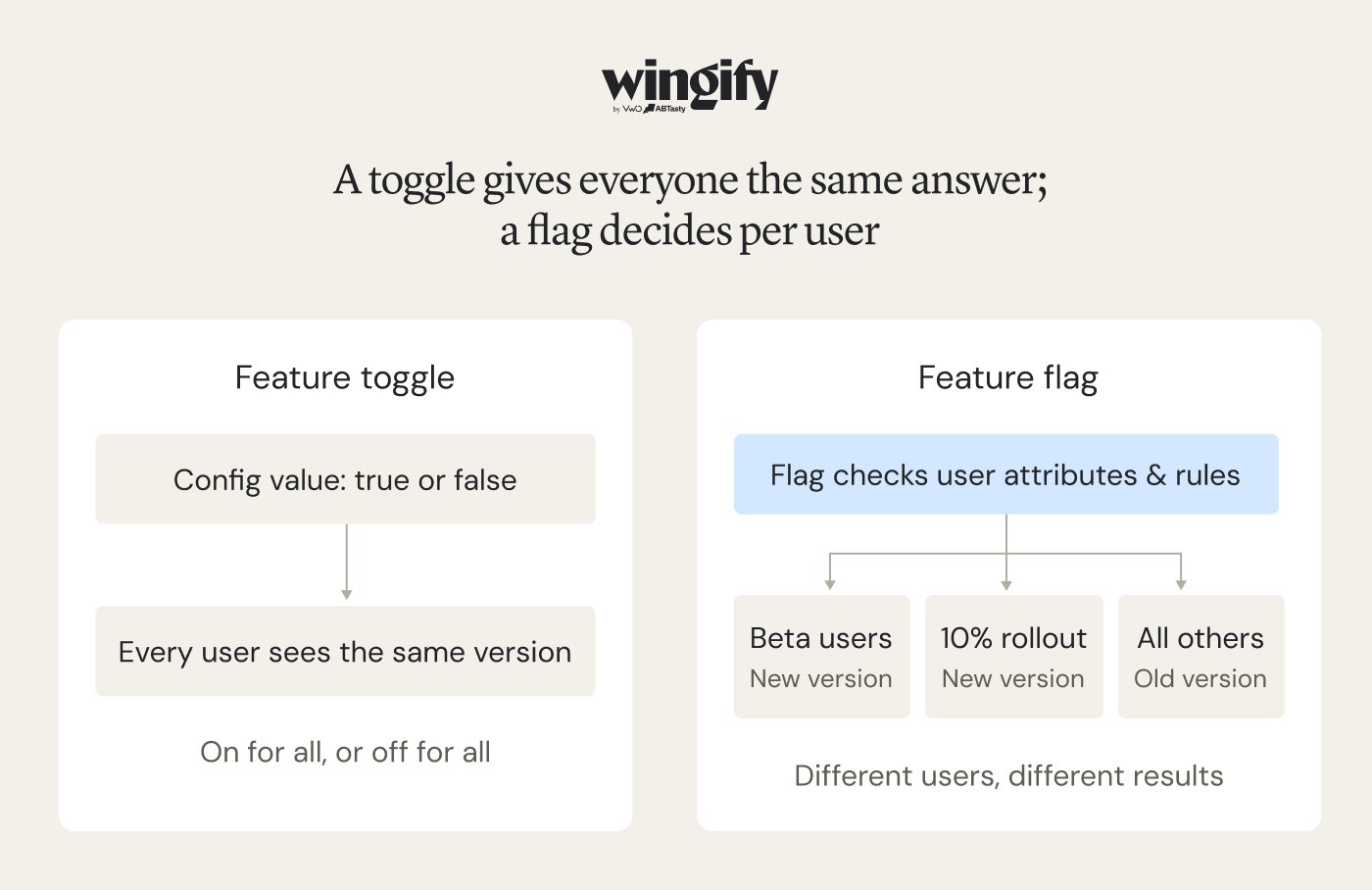
A basic toggle usually applies the same state across its environment. A flag can evaluate user attributes and targeting rules, allowing different groups to receive different experiences at the same time.
A toggle returns one value for everyone. A flag evaluates each user against rules, so different groups can see different versions at the same time.
Feature toggle vs feature flag comparison
Aspect
Feature toggle
Feature flag
Core idea
An on/off switch for a feature
A runtime rule that determines which users receive a feature or variation.
Values
Usually Boolean (true/false)
Boolean values, multiple variations, or configuration values such as strings, numbers, and JSON.
Audience
Everyone in an environment
Targeted users, segments, or a percentage of traffic
Rollout style
All at once
Gradual, staged, or canary
How it changes
Config edit, sometimes a redeploy
Dashboard or API, no redeploy
Measurement
Not necessarily integrated
Often tied to metrics and experiments
Governance
Usually just code review
Access control, approval workflows, and change history
Typical owner
Engineering
Engineering, product, QA, and growth
Typical tooling
Config file, environment variable, or in-house code
Feature management platform with SDKs
Lifespan
Usually temporary for releases, but potentially long-lived for operational shutoffs.
Temporary for launches and experiments; potentially persistent for operational controls and access permissions.
Best for
Hiding unfinished code, simple kill switches
Progressive delivery, experimentation, personalization, access control
Four types of feature toggles and flags
Switches serve different purposes. Hodgson’s guide outlines four broad categories, and their intended use often influences whether teams call them toggles or flags.
Type
What it does
Typical lifespan
How it varies
Often called
Release
Hides merged but unreleased code until it is ready
Days to weeks, then removed
Changes once, at launch
Toggle
Experiment
Splits users across variations to measure impact
As long as the test runs
Per user, on every request
Flag
Operational
Changes operational behavior, including emergency shutoffs and fallback options.
Months to permanent
Flipped during incidents
Kill switch or toggle
Permission
Gates features by plan, role, or customer
Permanent
Per user
Flag or entitlement
Classifying switches by purpose makes them easier to maintain. Release and experiment flags should have a planned retirement date, while operational and permission controls need a designated owner.
How different teams use the terms flag and toggle
The terminology people use often reflects their role and the decisions they manage. Common patterns across teams include:
Engineering: Often says “toggle”. Engineers often talk about toggles when they need to keep incomplete functionality disabled while its code is integrated into the main branch.
Product management: Usually says “flag”. Product managers tend to focus on audience eligibility, rollout pace, and the effect a release has on key metrics.
DevOps and SRE: Switches by context. A “toggle” or “kill switch” for operational on/off controls, and a “flag” for the release itself.
QA: Tends to say “flag”. QA teams may set a particular variation for test accounts so they can check each experience before launch.
Growth and marketing: Says “flag” or “experiment”. These teams often use flags to target audiences and compare the performance of different versions.
If the terminology debate gets in the way, focus on the requirement: is a shared on/off switch enough, or must the team control the audience, timing, and percentage of exposure?
System stability is undoubtedly the biggest use case for feature flags. Personalization is the second-biggest use case across the industry for feature experimentation. Looking ahead, using feature flags with MCP or AI models to generate a set of experiments is the future.
Mahek Mahendra Shah, Director of Product Management at Wingify (Source: Wingify Podcast)
When to use a feature toggle vs a feature flag
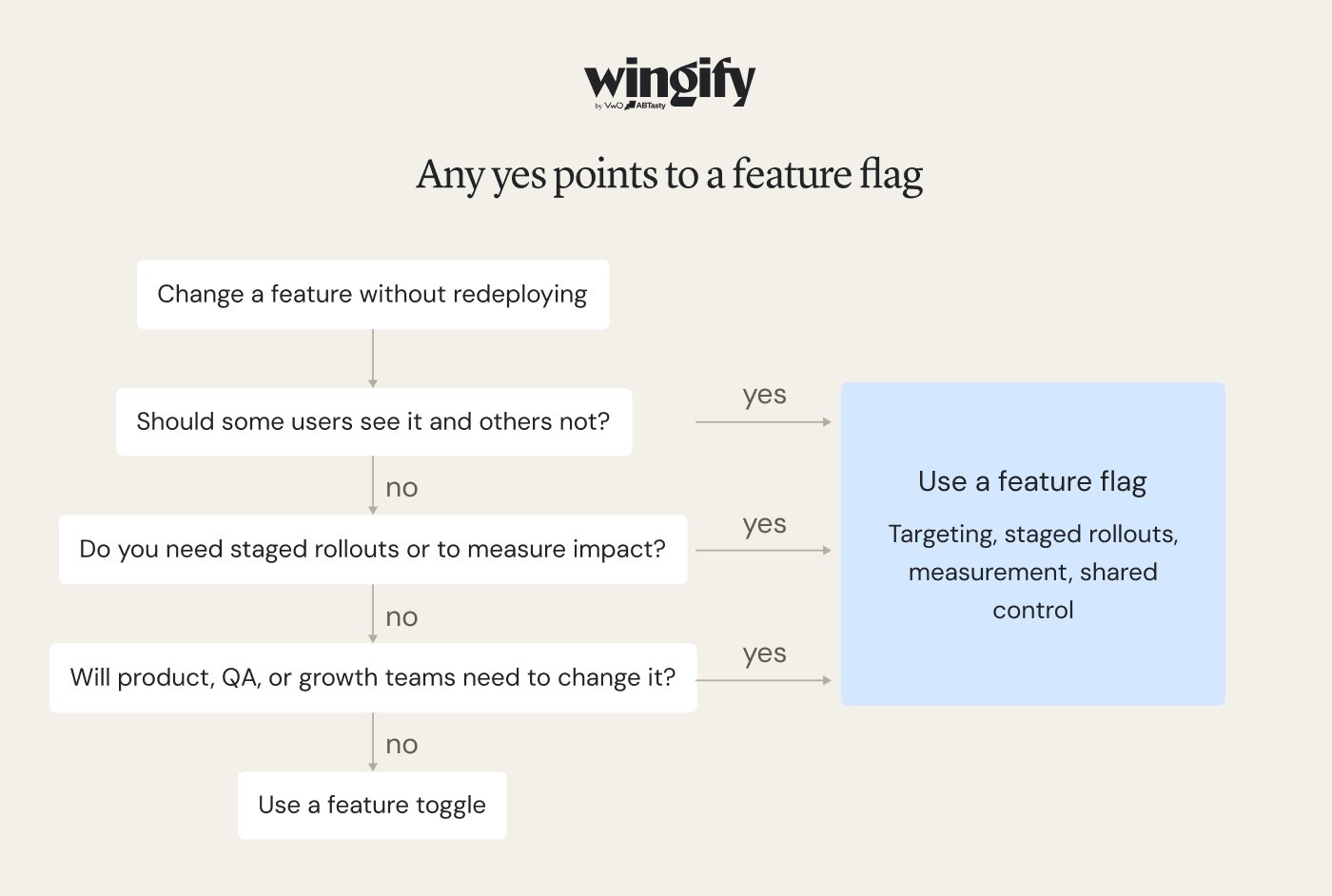
A feature toggle works when the only question is, “On or off for everyone?” A feature flag is the better fit when you also need to decide who sees a feature, how gradually it rolls out, and whether it delivers results.
Use a feature toggle if:
The change is all-or-nothing
Only engineers will change its state
You don’t need to measure its impact
It will be removed soon after launch
Use a feature flag if:
Different users should see different behavior
You want to release in stages
You need data before a full launch
Product, QA, or growth teams need control
When a simple feature toggle is enough
A simple toggle may be sufficient when the change is low-risk and affects a limited audience. Look for situations such as:
Hiding work in progress on the main branch
Switching a feature by environment
A low-risk, short-lived change
An internal tool with a handful of users
A global kill switch for a non-critical dependency
No need to compare outcomes
Assign an owner and a review or removal date even to simple toggles. An abandoned switch in a configuration file can become technical debt.
When to move up to feature flags
A team may need feature flags once its switches require more complex rules. Common triggers include:
Higher-risk launches. Start by exposing the change to a small share of users, review error rates and performance, and expand in stages if the results remain healthy.
Segment-specific behavior. The experience needs to vary according to subscription plan, location, device, or account.
Decisions that need data. You need evidence that the new version improves a target metric before making it widely available.
Non-engineers need control. Product or QA colleagues need to change rollout settings without raising an engineering request.
Frequent releases. When deployments happen frequently, manually coordinating many toggles can become a bottleneck for the release process.
Releases across services. Because app-store reviews can delay a new build, remote controls can help teams manage mobile features without waiting for another release.
Mobile releases. App store review cycles make it slow to ship a fix, so remote control over mobile features matters more.
Governance requirements. The organization needs role-based access, approval steps, and an audit trail of changes.
Toggle sprawl. Controls are spread across services and configuration files, and the team has accumulated flags whose purpose or owner is unclear.
This is where Wingify Feature Management earns its place. It brings feature flags, progressive rollouts, A/B testing, and personalization into a single capability. Teams can stage rollouts while monitoring key metrics, and configure kill switches to disable a feature if important indicators deteriorate.
Product teams can adjust copy, interface elements, eligibility criteria, and thresholds without needing an engineering change for every update. On the engineering side, local SDKs evaluate flags in memory, enabling decisions in under a millisecond without a network request for each evaluation. SDKs are available for major languages and platforms. Engineering teams can use governance features such as access controls and approval workflows, along with REST APIs and OpenFeature support. A dedicated module also helps teams identify and manage technical debt related to flags.
In practice: Meliá wanted to make add-on services more visible during booking without creating unnecessary friction. The team introduced a contextual step for a limited audience first, then used staged rollout and guardrail metrics in Wingify to evaluate the effect before widening availability. Read the case study in detail.
Using feature toggles and feature flags together
Teams often use both approaches because they address different needs and can coexist within a release. Examples include:
A release toggle that grows into a flag. A new search experience can remain disabled behind a Boolean switch during development. At launch, the control can be extended with beta-user targeting and then a gradual percentage rollout.
A rollout flag plus an operational kill switch. A flag can expand a recommendation engine from a small audience to the full user base, while a separate operational switch remains available to disable the third-party service it relies on.
Environment toggles beside user-facing flags. A simple toggle can manage debug logging in staging, while audience-specific customer changes are managed through flags.
Short-lived release flags beside long-lived entitlement flags. A short-lived release flag can launch a new reporting view, while a longer-lived entitlement flag restricts advanced reports to eligible subscription tiers.
How to move from feature toggles to feature flags
Most teams don’t switch overnight, and they don’t need to. A gradual path keeps the change low-risk:
Inventory your toggles. Create an inventory of switches in code, configuration files, and environment variables, recording each one’s purpose and owner.
Classify each one by type. Classify each control as a release, experiment, operational, or permission flag.
Delete what’s finished. Retire release toggles that have completed their purpose, and remove the associated obsolete code path where appropriate.
Move user-facing switches first. Prioritize moving controls that require audience targeting, phased exposure, or measurement into the feature-management platform.
Leave environment config where it is. Build-time settings and debugging controls can remain in configuration files when they do not need runtime targeting.
Set rules for new flags. Set conventions for naming, ownership, and retirement dates to keep the flag inventory manageable.
Pro Tip!
After a feature is fully available, consider whether different audiences need different experiences. Feature Personalization can use user attributes from internal databases or connected tools to deliver tailored versions and assess their effects on adoption, engagement, and conversions.
Final thoughts
Shipping a feature is only half the job. Teams also need to manage exposure, evaluate outcomes, and use the findings to improve the experience. Wingify Feature Management helps teams manage the entire feature lifecycle, from controlled rollouts and experimentation to personalization.
Wingify Feature Management supports the feature lifecycle, including controlled rollouts, experimentation, and personalization. Within Wingify’s Agentic Experience Optimization Platform, it works alongside behavioral analysis to help teams investigate user behavior, identify friction, and test improvements. Wingz serves as the platform’s intelligence layer, connecting behavioral insights with ongoing experimentation and optimization. Request a demo to see it in action.
FAQs
How do you prevent technical debt from feature flags and toggles?
Manage each flag or toggle through a defined lifecycle. Assign an owner when it is created and identify whether it is temporary, such as a release or experiment control, or long-lived, such as an operational switch or entitlement. Once a temporary flag has completed its rollout, remove the flag and any obsolete code path. Adopt consistent naming, review active flags regularly, and maintain a central inventory so outdated or conflicting controls can be identified. Tooling can support this process. Wingify Feature Management includes a module for identifying flag-related technical debt, as well as workflow integrations. For a fuller checklist, see our guide to feature flag best practices.
Does the feature flag vs feature toggle distinction actually matter?
At a technical level, the terms often refer to the same mechanism and are used interchangeably. The distinction is mainly practical: a simple global switch may be managed in configuration, while targeting, staged rollouts, and measurement usually require a broader feature-management setup. Teams should agree on their terminology so requirements are clear.
Is a kill switch a feature flag or a feature toggle?
Either term can be appropriate. A kill switch provides a rapid way to disable a feature for everyone, so it may be described as a toggle. In a feature-management platform, it can be implemented as a long-lived operational flag. Test it in advance and confirm it disables backend behavior as well as the interface.
What is a release toggle?
A release toggle keeps merged functionality unavailable to users until it is ready to launch. This allows developers to integrate work into the main branch without exposing it prematurely. Remove the toggle once the release is complete.
What is the difference between a feature flag and a config setting?
Configuration settings typically define application behavior and may need a configuration change or deployment to take effect. Feature flags control feature availability or code paths while the application runs, and can support audience targeting and phased rollouts without redeploying the code. Teams often adopt flags when ordinary configuration no longer offers enough control.
Hi, I’m Pratyusha Guha, manager - content marketing at VWO. For the past 6 years, I’ve written B2B content for various brands, but my journey into the world of experimentation began with writing about eCommerce optimization. Since then, I’ve dived deep into A/B testing and conversion rate optimization, translating complex concepts into content that’s clear, actionable, and human. At VWO, I now write extensively about building a culture of experimentation, using data to drive UX decisions, and optimizing digital experiences across industries like SaaS, travel, and e-learning.