
11.8 billion data points is the staggering amount McLaren tracks to keep their F1 car at peak performance.
These insights help them identify flaws, optimize strategies, and stay ahead in one of the most competitive sports in the world. The same principle applies to modern businesses operating through digital touchpoints like websites.
In the highly competitive digital space, a website must captivate potential customers and deliver flawless performance. Falling short means losing the race entirely. Just like McLaren, keeping your website at the top of its game requires meticulous tracking and optimization. But what does website tracking actually entail?
What is website tracking?
Website tracking involves monitoring various activities on a website to gain insights into its performance, strengths, and areas for improvement. It’s a comprehensive approach to refining your digital presence. Here are the key aspects of website tracking:
- Qualitative data tracking: This involves studying user behavior, such as frustration and confusion, using tools like heatmaps, session recordings, surveys, form analytics, and interviews.
- Quantitative data tracking: Focuses on web analytics metrics like conversions, bounce rates, and page views to measure the quantitative performance of individual web pages.
- Technical tracking: Tracks factors like website speed, core web vitals (e.g., Largest Contentful Paint or LCP), and front-end structure to ensure optimal technical performance.
- SEO tracking: Monitors search engine optimization metrics, including SERP rankings, backlinks, indexing, website architecture, and sitemaps.
- Intent data tracking: Tracks and analyzes high-intent visitors and their backgrounds to align marketing and sales strategies for better results.
- User test tracking: Evaluates A/B test data and other experiments to understand how key performance indicators (KPIs) are impacted.
Each of these tracking dimensions is essential for maintaining a detailed understanding of website performance and the effectiveness of various initiatives. However, to truly excel, you need the right website tracking tools that provide a clear, precise, and actionable view of your website’s activity.
Let’s explore the best tools for each of these aspects and how they can help you stay ahead of the competition.
Featured website tracking tools at a glance
- Wingify Analytics & Testing
- Google Analytics
- GTMetrix
- Semrush
- Leadfeeder
- Tracking depth: We checked what kind of data each tool captures, such as visitor behavior, traffic sources, page speed, search rankings, or company-level visits.
- Setup and data collection: We looked at how each tool starts collecting data, whether through a tracking script, a URL test, or a connected account. Strong tools collect useful data quickly, without heavy engineering work for every new question.
- Reporting and actionability: We reviewed how each tool turns raw data into findings, through reports, alerts, recommendations, or AI summaries.
- Pricing and access: We compared free plans, free trials, and starting prices on each tool’s official pricing page.
- Wingify Analytics Suite: 4.2/5 based on 62 reviews
- Wingify Experimentation Suite: 4.4/5 based on 929 reviews
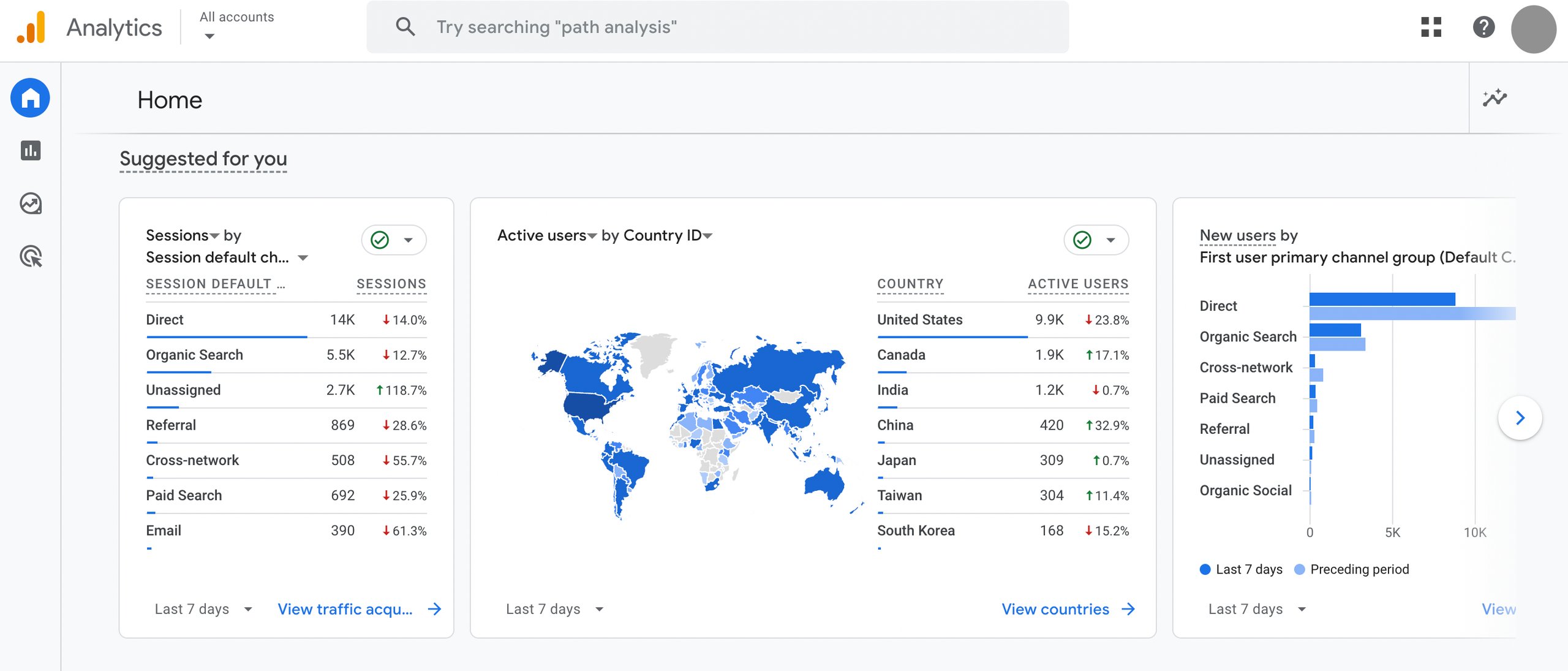
- Real-time reporting shows site and app activity as it happens, helping businesses confirm that tracking is working and spot traffic spikes immediately.
- Acquisition reports show how users arrive through different paid and organic sources, with both user-level and session-based views of traffic.
- Engagement reports reveal which pages and app screens users engage with most, while the events report gives a detailed view of user actions, system events, and errors.
- Funnel exploration visualizes the steps users take to complete tasks on a site or app and highlights underperforming audiences, using open or closed funnels.
- Path exploration and backwards pathing trace the routes users take to conversion and work backward from a conversion or key event to analyze differences, trends, and patterns in those paths.
- Predictive capabilities apply Google’s machine learning to forecast actions users may take, such as purchasing or churning, so businesses can build audiences around those predictions.
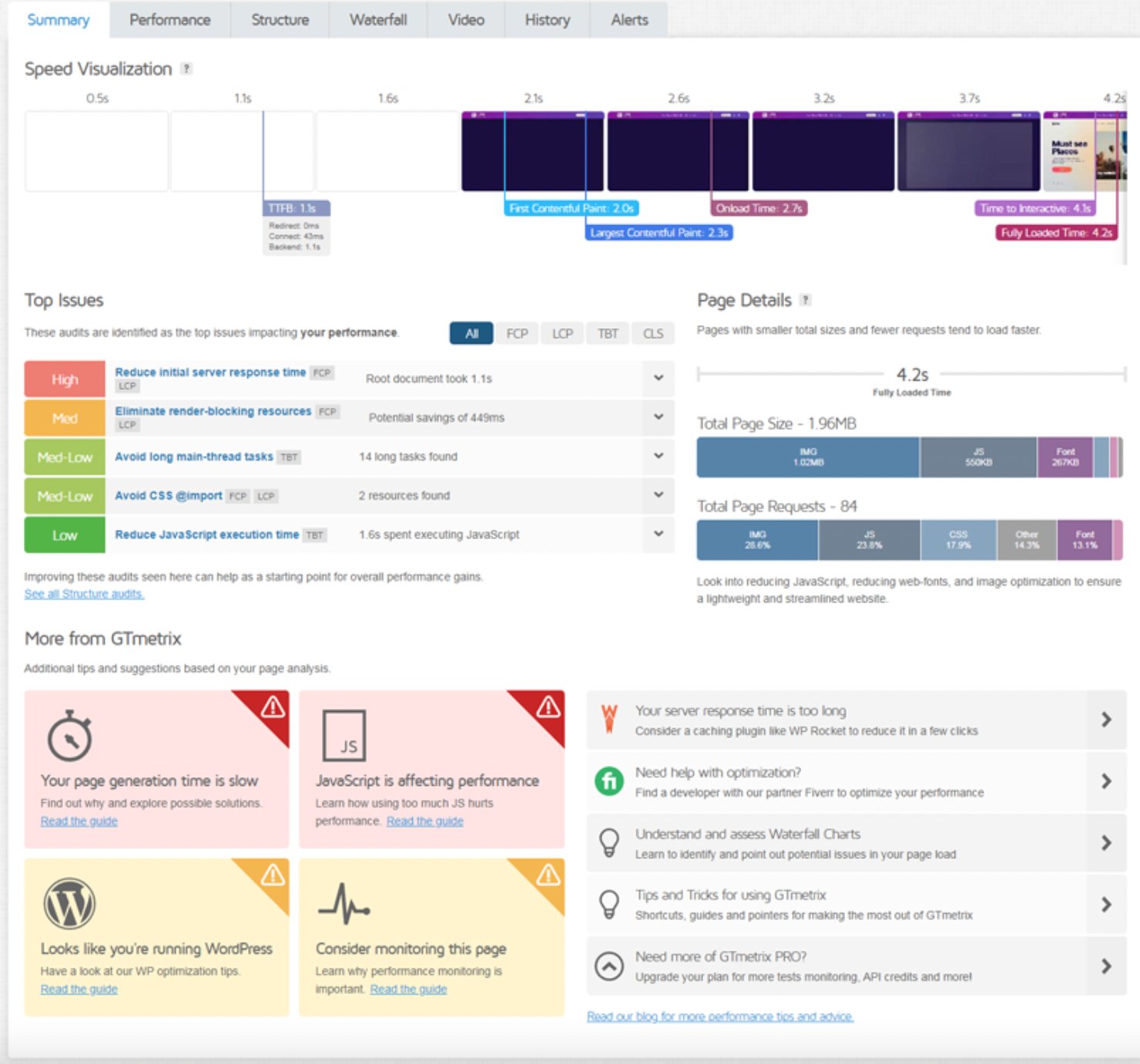
- The GTmetrix Grade measures the Web Vitals that affect SEO and user experience, and combines a Lighthouse-powered Performance Score with a Structure Score, ranking every audit by impact so businesses know what to fix first.
- Real browser testing loads every page in an actual Chrome browser instead of a headless or emulated one, so results reflect how pages load for real visitors.
- The waterfall chart breaks the page load down request by request, so businesses can spot long or broken requests at a glance and see request and response header details, CDN cache status, and IP information.
- Real user experience data pulls Chrome UX Report (CrUX) field data, including INP, and tracks trends for up to six months on sites with enough Chrome traffic.
- Speed Visualization shows the page load as a frame-by-frame filmstrip, and video playback replays the full load with milestones such as TTFB and LCP marked.
- Location and device testing lets businesses run tests from global test locations, on simulated mobile devices, and at different connection speeds, with additional locations and devices.
- Lite: $4.99/month
- Core: $9.99/month
- Advanced: $24.99/month
- Expert: $49.99/month
- Position Tracking monitors rankings daily across search engines, devices, and locations, and now tracking visibility in LLMs, with multi-location and multi-device tracking.
- SERP feature tracking shows when tracked keywords trigger featured snippets, video carousels, AI Overviews, and local packs, and whether the site appears in them.
- Competitor tracking lets businesses add up to 20 competitors to compare visibility side by side, monitor movement over time, and spot gaps.
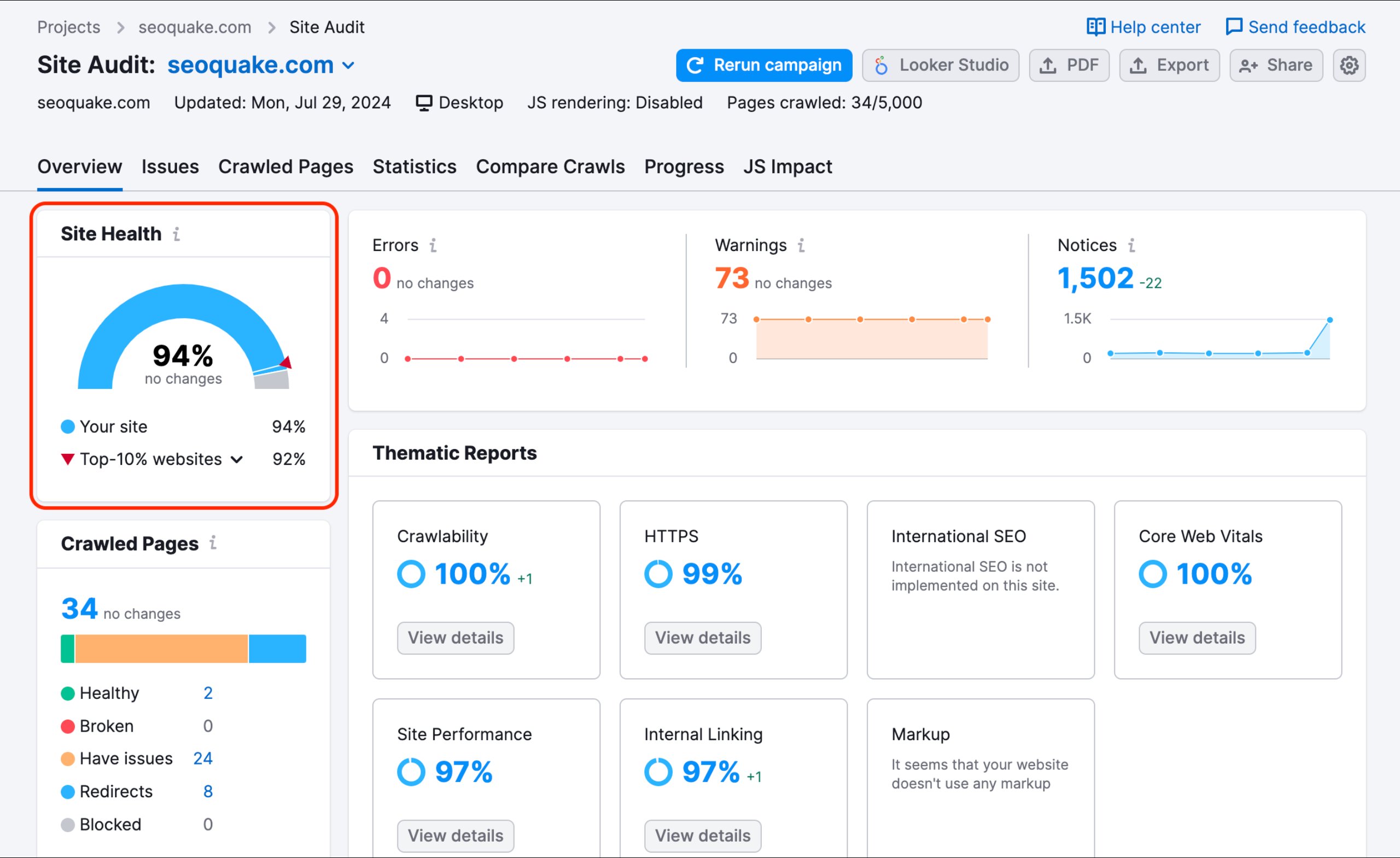
- The technical site audit crawls a website for issues that hurt search and AI visibility, including broken links, slow pages, schema gaps, and crawlability blockers.
- Backlink analysis reviews the backlinks pointing to a site and the citations LLMs use when they mention the brand, helping businesses find gaps and monitor competitors.
- AI visibility tracking shows how often a brand and its content appear in answers from ChatGPT, Perplexity, Gemini, Claude, and AI Overviews.
- Automated reporting sends ranking updates by email and triggers real-time alerts and notifications when visibility changes, so businesses don’t miss a critical ranking shift.
- SEO: $117.33/month
- Starter: $165.17/month
- Pro+: $248.17/month
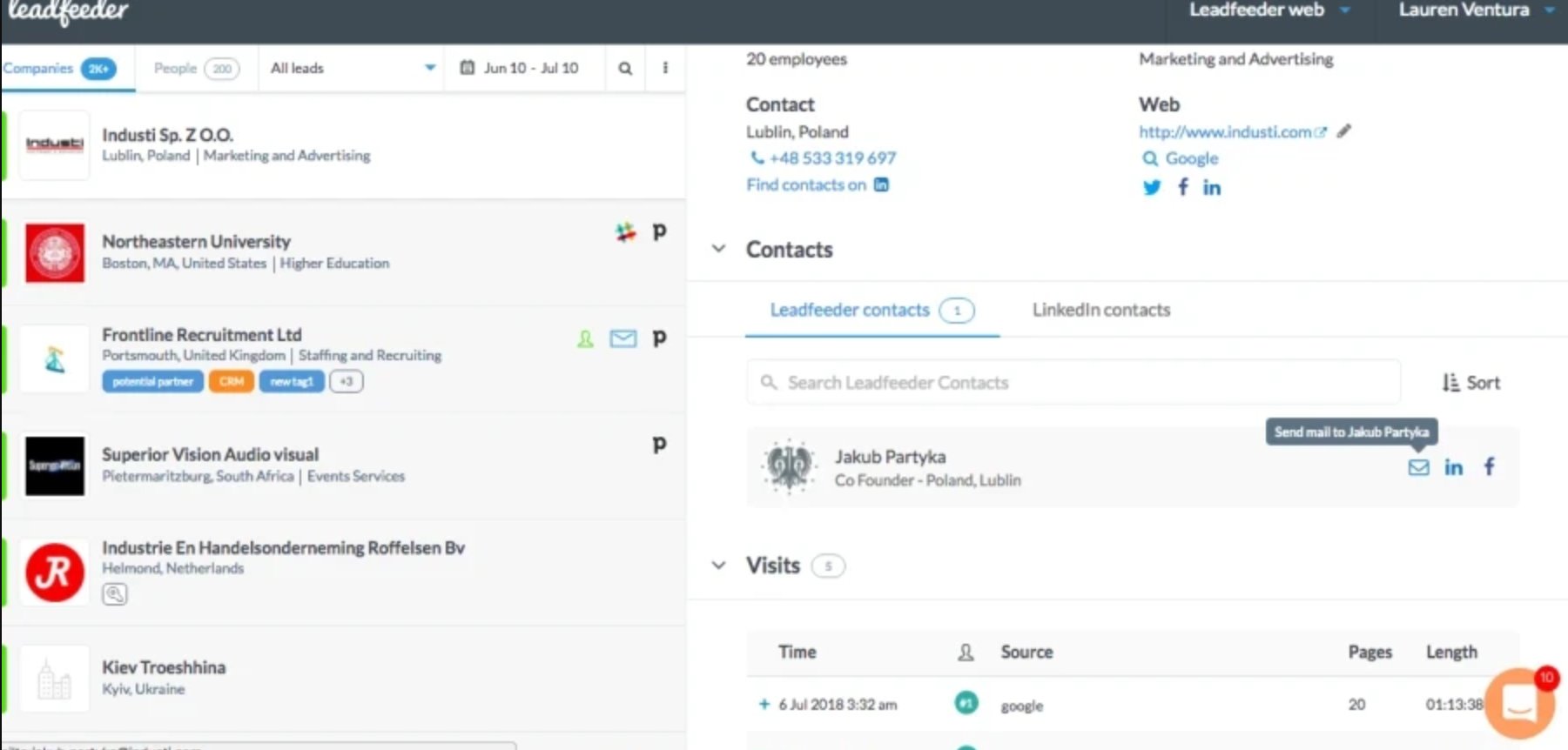
- Anonymous visitor identification reveals companies visiting the website through IP-based recognition, even when teams work remotely, so businesses can see interested companies that never fill out a form.
- Buying intent tracking shows which pages each company visits and what content it engages with, with 50+ behavioral and firmographic filters to help qualify the companies with the highest potential.
- ICP fit scoring shows how well each visiting company matches the ideal customer profile, and automatic lead scoring places the hottest leads at the top of the lead list.
- CRM sync automatically sends identified companies and their details to the CRM and sales tools, with each company’s visit history attached.
- Decision-maker search lets businesses find contacts in a global database using filters such as job role, seniority, or location, with verified emails and phone numbers.
- Ad impact tracking shows which companies engage with ads, not just which clicks they generate, including the keywords attracting target accounts.
- Discover: Starting at €79/month
- Activate: Starting at €369/month
- Scale: Starting at €599/month
How we evaluated these tools
Our evaluation methodology is based entirely on secondary research. We assessed each tool using official product documentation, publicly available feature information, and third-party user reviews from G2.
The order in which tools appear and the way they are described reflects only what each tool actually offers based on these sources, with no bias toward any particular platform. We recommend taking advantage of free trials wherever available before making any final commitment.
We assessed each tool on four points:
Quick picks
| Category | Tool | Why it wins |
| Best overall for understanding and improving website behavior | Wingify | Tracks metrics, funnels, and user flows with Journey Analytics, then shows why visitors drop off through heatmaps, session recordings, and surveys, all in one platform. |
| Best free tool for quantitative traffic tracking | Google Analytics | Free to use, with acquisition reports showing how visitors arrive through paid and organic sources, plus funnel and path exploration to trace routes to conversion. |
| Best for page speed tracking | GTmetrix | Tests pages in a real Chrome browser and breaks the load down request by request in a waterfall chart, with scheduled monitoring to track speed over time. |
| Best for SEO and AI search visibility tracking | Semrush | Tracks rankings daily across search engines, devices, locations, and LLMs, and shows how often a brand appears in answers from ChatGPT, Perplexity, Gemini, Claude, and AI Overviews. |
| Best for identifying B2B companies visiting a website | Leadfeeder | Reveals visiting companies through IP-based recognition, shows which pages they view, and sends them to the CRM with their visit history attached. |
Website tracking tools: A quick comparison table
Here’s a quick summary comparison table of the website tracking tools:
| S.No. | Tool | Category | Best for | Free trial | Starting price | G2 rating |
| 1 | Wingify | Qualitative, quantitative, and user test tracking | Tracking what visitors do, how they behave, and why they drop off, then testing which fixes improve key metrics | 30 days | Custom pricing | Analytics Suite: 4.2/5 based on 62 reviews Experimentation Suite: 4.4/5 based on 929 reviews |
| 2 | Google Analytics | Quantitative data tracking | Measuring quantitative website and app metrics, such as traffic sources, engagement, and conversions, across the customer lifecycle | No free trial | Free | 4.5/5 based on 6,882 reviews |
| 3 | GTmetrix | Technical tracking | Diagnosing why website pages load slowly and monitoring page speed over time | No free trial | $4.99/month (billed annually) | 4.6/5 based on 40 reviews |
| 4 | Semrush | SEO tracking | Tracking a website’s search rankings and visibility across search engines and AI search, alongside competitors | 7 days | $117.33/month (billed annually) | 4.4/5 based on 4,304 reviews |
| 5 | Leadfeeder | Intent data tracking | Identifying which B2B companies visit a website and acting on their buying intent before they fill in a form | 14 days | €79/month (billed annually) | 4.3/5 based on 870 reviews |
1. Quantitative, qualitative, and user test tracking: Wingify

Wingify is an Agentic Experience Optimization Platform that helps businesses make every digital experience more relevant.
Wingify Analytics Suite covers both quantitative and qualitative tracking. Journey Analytics measures what visitors do, while Behavior Analytics and User Feedback show how and why. It brings behavior, journeys, and feedback into one place, so the signals behind every number stay visible.
Wingify Experimentation Suite helps teams create, target, measure, analyze, and roll out web experiments. Wingz, Wingify’s agentic AI layer, carries context across both suites, so teams can act faster.
Find where visitors drop off and see exactly why
Journey Analytics tracks metrics, funnels, and user flows to show where visitors drop off. From any report, businesses can open the matching heatmaps and session recordings in one click to see what happened, while form analytics pinpoints the exact field where visitors hesitate.
The Behavior Analytics dashboard scores the website experience and highlights the pages and visitor segments with the lowest scores, so businesses know where to look first. User Feedback surveys then capture the reasons, straight from visitors.
Test fixes and see what actually moves conversions
Teams can run A/B, multivariate, and split URL tests on any metric, with guardrails that disable underperforming variations when critical KPIs fall below a set threshold. Results appear on a Bayesian-powered dashboard, and heatmaps and recordings inside test reports explain why a variation won or lost. Real-time web vitals tracking also monitors LCP, TBT, CLS, and loading time while tests run.
Move from insight to action faster with Wingz
Wingz spots patterns in visitor behavior, reviews the recordings behind a conversion dip, and suggests what to do next. It can then build and configure experiments for teams to approve, and turn the results into stakeholder-ready reports.
Pros & cons
| Pros | Cons |
| Uses AI to summarize session recordings, which speeds up analysis of how visitors interact with a site. | No public pricing. Plans are scoped to traffic volume and tracking needs, which keeps costs aligned with usage but requires a conversation with sales to compare. |
| Offers personalization even for anonymous visitors, with no-code deployment. | Session recordings are sampled by default, so capturing every visit requires increasing the sampling rate. |
| Tracks test progress in real time, with the flexibility to measure multiple goals. | |
| Offers an easy-to-use interface and a seamless GA4 integration. |
Pricing
Wingify offers customized pricing plans according to your business requirements. You can also explore a free 30-day trial to determine how it can assist in achieving your business goals.
Free trial:
30 days
Best for:
Tracking where and why website visitors struggle, then testing which fixes improve key metrics
Free trial:
30 days
G2 rating:
A customer experience as per G2 reviews:
What I like about Wingify Analytics is that you can use AI to summarize recordings. The use of funnels and heatmaps is also very convenient. To see where our visitors drop off, why they drop off, and what issues they encounter, is also beneficial.
Marcella Silveira, User Experience Designer at Montréal Exchange.
Quick note: Your tracking setup captures every click, scroll, and conversion, but are you using that goldmine of behavioral data to power your experiments? Know how Netflix and Decathlon leverage their behavior insights to fuel experiments and create an experimentation engine that actually drives growth.
Download the ebook, ‘Building a Sustainable Experimentation Culture Using Behavior Analytics,’ to know how to utilize the full potential of your tracking data.
2. Quantitative data tracking: Google Analytics
What it does
Google Analytics helps businesses track how visitors find, use, and convert on their websites and apps. It measures customer engagement across sites and apps, showing businesses what’s working, what isn’t, and the role each marketing channel plays.
The tracking works through JavaScript libraries, mobile app SDKs, and an open measurement protocol, and businesses can also connect CRM, point-of-sale, and other first-party data sources for a more complete view of the customer journey.
Key features
Pros & cons
| Pros | Cons |
| Shows where traffic comes from and which landing pages keep people engaged. | Setting up events, goals, and custom reports needs technical knowledge. |
| Tracks the full user journey from start to finish, so teams can see what leads to conversions. | Standard reports answer limited questions, so teams often need to build custom reports from scratch. |
| Uses data-driven attribution to show which channels and campaigns drive results. | |
| Offers a powerful free version that works well for small and mid-sized businesses. |
Pricing
Google Analytics is available for free. For enterprise-level needs, it offers Google Analytics 360 with custom pricing tailored to business requirements.
Free trial:
No free trial
Best for
Measuring quantitative website and app metrics, such as traffic sources, engagement, and conversions, across the customer lifecycle.
G2 rating
4.5/5 based on 6,882 reviews
A customer experience as per G2 reviews:
What I like best about Google Analytics is how clearly it shows what’s working and what’s not. It helps you understand where your traffic is coming from, what people are doing on your site, and which pages or campaigns are converting. It’s not always easy to interpret at first, but once you learn how to read the data, it’s like having a roadmap.
Krissy Mikulski, Influencer Marketing Specialist at Influenster
3. Technical tracking: GTMetrix
What it does
GTmetrix is a website performance testing and monitoring tool that helps businesses track how fast their pages load, why they slow down, and how to fix them.
Its reports show how quickly a page loads, explain why it is slow, and recommend fixes. Businesses enter a page URL, and GTmetrix tests the page using the location, browser, and connection settings they choose, then returns a performance report.
Key features
Pros & cons
| Pros | Cons |
| Breaks down Core Web Vitals like LCP, TBT, and CLS using Google Lighthouse, so teams can see exactly what slows a page down. | Focuses mostly on front-end issues, so finding server-side or database problems needs other tools. |
| Combines Performance and Structure scores into one overall grade, giving a clear view of both page speed and site setup. | Scores can change between tests of the same page, so repeat tests are often needed to confirm results. |
| Offers video playback and filmstrip views to see how a page loads and where layout shifts happen. |
Pricing
GTmetrix offers four plans, all billed annually:
Free trial:
No free trial
Best for
Diagnosing why website pages load slowly and monitoring page speed over time.
G2 rating
4.6/5 based on 40 reviews
A customer experience as per G2 reviews:
GTmetrix has enabled me to identify and address specific performance bottlenecks that were negatively impacting user experience and SEO. The detailed, prioritized recommendations have guided code minification, image optimization, and reduction of render-blocking resources, leading to visibly faster load times and smoother page interactions.
Luca Piccinotti, Growth Advisor at Robotalp
4. SEO tracking: Semrush
What it does
Semrush is an SEO and AI search visibility platform that helps businesses track how their website ranks in search engines and appears in AI-generated answers. It brings keyword research, rank tracking, technical audits, backlink analysis, and AI visibility data into one platform, so businesses can see where they rank, why rankings change, and how they compare with competitors.
Its tracking is backed by the largest keyword database on the market. Semrush is now part of Adobe.
Key features
Pros & cons
| Pros | Cons |
| Tracks AI visibility, so teams can see how their brand shows up in AI search. | The interface can feel cluttered and overwhelming for new users. |
| Shows which keywords and pages drive competitor traffic, which helps teams spot content gaps and new opportunities. | The backlink toxicity score can flag harmless links as risky, which adds extra review work. |
| Works with Claude through MCP, so teams can ask questions in plain language and get data without opening a dashboard. |
Pricing
Semrush offers three SEO + AI Search plans, billed annually:
Free trial:
7 days
Best for
Tracking a website’s search rankings and visibility across search engines and AI search, alongside competitors.
G2 rating
4.4/5 based on 4,304 reviews
A customer experience as per G2 reviews:
For me as a marketer, Semrush has become an indispensable tool. The platform offers an extremely comprehensive suite of features that allow SEO and marketing projects to be professionally accompanied and implemented from start to finish. I particularly appreciate the versatility. From keyword research to competitive analysis to technical website audits, I have everything combined in one central tool.
Noel Lehmann, Marketing manager SEO & SEA, at dskom digital.marketing.agentur
5. Intent data tracking: Leadfeeder
What it does
Leadfeeder is a B2B website visitor identification tool that helps businesses track which companies visit their websites, what those companies view, and when to reach out.
Businesses add a single tracking script to their site, and Leadfeeder matches each visit’s IP address against a continuously updated company database, automatically filtering out bots, internet service providers, and low-value traffic. Identification happens at the company level, so individual visitors are not shown by default.
Leadfeeder merged with Echobot to form Dealfront, and then Dealfront rebranded back to Leadfeeder, bringing the entire platform under the Leadfeeder name.
Key features
Pros & cons
| Pros | Cons |
| Lets teams build custom feeds that filter visitors based on their ideal customer profile. | Contact and email data isn’t available for every company, so teams often need other tools to fill gaps. |
| Tracks which companies return to and engage with the website, along with a buying intent score to help prioritize leads. | Some company details, like industry tags and CRM match flags, can be inaccurate. |
| Offers a solid API that lets teams pull visitor data into their own systems. | Can’t always identify the right company, especially when visitors use a corporate VPN. |
Pricing
Leadfeeder offers three paid plans, billed annually:
Free trial:
14 days
Best for
Identifying which B2B companies visit a website and acting on their buying intent before they fill in a form.
G2 rating
4.3/5 based on 870 reviews
A customer experience as per G2 reviews:
What I like most is the simplicity and clarity of the user interface — it’s clean, intuitive, and very easy to use even for new team members. The Salesforce and Google Ads integrations work smoothly, helping us connect anonymous website visitors with real intent signals and feed them directly into our CRM and ad workflows.
João Magalhães, Head of Marketing at Assembla
And there you have it! These 5 top web tracking tools offer a comprehensive view of your website’s activities, allowing you to optimize performance and enhance user experiences.
How to choose the right website tracking tool
Let’s review some criteria to narrow down the best website visitor tracking tools for you.
1. Identify the information gap
The first step is to brainstorm and analyze the data from your existing tools. Identify gaps in the information related to website activity. This will help you define clear goals.
For instance, if your web analytics tools show low conversion rates on key pages, your goal could be to uncover the reasons behind this trend. In such cases, exploring qualitative tools like the Wingify Analytics suite can provide valuable answers and help you address the issue effectively.
“It’s really important to have that core and core balance and focus on the behavior analytics. Because it can help you to quantify for example, how many people are having this issue at the moment which we saw in the use of research?”
Chief Experience Officer at Creative CX
Source: Wingify Webinar

2. Understand your budget
Once you’ve defined your needs, consider your budget. Compare offerings from top tools and prioritize those with free trials or no-cost plans, allowing you to test their capabilities without immediate financial commitment.
If you have the budget for enterprise-level solutions, evaluate features like advanced user management, scalability, and customization to ensure the tool grows with your business needs.
3. Evaluate integration capabilities
Next, assess how well the shortlisted tools integrate with your existing tech stack. Seamless data transfer and compatibility with other tools are essential for efficient operations. Look for solutions that offer wide-ranging integration options.
4. Prioritize modern features
Another important factor to consider is the modern features offered by the tool. Prioritize tools with Generative AI capabilities that automate tasks and ease the workload on human resources.
For instance, as mentioned earlier, Wingify Copilot enables users to automate heatmap and session recording analysis with the help of generative AI. This not only saves a significant amount of time but also reduces human error, streamlining the entire tracking process.
5. Evaluate privacy compliance
Lastly, the privacy compliance of the tools must be evaluated. With increasing emphasis on user privacy and data protection, this step is critical.
Select tools that comply with standards such as GDPR, HIPAA, and SOC 2 certifications. This will help you track website activity effectively while protecting user data and preventing leaks or breaches. Additionally, the tool should clearly specify its data retention period and offer an automatic deletion feature for unsaved recordings, ensuring that unnecessary information is removed promptly. Prioritizing privacy-compliant tools is a wise decision to build trust and avoid regulatory issues.
Final thoughts
Website tracking is essential, but success hinges on using the right website visitor tracking tool. The tools mentioned above are some of the best in the market. Explore them—they can be used individually or combined for a comprehensive tracking strategy.
Remember, tracking is just the first step. The real magic happens when you act on the insights. Whether it’s optimizing conversion rates or personalizing user experiences, taking action is what transforms a website from average to exceptional.
Start your optimization and personalization journey today with Wingify to turn visitor insights into revenue-driving experiences.
Frequently asked questions (FAQs)
Tracking visitors begins with adding a tracking tool to a website, usually by placing a short code snippet on every page. A web analytics tool like Google Analytics shows how many visitors arrive, where they come from, and which pages they view. To understand how visitors behave on those pages, a behavior analytics tool like Wingify adds heatmaps, session recordings, and on-page surveys.
Most website tracking tools collect data through a JavaScript snippet that records page views, clicks, scrolls, and other events as visitors browse. Mobile apps use SDKs instead, and some tools rely on other methods. Page speed tools like GTmetrix load pages in a real browser, SEO tools like Semrush crawl websites and monitor search results, and intent data tools like Leadfeeder match visitor IP addresses against a company database.
Several website tracking tools can be used for free. Google Analytics is free to use and covers traffic sources, engagement, and conversions, while GTmetrix, Semrush, and Leadfeeder offer free plans with limited features. Wingify offers a 30-day free trial.
Google Analytics shows what visitors do, such as which pages they view and where they drop off, but not why they do it. Heatmaps show where visitors click and scroll on a page, and session recordings replay their actual journeys, revealing friction like rage clicks or confusing navigation. Together, they give a fuller picture: Google Analytics spots the problem, and behavior analytics explains it.
Every tracking script adds some load, but the impact is usually small when scripts load asynchronously, meaning they don’t block the rest of the page. Wingify’s tracking script, for example, loads asynchronously so analysis doesn’t slow the page down. Testing page speed with a tool like GTmetrix before and after adding a script shows the real impact, and removing unused tracking tools keeps pages fast.
Most website tracking tools work on mobile browsers automatically, since they run on the same web pages. Tracking inside native mobile apps requires an SDK. Google Analytics supports both websites and apps, and Wingify supports iOS, Android, React Native, and Flutter apps through its mobile SDKs.
Website tracking is legal, but privacy laws set rules for how it’s done, and these rules vary by region. In the EU, for example, the ePrivacy Directive generally requires visitor consent before websites store or access information on a visitor’s device, such as non-essential cookies. Businesses should choose tools that support consent management and mask sensitive information, and confirm the rules that apply to them with their legal team.
The first metrics to track are the ones that show whether a website meets its goals: traffic sources, conversion rate, and engagement on key pages. Page load speed comes next, since slow pages lose visitors, along with top exit pages, which show where visitors leave. Once these are in place, behavior analytics helps explain why visitors drop off on the pages that matter most.
Categories:

I’m a content marketer at VWO, reading and writing on topics like behavior analytics, conversion rate optimization, and experimentation. Prior to VWO, I built and managed my own website where I discussed business growth and career. When I’m not at my desk, you’ll find me exploring nature trails, cycling through the countryside, or seeking out new physical challenges—those are my ideas of a good time! Want to start a conversation with me? Just mention BIRDS, and you’ll have my undivided attention.