Feature flags start simple: turn a feature on or off without waiting for another deployment. But that simplicity changes quickly when dozens of teams release and experiment across the same products, environments, and user base.
At that scale, the question is no longer whether to use feature flags. It is about managing them without introducing new risks or complexity.
This guide looks at feature flag management through that enterprise experimentation lens.
What is feature flag management?
A feature flag is a conditional control that determines whether a user can access specific functionality. Instead of making a feature available as soon as its code is deployed, teams can deploy the code first and control when, where, and to whom they release the feature.
Feature flag management is the structured process of creating, configuring, targeting, monitoring, and retiring these flags throughout their lifecycle. Rather than treating flags as individual ON/OFF switches, teams can manage them centrally across applications, environments, releases, and user groups.
This separates three activities that traditional releases often combine into a single step: deployment, release, and learning. Code can reach production without reaching every user. Teams can then control exposure and learn from real-world performance before deciding whether to expand, change, or stop the release.
For enterprises running multiple feature releases and experiments simultaneously, feature flag management provides the structure needed to keep flags manageable as usage scales.
Simply put, feature flagging controls whether functionality is available. Feature flag management controls how teams manage that flag from creation to retirement.
How feature flags power enterprise experimentation
Feature flags and A/B testing solve different problems. Flags control who sees which version of a feature, evaluated by an SDK at runtime; a statistical engine determines whether that version actually performed better against a defined metric. In enterprise experimentation platforms, the two are paired: flags handle delivery, while the experimentation engine handles measurement. A flag split with no sample size calculation and no statistical analysis is a controlled rollout, not an experiment.
At enterprise scale, that pairing also needs controls for how exposure changes across multiple releases, experiments, and teams:
Gradual rollouts: Release new features to a small canary group first, expand in stages as guardrail metrics hold, and reach full rollout only once each stage clears. Our guide to progressive rolloutscovers the three-phase framework: canary, extended validation, and full rollout, in detail.
Kill switches: Disable a feature for all users if a regression appears, without waiting for a hotfix deployment.
Mutual exclusion: Prevent users assigned to one experiment from being exposed to another overlapping experiment, reducing cross-experiment interaction effects.
Multi-team visibility: Give product and engineering teams visibility into what is currently flagged, running, and planned so they can coordinate overlapping releases and experiments.
See how digital brands are investing in feature experimentation and the trends shaping their strategies in our latest report.
Deployment of a feature is an engineering decision. Releasing the feature is a business decision. Rolling back the feature is a business decision. Feature flags give you the simplicity to do all of this and time it exactly how you want.
Mahek Mahendra Shah, Director of Product Management, Wingify (Source:Podcast)
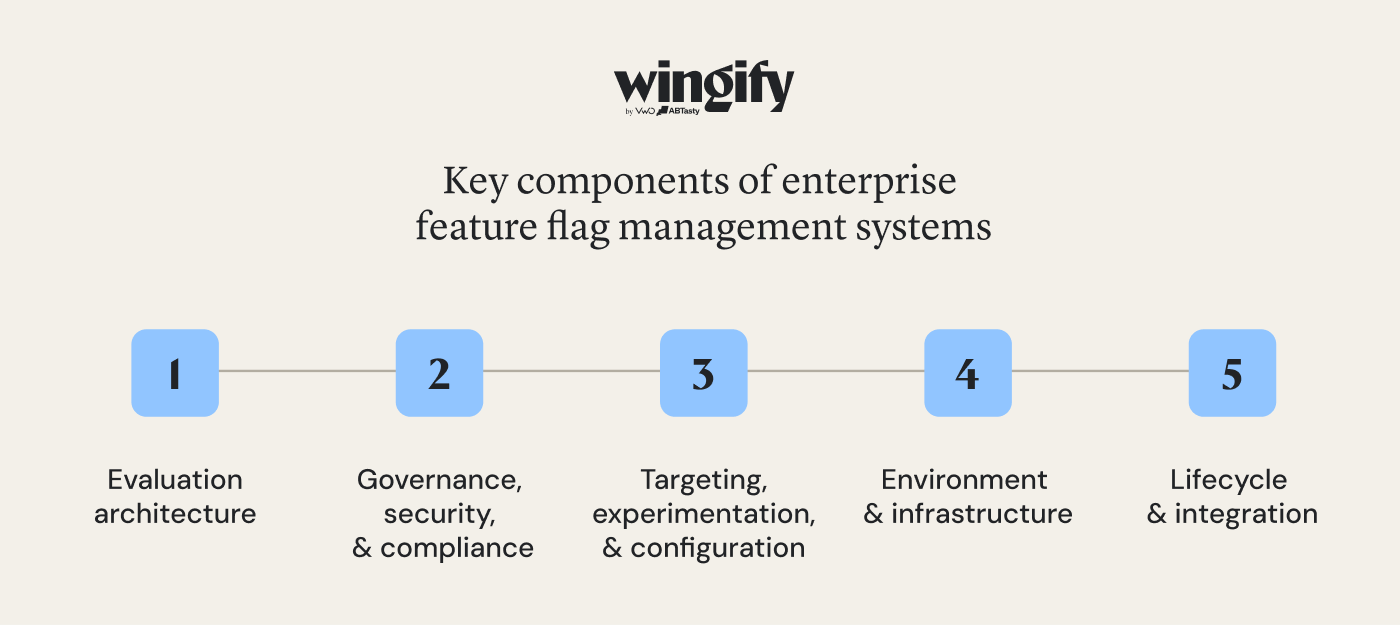
Key components of enterprise feature flag management systems
The best enterprise feature flag management systems need more than a toggle UI. These components determine whether a system holds up across multiple teams, environments, and compliance requirements at scale.
1. Evaluation architecture
Local SDK evaluation: Server-side feature flag systems can evaluate flag decisions within the application using locally available configuration rather than making a network request for every flag check. This reduces flag-decision latency and avoids putting a remote API call directly in the request path. Wingify Feature Management, for example, uses local, in-memory evaluation for server-side SDK decisions, with no network call required to evaluate flags.
Real-time configuration sync: Configuration changes propagate to application SDKs through mechanisms such as streaming or polling, without requiring an application restart or code deployment.
Fail-safe defaults: Predetermined fallback behavior defines what should happen when a flag cannot be evaluated as expected, rather than leaving feature behavior undefined.
2. Governance, security, and compliance
Role-based access control, scoped by environment: Restricts who can create flags, edit targeting rules, or change production feature flags.
Approval workflows: Add multi-person review for high-risk production changes before they reach live traffic.
Audit logs: Record who changed a flag, what changed, and when, supporting troubleshooting, accountability, and compliance review.
SSO and IP allowlisting: Control access through enterprise identity providers and network-level restrictions.
Compliance and data residency controls: Support relevant security and privacy requirements through measures such as SOC 2 and ISO 27001 assurance/certification, support for regulations such as GDPR and CCPA, and data residency options where required.
3. Targeting, experimentation, and configuration
Targeting engine: Evaluates flags against user attributes, segments, and percentage-based rollout rules to determine which users receive a feature or variation.
Experimentation and measurement: Connects flag assignments to defined metrics and statistical analysis, enabling teams to determine whether differences between feature variations are meaningful, rather than treating traffic allocation itself as an experiment.
Remote configuration: Allows teams to change feature variables and configuration parameters, including strings, numbers, booleans, or JSON-based settings such as algorithm parameters, without a new deployment.
4. Environment and infrastructure
Multi-environment support: Maintains separate flag states for development, staging, and production, allowing teams to validate a feature before it reaches live traffic.
Deployment options: Depending on the feature flag tools, enterprises may have managed cloud, private, or self-hosted deployment options. This can matter for organizations with specific infrastructure, security, or data residency requirements.
5. Lifecycle and integration
Flag lifecycle tooling: Helps identify stale or unused flags, enabling teams to remove obsolete flags and code paths before they accumulate as technical debt.
API and CI/CD integration: REST APIs and development integrations enable teams to create, toggle, update, or archive flags through CI/CD pipelines and internal tooling, rather than relying solely on a dashboard.
Data warehouse and analytics integration: Flag evaluation and experiment data can flow into analytics and data systems, where teams perform broader product and business analysis, rather than remaining isolated within the feature management platform.
Pro Tip!
Wingify Feature Management includes technical debt recommendations that identify unused or stale feature flags and surface where they remain in the code, including the file name, location, and line number. This helps teams identify flags that need to be cleaned up and keep their codebase free of unnecessary technical debt.
Best practices for feature flag management in enterprises
Enterprise feature flagging needs clear controls around ownership, rollout, monitoring, and cleanup. Some practical best practices include:
Define flag types, ownership, and naming upfront: Classify flags as temporary or permanent, assign an owner, follow consistent naming conventions across teams, and set removal dates for temporary flags.
Set rollback conditions before release: Define measurable thresholds and guardrail metrics that determine when to pause or reverse a rollout.
Roll out to representative users: Build early cohorts around relevant user attributes, not arbitrary traffic percentages.
Test kill switches before you need them: Verify that disabling a flag safely handles the UI, APIs, and downstream dependencies it affects.
Automate where appropriate: Use time- or metric-based rules to advance, pause, or reverse feature rollouts instead of relying entirely on manual monitoring.
Control access by environment: Give teams flexibility in development and staging while applying stricter permissions and approvals to production.
Monitor stability and value separately: Track technical guardrails alongside the product or business metric the feature is intended to improve.
Use flags for experimentation, not just releases: Connect feature variations to defined metrics and statistical analysis before committing to a permanent change.
Further reading:Check out ourblogfor a deeper dive into feature flag best practices.
Common challenges in enterprise feature flag management
As feature flag usage scales across products and teams, several challenges become harder to manage:
Toggle debt: Flags that outlive the feature they gated accumulate as dead conditionals, cluttering the codebase and slowing down anyone tracing a bug through code paths that no longer matter.
Difficult-to-test flag combinations: Multiple feature toggles interacting on the same code path can create more possible states than QA can realistically cover before release.
Flag sprawl without shared visibility: Teams creating flags independently, without a shared system of record, can end up flagging the same surface for conflicting purposes without knowing until results contradict each other.
Targeting errors: Incorrect user attributes or rules can expose a feature to the wrong audience, compromising both the rollout and any experiment running on top of it.
Environment drift: A flag behaving differently in staging and production, due to differences in SDK versions, configuration, targeting rules, or other environment-specific settings, can produce bugs that are hard to trace back to the flag itself.
Residual mobile evaluations: A flag retired from the current application configuration can still be evaluated by older app versions active on users’ devices, since mobile clients can’t be force-updated the way a web release can.
Vendor lock-in: Proprietary SDKs and closed flag-evaluation formats make migrating platforms expensive once an organization has years of flag history and deep code-level integration. OpenFeature can reduce provider-specific coupling in application code by providing a vendor-neutral evaluation API.
The goal isn’t eliminating these risks entirely. It’s making them visible and manageable as flag usage scales across teams.
Top use cases of feature flag management in experimentation platforms
Progressive feature rollouts: Release to a small user segment first, then expand exposure in stages based on guardrail metrics and relevant user feedback, rather than shipping to 100% of users at once.
Instant kill switches and rollbacks: Disable a problematic feature the moment guardrail metrics cross a defined threshold, without waiting on a hotfix deployment. Retail and eCommerce teams rely on this during high-traffic events like Black Friday, gating checkout flows and seasonal pricing changes behind a flag they can pull instantly if something breaks.
Beta and early-access programs: Expose a feature to internal users, a specific plan tier, or an opted-in cohort before general availability, using the same targeting infrastructure that runs controlled experiments. SaaS and B2B teams use this to target flags by account or tenant ID, phasing a feature to specific enterprise customers before wider release.
Trunk-based development: Merge incomplete features into the main branch behind a flag, keeping the codebase unified without long-lived feature branches that diverge and become expensive to reconcile.
Full-stack A/B testing: Flags assign users to experiment arms across both front-end interfaces and back-end logic, while the experimentation layer measures which arm performed better against a defined metric.
Personalized targeting by user attribute: Deliver different experiences to different user segments based on plan tier, geography, or other user attributes, using the same flag infrastructure that runs controlled experiments.
Testing configuration and algorithm changes: Vary parameters like recommendation logic, pricing configuration, or search ranking as flag-controlled variables, without maintaining a separate code deployment for each variation.
How to choose the right feature flag management platform
The right feature flag management platform needs to fit how your teams build, release, experiment, and govern features at scale. When evaluating a feature flag management tool, look beyond feature lists to the requirements that will affect day-to-day use and long-term scalability:
Does it include a statistical engine, or only flag delivery? A feature delivery platform that handles targeting and rollout without built-in statistical analysis requires a separate experimentation or analytics system to determine whether observed differences between variations are meaningful.
What SDK language coverage does it offer, and does that match your stack? Confirm that teams can implement feature flags across every language actually in use, not just through a JavaScript SDK for the browser.
Self-hosted or managed? Self-hosting can provide greater control over infrastructure and data location but adds deployment and maintenance overhead. A managed platform shifts more of that operational responsibility to the vendor.
Does it provide enterprise-grade security? Look for granular access controls and audit logs that capture not only flag creation but subsequent targeting-rule and configuration changes.
How does it handle multiple environments? Confirm that development, staging, and production can maintain separate flag states, permissions, and configurations without cumbersome workarounds.
How does it manage the flag lifecycle? Look beyond flag creation to ownership, status tracking, stale-flag identification, and cleanup. At scale, lifecycle management directly affects toggle debt.
How is pricing structured? Feature flag platforms may be priced by seats, usage, tracked users, or custom enterprise contracts. Compare how costs change as teams, environments, flag evaluations, and experimentation volume grow.
Conclusion: How Wingify brings feature management and experimentation together
Enterprise feature flag management goes beyond controlling when and where a feature is released. At scale, teams need to manage exposure, evaluate changes, govern access, and keep flags maintainable across products and environments.
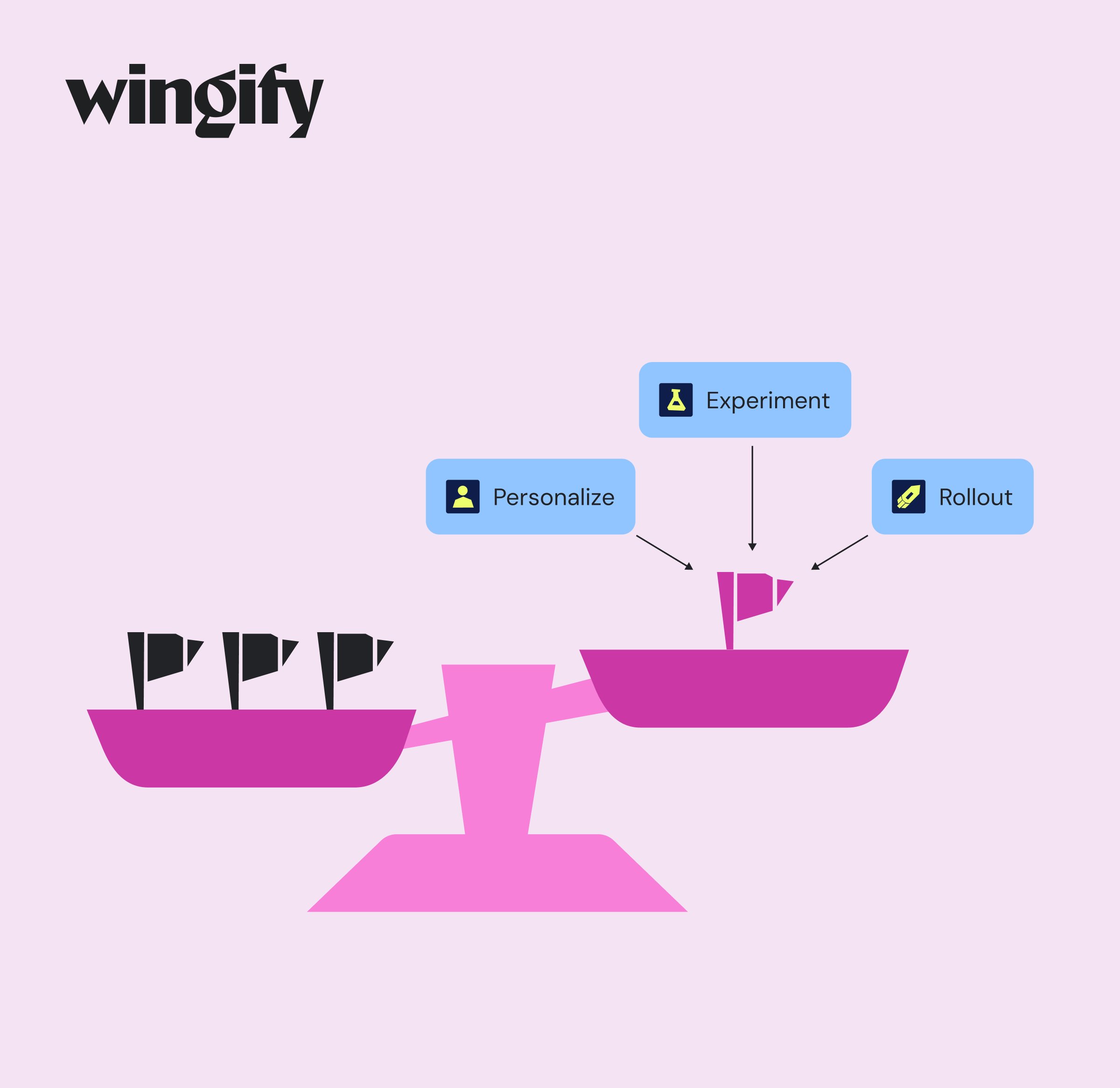
Wingify Feature Management brings feature flags into a broader feature lifecycle. Teams can manage flags across environments, progressively roll out or roll back features, run controlled experiments through Feature Experimentation, and target feature experiences through Feature Personalization. The same flag can support a rollout, experiment, or personalization campaign, reducing the need to stitch together separate delivery and measurement workflows.
Wingz, the embedded intelligence layer, adds context from releases, experiments, metrics, and user behavior to help teams analyze impact and determine what to do next.
Meliá Hotels International used feature experimentation within Wingify’s Feature Management to safely introduce a new step in its booking funnel. The team started with just 5% of users, monitored booking progression, and scaled the rollout to 100% within a week with no increase in drop-offs. The change also delivered a 1.85% uplift in average revenue per visitor. Read the full success storyhere.
Request a demo to see how Wingify Feature Management connects feature flags, controlled rollouts, experimentation, and impact measurement across your product stack.
FAQs
What is feature flag management in experimentation platforms?
Feature flag management is the process of creating, targeting, monitoring, and retiring feature flags within an experimentation platform. It lets teams control feature exposure while connecting variations to metrics and statistical analysis.
How do feature flags improve A/B testing?
Feature flags separate feature deployment from exposure. Teams can assign users to different feature variations without separate deployments, measure their impact, and roll out the winning experience or disable a problematic variation without redeploying code.
Are feature flags suitable for non-technical teams?
Yes, with the right platform and governance. Product and other business teams can manage targeting, rollout percentages, and experiment configurations through a dashboard, while engineering typically handles the initial SDK implementation and code-level flag setup.
Hi, I’m Pratyusha Guha, manager - content marketing at VWO. For the past 6 years, I’ve written B2B content for various brands, but my journey into the world of experimentation began with writing about eCommerce optimization. Since then, I’ve dived deep into A/B testing and conversion rate optimization, translating complex concepts into content that’s clear, actionable, and human. At VWO, I now write extensively about building a culture of experimentation, using data to drive UX decisions, and optimizing digital experiences across industries like SaaS, travel, and e-learning.
You might also love to read these
12 Min Read
7 Top A/B Testing Tools with Heatmaps for 2026
6 Min Read
Turn Insights Into Action: How Wingz AI Closes the Loop