France’s data protection authority has set out what responsible session replay looks like. The controls it describes were in Wingify Behavior Analytics before the recommendation was written. Here they are, one by one.

Key Takeaways
On 5 November 2026 the CNIL published its recommendation on session replay tools (Deliberation No. 2026-114 of 8 October 2026). It confirms that session replay needs the visitor’s prior consent and sets out masking, minimisation, retention and security measures for tool providers and website publishers.
Once a customer connects Wingify to its consent banner, Wingify Behavior Analytics does not record a session until the visitor accepts.
No input field is ever captured. Form fields, usernames, passwords, card details and one-time codes are anonymised in the visitor’s browser by default and never reach Wingify.
Recordings are permanently deleted automatically 30, 60 or 90 days after collection, depending on plan, unless the customer has extended retention with an add-on.
These controls were not built in response to the CNIL. They were already in the product, designed to meet the GDPR and ePrivacy rules. Section 5 maps them to the recommendation one by one, and section 7 sets out what remains the publisher’s job.
1. What the CNIL published
Session replay tools reconstruct a visit to a website or app: mouse movements, clicks and taps, scrolling, the pages seen. Product, UX and support teams rely on them because they show what aggregate analytics cannot, such as where a visitor hesitated, which button did nothing, or at which field a form was abandoned.
The CNIL’s recommendation, published in the Journal officiel on 5 November 2026 after a public consultation that ran from February to May, is addressed to both the providers of these tools and the publishers that deploy them. It applies to organisations established in the EU and to those outside it that process data about people in the EU. Its main points are these.
- Consent comes first. Session replay depends on trackers that read and write information on the visitor’s device, so Article 82 of the French Data Protection Act applies. The CNIL finds that neither of the Article 82 exemptions fits these tools, which means the visitor’s prior consent is required.
- Three purposes are covered. Detecting and understanding technical errors, improving user experience, and support and assistance for customer requests. The CNIL adds that session replay should not be used for advertising retargeting, where less intrusive tools exist.
- Visitors should be told specifically. The CNIL recommends a short, explicit mention of session replay on the consent banner, separate from the list of purposes, with a fuller description within easy reach.
- Tools should be configurable and protective by default. Providers should offer sampling, masking (forms, text fields, dynamically filled fields, images, mouse movements and clicks on numeric keypads, chatbot conversations), limited identifiers, retention settings, blocking of passwords and banking data, and role-based access, with the most protective setting as the default.
The CNIL is clear that the recommendation is not regulation. Its measures are not mandatory, and alternatives are acceptable where a controller can show that they satisfy the law. We read it as the clearest statement so far of what a European regulator expects to find when it looks at a session replay deployment, and we treat it that way.
2. Proactive, not reactive
Privacy by design and by default, the obligation in Article 25 of the GDPR, is how Wingify builds product. Privacy requirements sit in our software development lifecycle alongside functional ones. Features that touch visitor data go through privacy and security review before release, our governance processes keep those reviews honest, and every employee is trained on data protection.
C’est précisément pourquoi les dispositifs de protection présentés dans cet article étaient déjà intégrés à notre solution, bien avant la publication de cette recommandation. Le déclenchement de l’enregistrement uniquement après le recueil du consentement, le masquage par défaut des champs de saisie, le masquage de certains éléments et de pages entières, la suppression automatique des données et la gestion des droits d’accès en fonction du rôle de chaque utilisateur : autant de mesures conçues pour répondre aux exigences du RGPD, de la directive ePrivacy et des textes nationaux comme le PECR au Royaume-Uni et l’article 82 de la loi Informatique et Libertés en France.
Nous n’avons pas attendu qu’une autorité de contrôle nous demande d’agir.
That is why the controls described in this article predate the recommendation. Consent-gated recording, default anonymisation of input fields, element and page-level masking, automatic deletion and role-based access were built to meet the GDPR, the ePrivacy Directive and its national implementations, such as PECR in the United Kingdom and Article 82 in France. We did not wait for a regulator to ask.
When the recommendation appeared, we compared it with the product line by line. The rest of this article is the result of that comparison.
3. Consent first: no consent, no recording
Wingify’s SmartCode reads the visitor’s choice from your consent management platform (CMP) and behaves accordingly. Supported CMPs are selected from a dropdown in the dashboard, and others can be connected with a short snippet. Once cookie consent handling is enabled for the site, Wingify Behavior Analytics (session recordings, heatmaps and scrollmaps) starts collecting data only after the visitor accepts. The full behaviour is documented in our cookie consent configuration guide.
For the period before the visitor has answered the banner, you choose one of three modes. Completely Block Wingify is the default.
Mode | While consent is pending | After the visitor accepts | After the visitor declines |
Completely Block Wingify (default) | SmartCode does not run. No Wingify cookies are set. No session is recorded. | SmartCode runs and recording can begin. | SmartCode does not run. No Wingify cookies are set. |
Partially Block Wingify | Selected experiment changes may display, but no tracking calls are made and Behavior Analytics does not function. No session is recorded. | Tracking and recording begin. | SmartCode stops immediately. Nothing is tracked. |
Do Not Block Wingify | SmartCode runs as usual. Intended only for jurisdictions that do not require opt-in consent. | SmartCode continues. | SmartCode stops immediately. Nothing is tracked. |
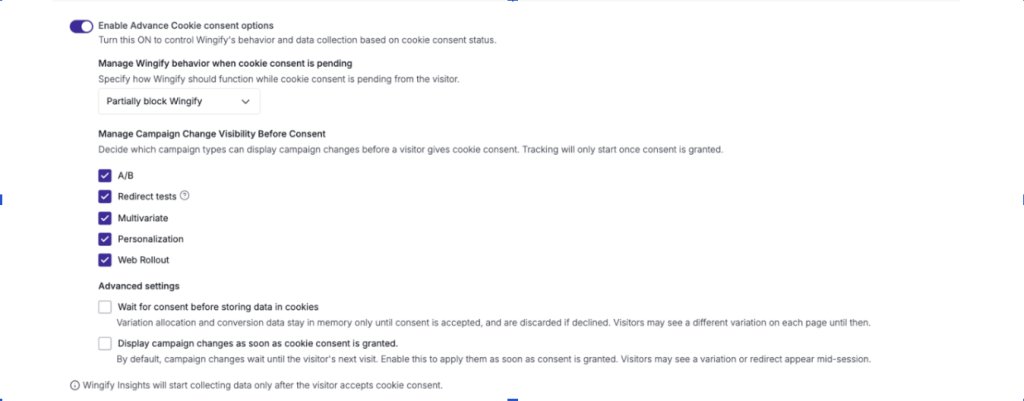
For visitors in France and the rest of the EU, we recommend using “Partially Block Wingify” and Enable “Wait for Consent Before Storing Data in Cookies” OR “Completely Block Wingify”. If you use Partially Block to keep experiments visible, enable “Wait for consent before storing data in cookies” so that nothing is written to the visitor’s device while their choice is pending. In either cases, the session recording will start only after visitor gives cookie consent.
You do not have to take this on trust. Open your browser’s network panel on your own site and look for Wingify’s tracking calls (the /events/t and .gif requests). They are absent before a consent decision and stay absent after a decline. Visitors can also opt out of Wingify directly at wingify.com/opt-out.
One limit applies to every vendor. If a site has no consent mechanism, or has deliberately chosen Do Not Block for EU visitors, no product setting can repair that. Collecting valid consent is the publisher’s obligation under the law, and under section 4.4 of our Terms and section 5 of our Data Protection Addendum.
4. Input fields are never captured: what a recording does not contain
Nothing a visitor types reaches Wingify
No input field is captured in a Wingify session recording. Form fields, usernames, passwords, debit and credit card details, one-time codes: whatever a visitor types is anonymised in the browser during collection, and the original characters are neither transmitted to nor stored on Wingify’s servers. This is the default on every account. Details are in our guide to securing visitor data in session recordings.
What the visitor types | What the recording holds |
Numbers, such as card numbers, CVV, national identifiers, one-time codes | Zeros |
Text and alphanumeric input, such as names, email addresses, passwords | Asterisks |
Dates | 1970-01-01 |
The customer does not have to do anything to get this protection. It stays in place unless the customer’s own account owner or administrator explicitly whitelists a field. We ask customers not to change this default, because doing so could expose personal or sensitive data.
Everything else on the page: a clear division of work
Content that the page displays, as opposed to content the visitor types, is under the publisher’s control, and Wingify provides the configuration for every case.
What is on the page | How it is protected | Who acts |
Input fields of any kind | Anonymised by default | Nobody. It is built in. |
Non-input elements that show personal data, such as an order summary or account panel | Anonymize the element by CSS selector or with the nls_protected class | The publisher, once, in the dashboard |
Sensitive pages, such as login, payment or account pages | Exclude the URL from recording, or hide all text on the HTML body | The publisher, once, in the dashboard |
The full set of controls:
- Anonymize elements. Mask any element by CSS selector, for example an order summary, an account panel or a saved address. Where selectors change dynamically, add the nls_protected class to the element.
- Hide all text on HTML body. One setting that anonymises all text on recorded pages.Anonymize elements. Mask any element by CSS selector, for example an order summary, an account panel or a saved address. Where selectors change dynamically, add the nls_protected class to the element.
- Exclude URLs. Recording does not run at all on the pages or URL patterns you list.
- Canvas elements. Hidden in recordings unless you choose to show them.
Who may change these settings is restricted. Adding anonymisation is limited to owners and admins, and exempting an element from masking is a deliberate act also reserved for owners and admins.
Authentication codes, keypads and chatbots
The CNIL singles out four situations, and they deserve a direct answer.
- Codes the visitor types. One-time passwords and authentication codes entered in an input field are anonymised by default.
- Codes the page displays. Backup codes or recovery keys shown on screen are page content, not input. The publisher should anonymise that element or exclude the URL, and should never allow such values into a recording.
- On-screen numeric keypads. Where the pattern of clicks could reveal a PIN, exclude the URL so that recording does not run on that screen.
- Chatbots. What the visitor types into a chat is keystroke input and is anonymised by default. To keep the conversation transcript out of recordings as well, anonymise the chat container.
Deleted automatically, on a fixed schedule
Session recordings are kept for a fixed period that starts on the day of collection and depends on the customer’s plan. When the period ends, the recordings are permanently deleted, automatically. No request is needed.
Plan | Recordings permanently deleted after |
Growth | 30 days from collection |
Pro | 60 days from collection |
Enterprise | 90 days from collection |
These standard periods sit within the “few months” the CNIL suggests for error detection and UX improvement. A customer that needs a recording for longer can extend the retention period with an add-on, or download a recording before the period ends and store it under its own retention policy. A publisher that extends retention should be able to justify the longer period against its purpose for . In every case, Wingify’s copy is permanently deleted when the applicable period ends.
5. Measure by measure: the recommendation mapped to Wingify
The CNIL labels its technical measures with codes (L for limiting sessions, M for masking, I for identifiers, S for security). The table uses the same codes.
| CNIL measure | What it asks for | In Wingify Behavior Analytics |
|---|---|---|
| Consent (section 5) | Prior consent before any read or write on the visitor’s device. | Once the customer has enabled cookie consent handling in Wingify with appropriate configurations, recording starts only after the visitor accepts. The Default mode is Completely Block Wingify: no SmartCode execution and no cookies while consent is pending or declined. |
| L1 | Random sampling of sessions to limit volume. | The customer can choose to record only a sample of visitors. Wingify providers required configurations for visitor sampling before recording. |
| L2, L3 | Limit collection to the sessions the purpose needs. | Recordings are scoped to the pages and visitor segments you target, and Exclude URLs removes pages entirely. |
| M0 | A masking tool, automatic and manual, applied by default. | Input fields are anonymised by default with no configuration. For displayed content, the publisher anonymises elements, hides all body text or excludes URLs. Canvas is hidden by default and images can be hidden on request. |
| M3 | Option not to collect masked data at all. | Anonymisation happens during collection in the browser. The original values are not sent to Wingify, so there is nothing to unmask later. |
| M1 | Unmasking limited to a few authorised users. | Exempting a field or element from masking requires an explicit whitelist action by a privileged account role. |
| I1, I3 | Random identifiers, limited to one domain. | The visitor identifier is a randomly generated UUID containing no personal data, held in a first-party cookie on your domain. Cross-domain tracking is off unless you enable it. |
| Retention (section 7.2) | Retention limited to what the purpose needs; a few months for error detection and UX. | Automatic permanent deletion 30, 60 or 90 days after collection, by plan. A longer period applies only where the customer has purchased the retention add-on. |
| S1 | Block collection of passwords, banking data and similar. | Covered by default anonymisation of input fields: passwords, card numbers and CVV are replaced before transmission. |
| S2 | Role-based access with periodic review. | Every user has an access level that the owner or an admin can change or revoke at any time. Masking changes are limited to owners and admins. |
| Defaults (GDPR Art. 25) | The most protective setting should be the default. | Completely Block Wingify, anonymisation of input fields, hidden canvas and automatic deletion are all defaults. |
6. Three deployments
The CNIL ties its measures to three purposes. These illustrative scenarios show a Wingify configuration for each.
Improving user experience: an online retailer
A French retailer wants to understand why visitors abandon checkout. It keeps “Completely Block Wingify”, or Partially Block with “Wait for consent before storing data in cookies” enabled, names session replay on the first layer of its banner, records a sample of consenting visitors on the cart and checkout pages, and anonymises the order summary and saved-address elements. The UX team sees rage clicks on the promo code field and visitors scrolling past the delivery options. It never sees a name, an address or a card number. The findings become hypotheses, tested as A/B experiments on the same platform.
Detecting technical errors: a bank or insurer
A lender’s online application fails for some visitors and the logs do not explain why. The team records only the application funnel, excludes the login page and any screen with an on-screen keypad, switches on Hide all text on HTML body, and has the account owner whitelist only the non-personal labels needed to follow the flow. Engineers see the step where the form stalls and the dead clicks on a disabled button. They see no account numbers, balances or credentials.
Support and assistance: a subscription service
A customer who accepted session recording on the consent banner reports that they cannot complete a plan upgrade. The support lead finds the recording of that visit from the time and page the customer describes, and reviews it to locate the fault. Nothing the customer typed is in the recording, because input fields are anonymised by default. The publisher has also anonymised the dynamically filled fields on account pages and the chat widget, and has limited access to recordings to the leads who handle escalations. For this purpose the CNIL recommends confirming with the customer before unmasking anything. With Wingify, typed values were never collected, so the question does not arise. The recording is permanently deleted automatically at the end of the plan’s retention period.
7. What stays with you as the publisher
Under the GDPR the publisher is the controller and Wingify is the processor. Section 6 of our Data Protection Addendum confirms that for visitor data Wingify acts strictly as a processor, on the customer’s documented instructions, and section 29 that we do not reuse personal data for any purpose other than providing the contracted services, including AI model training. A tool can make compliance straightforward; it cannot do it on your behalf. If you serve visitors in France, we suggest working through this list. Our session recordings compliance guide covers the same ground in more detail.
- Name session replay on the first layer of your consent banner in a short, plain sentence, separate from your list of purposes. For example: “We record and replay your actions on this site to understand how visitors use it and improve their experience.” Put a fuller description one click away.
- Decide the purpose before you switch recordings on, and do not reuse recordings for advertising.
- Enable cookie consent handling for your site in Wingify, connect it to your consent banner, and keep the consent mode on “Completely Block Wingify”, OR on Partially Block with “Wait for consent before storing data in cookies” enabled.
- Leave the default anonymisation of input fields as it is. Confirm that “Anonymize all key presses” is still enabled under Session Recordings > Settings > Configuration and that no input field has been whitelisted.
- Walk through every page that displays personal data and anonymise those elements or exclude the URL.
- Review who can view recordings and who holds owner or admin rights.
- State the retention period that applies to your plan (30, 60 or 90 days, or longer if you have the retention add-on) in your privacy notice, along with a description of session replay. If you download recordings, apply your own retention and security controls to those copies.
- Repeat the check after each significant site release.
8. Assurance you can check
Statements from a vendor about its own product only go so far. Wingify’s security and privacy controls are examined by independent auditors, and the evidence is available to customers and prospects.
- Privacy and security management: ISO/IEC 27001 Information Security Management Systems (ISMS), ISO/IEC 27701 PIMS, ISO/IEC 27017 Cloud Security and ISO/IEC 27018 Cloud Privacy.
- Service organisation controls: SOC 2 Type II.
- Payment data: PCI DSS v4.0.2, SAQ D, validated by a Qualified Security Assessor.
- Cloud assurance: CSA Consensus Assessments Initiative Questionnaire (CAIQ).
- Penetration testing: Vulnerability assessment and penetration testing by two independent security firms.
- Environment and workplace safety: ISO 14001 (EMS) and ISO 45001 (OH&S).
To our knowledge, no other platform in our category matches this depth of independent certification and third-party assurance across information security, privacy and compliance. Reports and certificates are available through the Wingify Trust Center. Our technical and organisational measures, and our commitments as a processor under the GDPR, UK GDPR and other applicable data protection laws, are set out in the Data Protection Addendum.
9. In closing
The CNIL has described session replay done properly: recorded only with consent, stripped of what the purpose does not need, kept briefly and seen by few. That is the product we had already built, and Wingify Behavior Analytics gives teams the recordings, heatmaps and scrollmaps they need to fix real problems on those terms.
If you have questions about this article or about your own configuration, write to privacy@wingify.com or speak to your Customer Success Manager.
Categories:

Keshav Kumar is Group Data Protection Officer at Wingify, where he oversees data protection and privacy practices across the organization. He focuses on helping businesses navigate data privacy regulations, manage compliance, and build trust through responsible data handling.