The problems that cost you on Black Friday are rarely new ones.
A checkout issue that affects mobile shoppers in the peak holiday season is often the same kind of issue you’d see in March.
What changes is how much it costs to wait. In a normal month, if your team spots a problem in its weekly review, you lose a few days of revenue before you fix it.
During Black Friday, those same few days can cover the entire sale.
Peak season also leaves little time to look for problems. Some go unnoticed because nobody has time to dig into the data, while others keep getting pushed back by launches and campaign checks that can’t wait.
That’s why the problems that hurt most during peak season usually aren’t the hardest to solve. They’re the ones your team can’t get to in time.
Where do AI agents fit in during peak season?
Much of the work to catch an issue early involves analysis, such as comparing results across segments, reviewing visitor behavior, or deciding which test to run next.
And it’s the exact work that gets pushed aside first when Black Friday campaigns take over the calendar.
Teams can build AI agents to take on these tasks during peak season and run them from start to finish. The agents will pull the relevant data, analyze it, and return findings with supporting evidence.
AI agents can tackle time-consuming analysis and work through far more data than anyone on your team can, especially during the rush. What they bring back is a clear direction for the next step your team can take.
3 ways AI agents can help your team manage the holiday rush
Wingz, the AI layer woven into Wingify, offers a library of pre-built agents designed to own a specific task, end to end. Or you can just create your own. These AI agents work with your campaigns, behavioral data, and user feedback data.
Once you set up an agent with a goal and a set of instructions, your team can run it whenever a task comes up. While agents bring back findings and recommendations, your team ultimately decides what to act on.
Let’s look at three practical use cases for common peak-season problems and how Wingz Agents can help you get to them in time.
1. When one market slips while the global numbers hold
If you sell in several countries, peak season doesn’t arrive everywhere at once.
Black Friday, Boxing Day, and Singles’ Day fall on different dates, and shipping cutoffs vary in each market. A global dashboard can look healthy while one country has been falling behind since the weekend.
Finding that market means pulling campaign results region by region, comparing them week on week, and then digging through funnels and survey responses to see what’s going wrong.
That’s hours of analysis, needed in the busiest stretch of the year.
To tackle this challenge, your team can run Wingz’s built-in Insight Agent with a prompt such as “Find out why a market is underperforming during our holiday campaign” whenever the numbers look off.
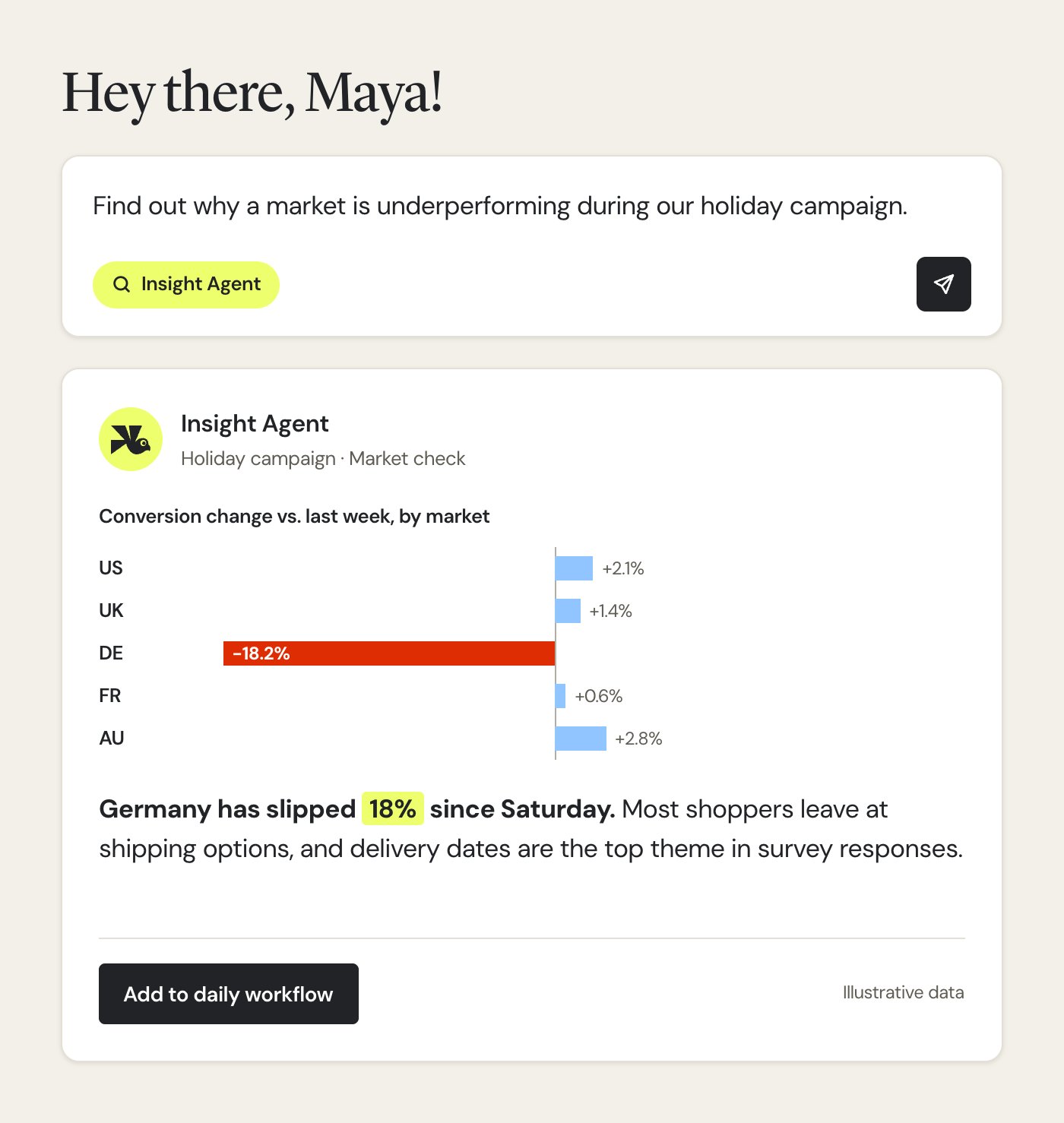
The agent breaks down the campaign’s results by region and week. For the market that’s falling behind, it reads the funnels, forms, and survey responses to find where shoppers drop off and what’s holding them back.
Your team gets a summary showing:
- Which market slipped, by how much, and since when
- The funnel step where shoppers leave
- What shoppers say about it in survey responses
Nobody has to stop what they are doing, and your team decides what that market needs.
You can also add the agent to a daily workflow, so the next market that slips gets flagged before anyone has to go looking for it.
2. When the obvious explanation for a drop is the wrong one
When mobile checkout conversion dips, there’s pressure to fix it fast, and the first explanation that fits often becomes the quick fix.
But knowing what’s actually wrong means isolating the mobile segment that’s struggling, then going through its session recordings and heatmaps to see where shoppers stop.
That’s a slow, manual review, in the weeks when the team has the least time for it.
Instead, your team can build three custom agents and run them in sequence whenever mobile numbers dip. Each agent has its own job, such as:
- Review campaign data to pin down the struggling segment.
- Analyze recordings and heatmaps in bulk, and flag rage clicks, dead clicks, and hesitation.
- Turn findings gathered from the other agents into suggested fixes.
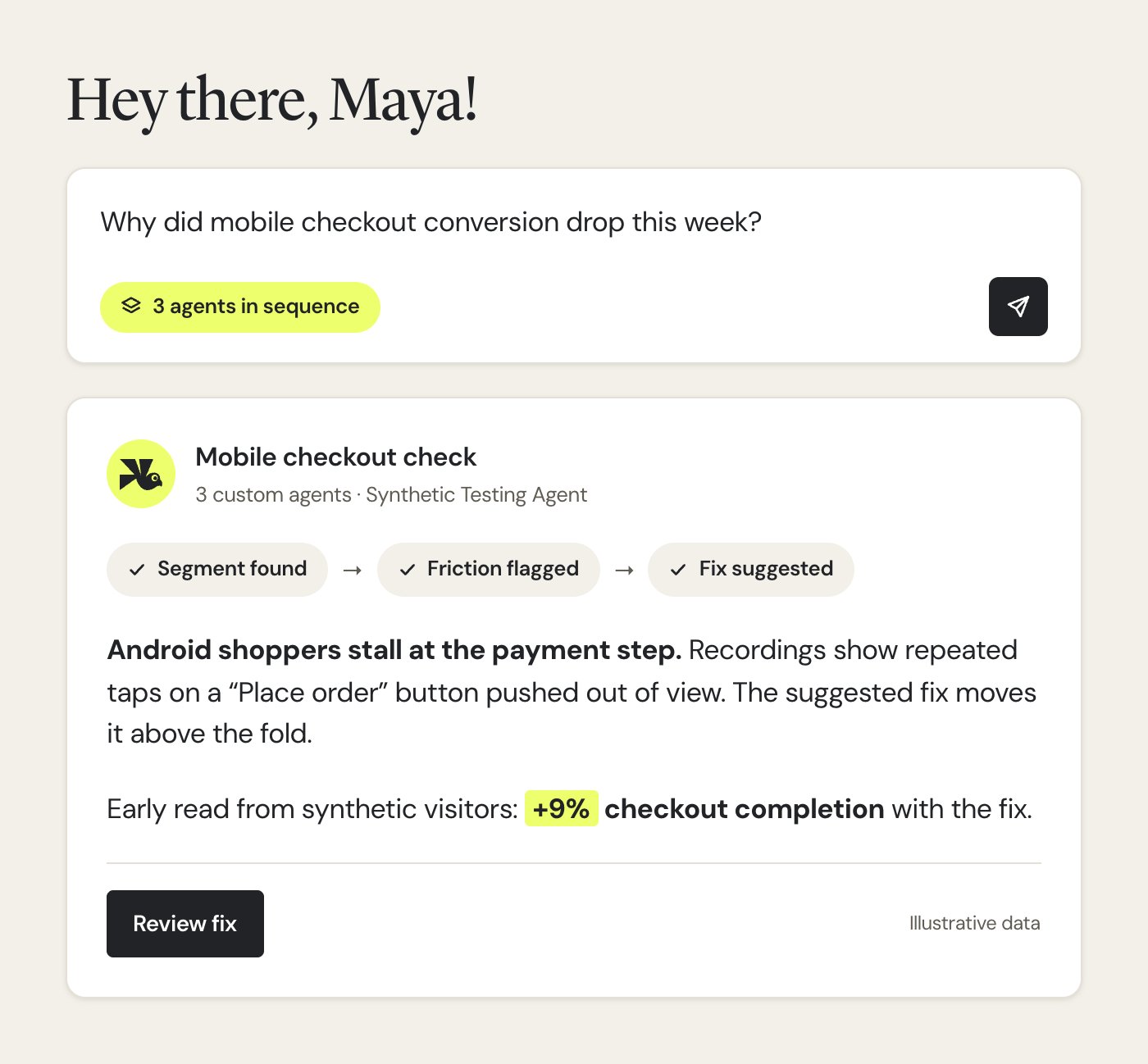
Before a fix reaches real shoppers, you can run the built-in Synthetic Testing Agent in Wingz to check it on synthetic visitors built from that same mobile segment. This gives your team an early read on whether the fix works.
So your team gets back the segment, the friction points, the recordings behind them, a suggested fix, and an early read on how that fix performs.
The hours of watching recordings and digging through campaigns are already done by the agents, and your team just has to decide whether the fix goes live.
3. When there are more test ideas than peak traffic to test them
The Black Friday season often leaves room for only a limited number of tests.
However, the list of test ideas is usually much longer, and weighing each involves reviewing page performance, learning from past tests, and analyzing shopper behavior on each page.
Your team can hand that work to Wingz’s built-in Hypothesis Agent with a prompt: “Rank the test ideas worth running on our product and checkout pages before the season ends.”
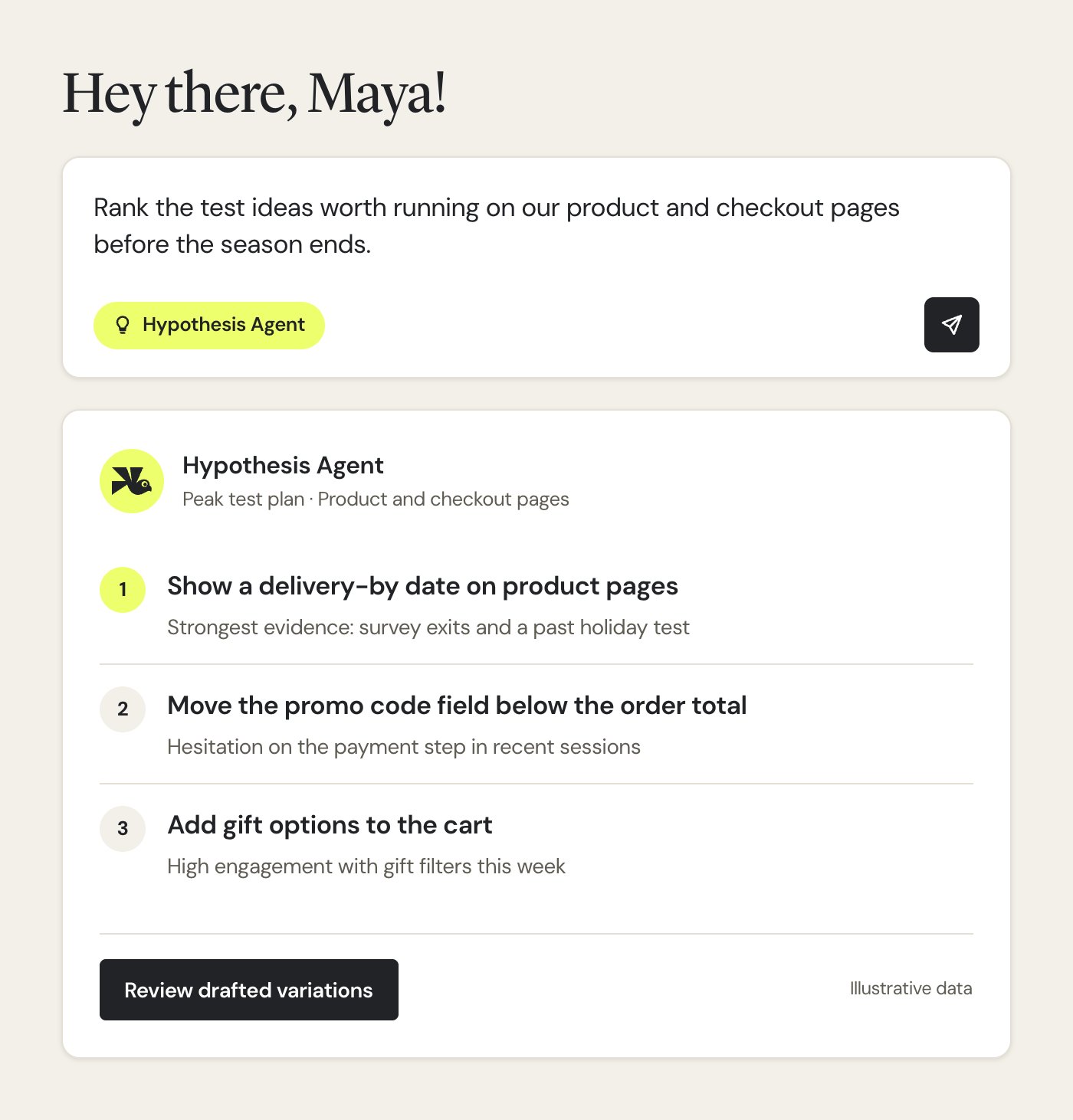
The agent analyzes the evidence from those pages and past tests, and turns the findings into a ranked list of testable ideas. It also explains the reasoning behind each idea and drafts the variations for the top picks.
The weighing and first drafts are done. Your team gets a ranked list with variations ready to review, and decides which tests to run, approving each draft before anything goes live.
3 agentic workflows worth setting up before the rush
AI agents work best when someone knows what to ask. Wingz Workflows go a step further, linking agents and running them on their own, so problems get flagged before anyone has to look for them.
Let’s look at some examples to understand how agentic workflows can tackle critical peak-season problems.
1. Automate QA on every campaign launch
During peak season, teams run multiple promos and tests in the same few days, often on the same pages. A wrong targeting rule, a missing goal, or two campaigns competing for the same shoppers can quietly impact the most valuable traffic of the year.
Catching these errors means checking each launch by hand.
Repeated across dozens of launches, that adds up to hours the team doesn’t have. To tackle this, your team can switch on Launch QA Check, one of the ready-made workflow templates in Wingz.
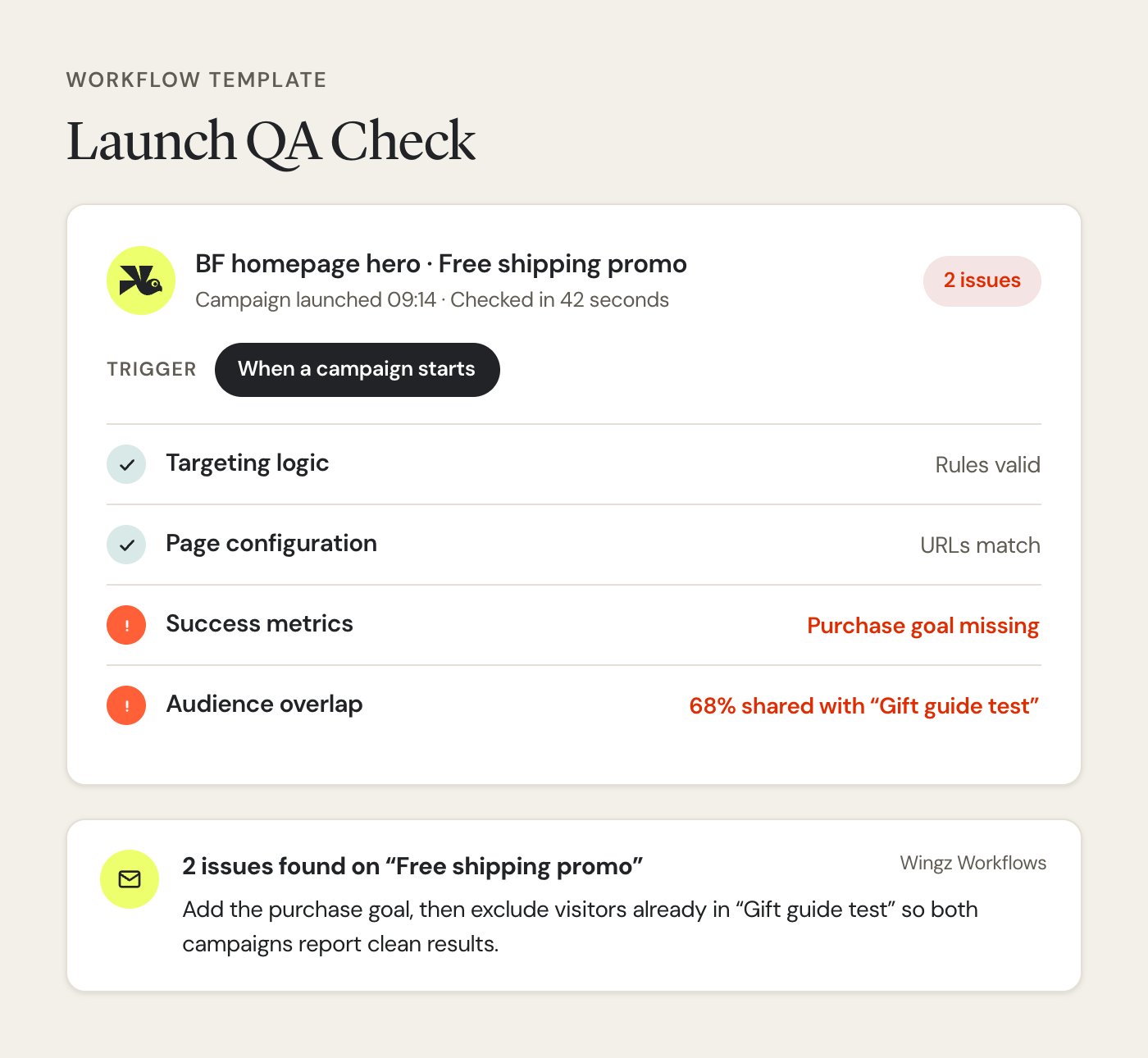
You can either implement it as it is or adjust it to fit how you run campaigns.
As soon as each campaign starts, the workflow checks its targeting logic, page configuration, success metrics, and audience overlap with your other campaigns.
It emails your team only if something’s wrong, so your team can continue launching without a manual QA pass on every campaign. When an email does arrive, it points to exactly what needs fixing, and your team decides how to handle it.
2. Get a daily brief on every new holiday feature
Holiday features like a gift finder or a delivery-date checker launch just for the season. If shoppers face friction while using these features, it can hurt your metrics during the peak season.
And with no history to analyze or baseline to reference, your team struggles to understand whether a feature is working as intended.
Finding out involves tasks like pulling the funnel data and feedback responses every morning and turning them into a summary for the product team.
Your team can instead hand that task to a custom Wingz workflow by describing it in plain language: “Every morning, run one agent on the gift finder’s funnel drop-off and another on its survey responses. Summarize both into one brief and email it to the product team.”
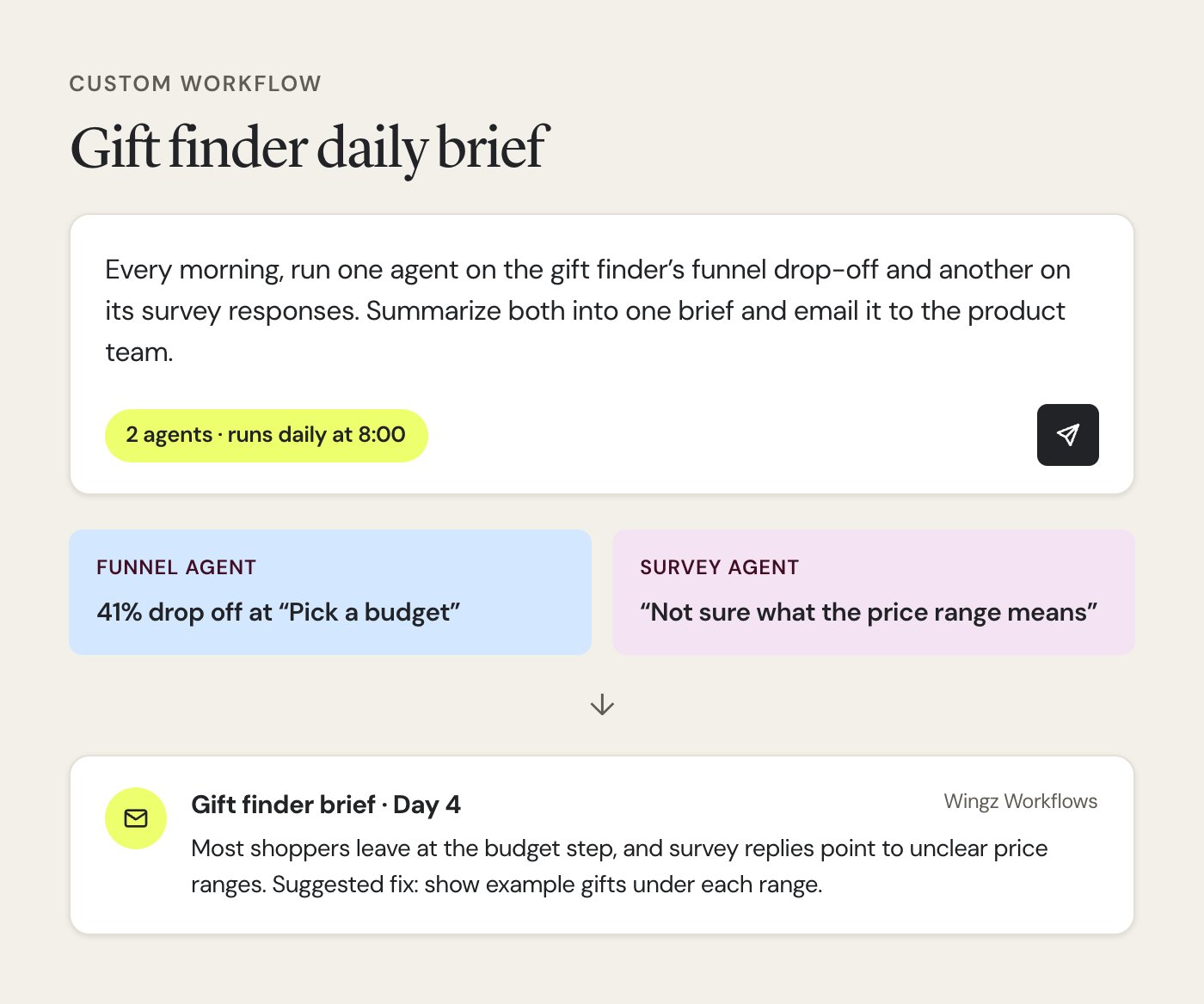
Each morning, one agent analyzes the funnel to find the step where most shoppers drop off, while another reads what shoppers say about the feature in a short on-page survey.
The workflow combines both into a single brief. The product team gets that brief every morning without anyone building it, and decides whether the feature needs a fix before the next wave of traffic.
The same setup also works for any page or feature your team launches for the season.
3. Turn every paused test into a report with evidence
Sometimes a test stalls for reasons not related to its idea, such as a bug in one step of the journey. However, if nobody checks it, the bug can still be live when Black Friday traffic arrives.
Identifying this bug involves reviewing each test: its results, its session recordings, and its heatmaps. At peak, that review rarely happens, and the test is simply paused and forgotten. Here, you can set up a custom workflow with a request:
“When a campaign pauses, analyze the results and visitor behavior. Combine the findings into a report with the evidence, and email it to me as a PDF.”
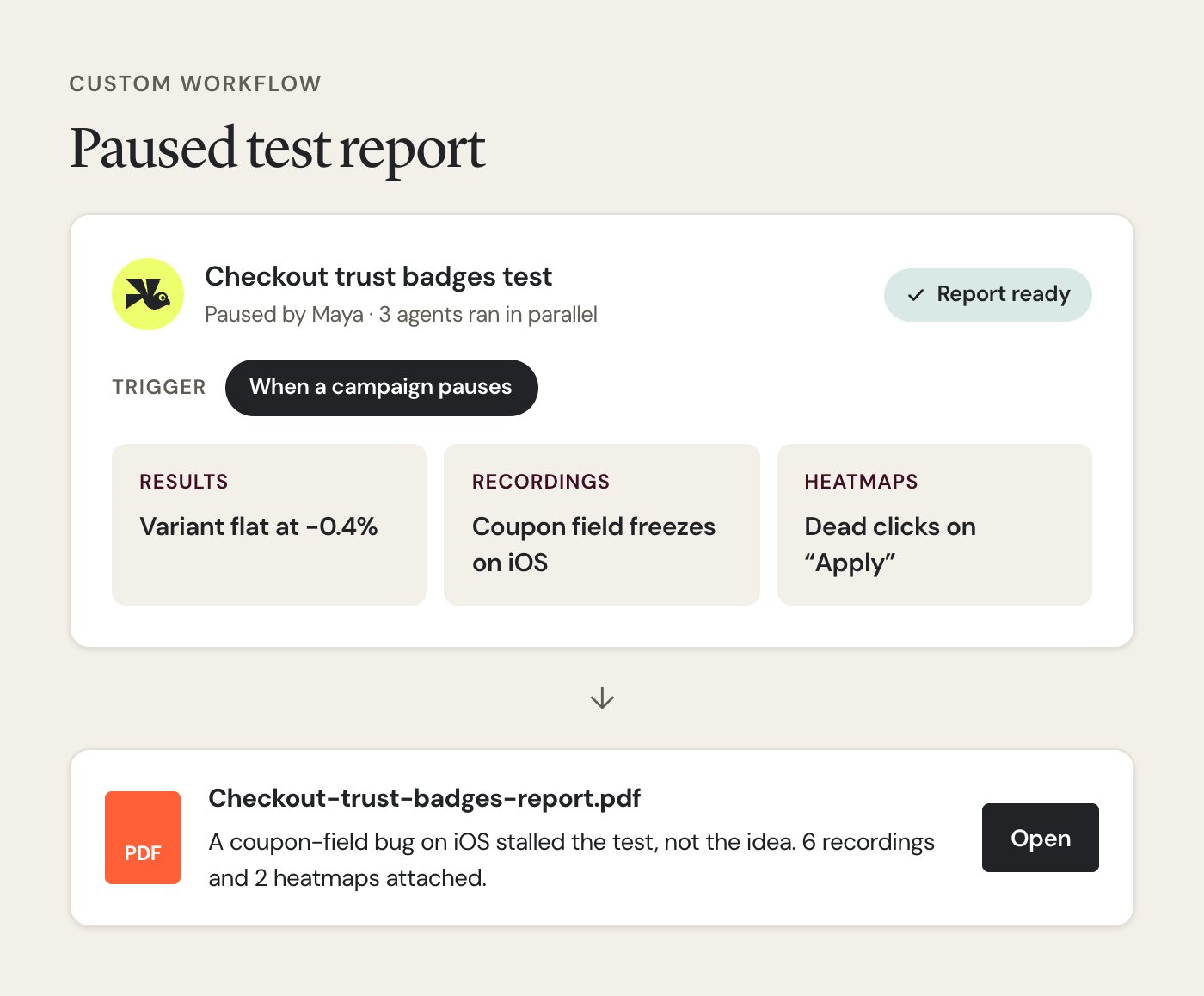
Whenever a test is paused, multiple agents work in parallel to perform these actions, and the findings are combined into a single PDF report, with the evidence attached. The report arrives without anyone setting time aside to review the test.
If the idea simply didn’t work, the report records what was learned. If something on the page was broken, your team can fix it before the rush.
Give your team its hours back with Wingz
Peak season always brings more to check than your team has hours for.
With agents handling the heavy analysis and workflows keeping watch in the background, issues surface while there’s still traffic to win back.
That helps protect revenue per visitor through the busiest days, make every peak test slot count, and keep each market on track. Also, your team gets to focus on strategy and the decisions that need its attention.
Get in touch now to see how you can use Wingz to work with agents, workflows, and the AI tools you already love.
Categories:

Hi, there! I’m a Manager, Content Marketing at Wingify with 7+ years of experience in B2B and B2C marketing. I work across blogs, SEO, thought leadership, newsletters, landing pages, and a video podcast I built and manage from scratch. At Wingify, I’ve gained expertise in CRO, experimentation, user behavior research, and personalization, creating content that makes complex ideas clear and actionable. Outside of work, I enjoy experimenting with memes and short-form video on Instagram.