Your developers finished the new checkout two weeks ago, but it still isn’t live. It sits on a feature branch, waiting on another team’s work, a release window, and a merge nobody wants to start. Your product manager can’t put it in front of real users yet, and if something breaks after launch, rolling back means another deploy.
A trunk based branching strategy is how many engineering and product teams get out of that queue. Everyone merges small changes into one shared branch every day, and unfinished features stay switched off behind feature flags until you’re ready to release them.
If you already release features behind flags, or you’re thinking about moving your team off long-lived branches, this guide walks through what changes. You’ll see how the workflow runs day to day, how it compares with GitFlow, where flags and CI/CD fit, how to get started, and when it isn’t the right move.
What is a trunk based branching strategy?
A trunk based branching strategy is a way of working in version control where everyone on the team merges small code changes into a single main branch, called the trunk, at least once a day. Any other branch is short-lived and exists only long enough to review one small change.
The trunk, usually main in Git, is kept ready to release at all times. That’s the part that changes your release process most. When the trunk is always shippable, the question becomes “when do we want customers to see this?”
You may also hear it called mainline development, an older name for the same practice from before Git.
Think of your codebase as a shared document the whole team edits. The trunk is the master copy, and a branch is a personal copy a developer takes so they can make changes without disturbing anyone else.
The real question for any team is how long those personal copies stay separate. In many teams it’s weeks. The longer a copy is kept apart, the harder it is to fold back in, because everyone else has kept editing the master in the meantime. A trunk based branching strategy keeps that gap to hours.
Core principles of a trunk based branching strategy
Five principles hold the model together. Each one solves a problem teams run into when they try to ship more often.
One shared trunk. Every change ends up on the same main branch, so there’s one version of the truth instead of several branches to reconcile before a release.
Short-lived branches. If a branch exists, it lasts hours or a day, not weeks. DORA suggests keeping three or fewer active branches at any time.
Daily integration. Everyone merges at least once a day, so nobody’s work drifts far enough from everyone else’s to cause painful merge conflicts.
Feature flags for unfinished work. Incomplete features go live switched off. Developers keep merging, and the team decides separately when customers see the feature.
Automated tests on every change. Tests run automatically whenever code is merged. If something breaks, the team fixes or undoes it right away.
Branch types used in a trunk based branching strategy
You only need three kinds of branches, and two of them are optional. That’s a big reason teams find the model easier to run than GitFlow.
Branch
Purpose
Typical lifespan
Who creates it
Trunk (main)
Single source of truth. All work is integrated here and production builds come from it.
Permanent
Exists from day one
Short-lived feature branch
Holds one small change while it goes through pull request review and CI.
A few hours to one day
Any developer
Release branch (optional)
Snapshot of trunk for teams that support a scheduled release or patch older versions. Fixes land on trunk first, then get cherry-picked.
Until that version is retired
Release owner, cut from trunk
There’s no separate develop branch, no long-lived feature branches, and no hotfix branch. An urgent fix is just another small change merged to trunk. If your team ships several times a day, you may not need release branches at all.
How a trunk based branching strategy works
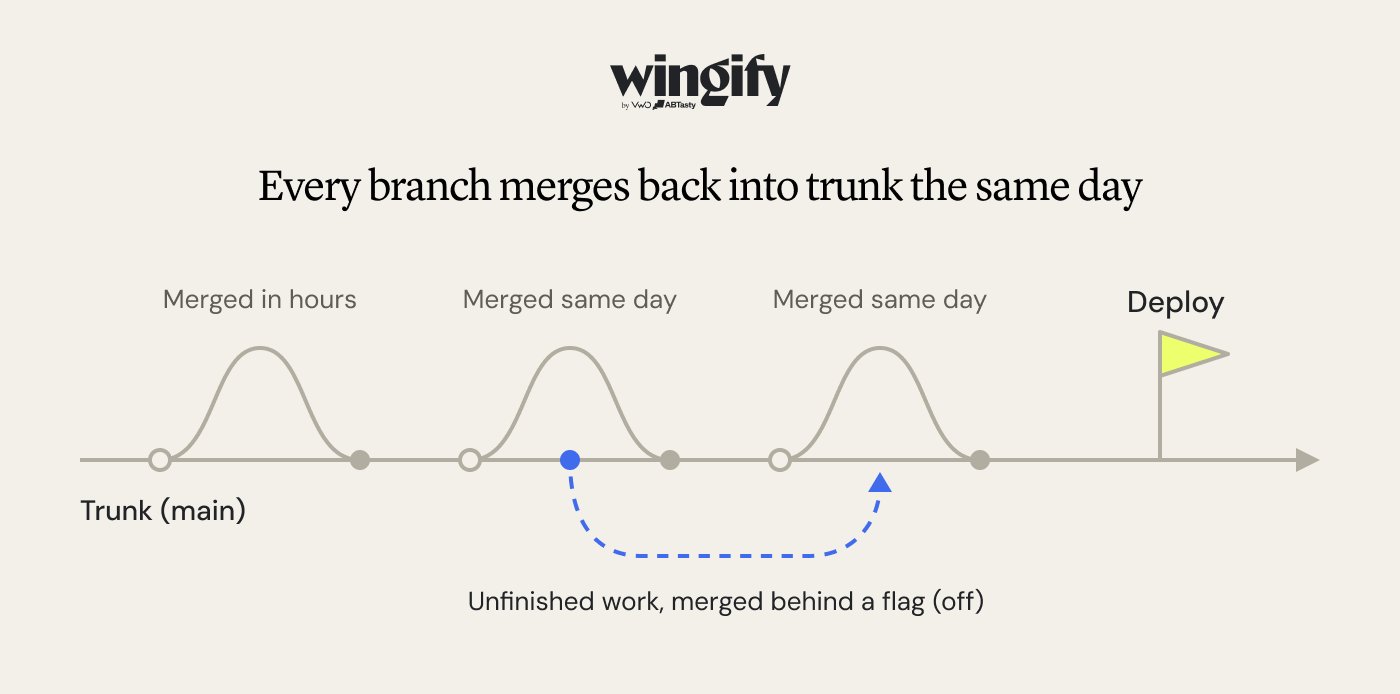
Each branch splits from trunk and merges back the same day. The dashed branch merges unfinished work that stays hidden behind a flag.
Here’s what a typical change looks like for a developer on your team, usually from first commit to production within a day.
Start from the latest trunk. The developer pulls in everyone’s merged work before starting, so they build on what’s already there.
Create a small branch. It covers one task they can finish today. Bigger work gets split up or placed behind a feature flag.
Make small, working commits. Each change builds and passes tests by itself, which keeps reviews quick.
Open a pull request early. A teammate reviews the change while it’s still fresh, ideally within the hour.
Let automated checks run. The build and tests run automatically, and the merge is blocked if anything fails.
Merge and clean up. The change joins the trunk and the branch is deleted. Everyone else picks it up on their next update.
Deploy, then release when ready. The new code goes to production. If it’s behind a flag, customers don’t see it until someone turns it on.
How feature flags support a trunk based branching strategy
Feature flags let your team merge unfinished work into the trunk without customers seeing it. The code ships to production switched off, and you turn it on when the feature is ready.
This is what makes daily merging practical for features that take weeks to build. Developers merge the first piece of a new checkout on Monday, and customers see nothing until the whole flow is ready and the product owner decides to release it.
For teams on trunk, flags do four jobs.
Hide unfinished work. Feature flags can keep incomplete features disabled in production while developers continue integrating small changes. The code must still be safe to deploy with the flag off.
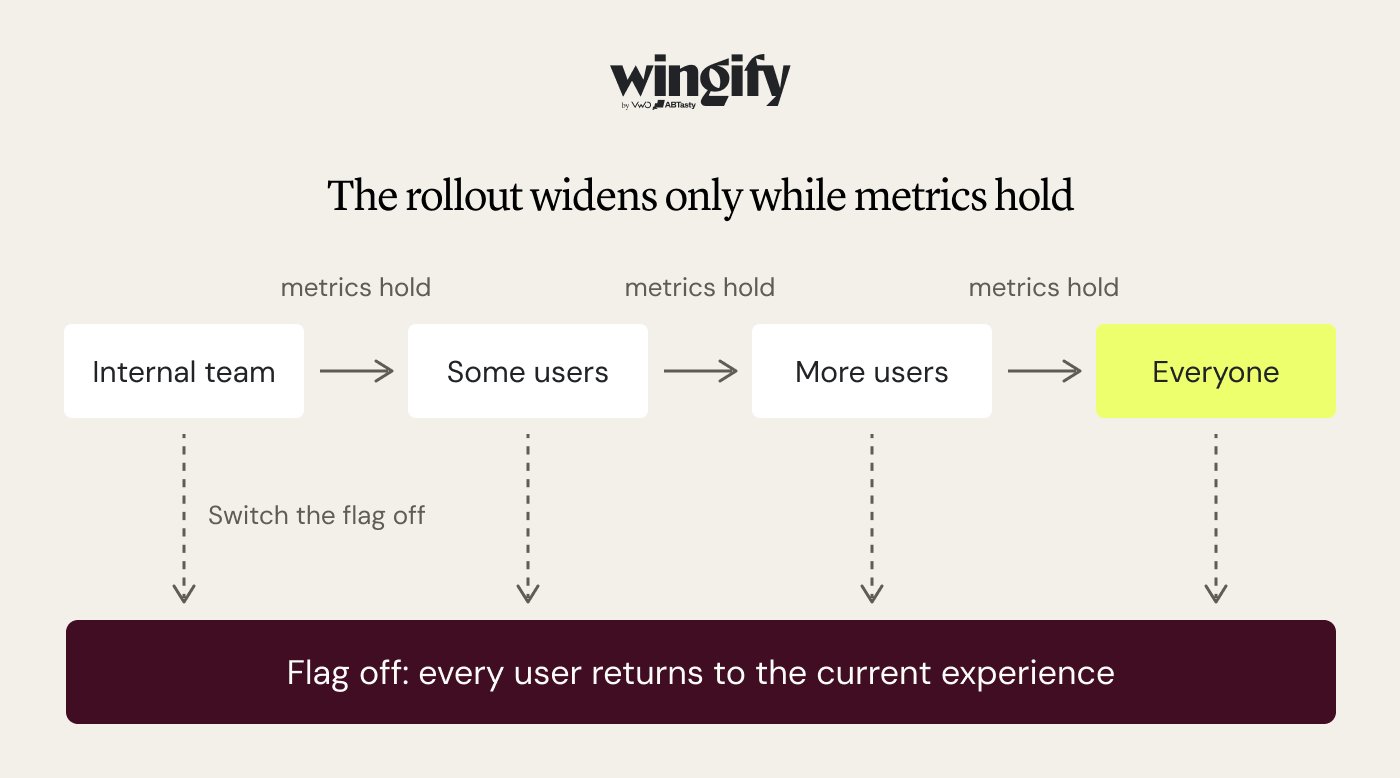
Release in stages. Start with your internal team, then a small share of users, and widen as long as errors and key metrics look healthy.
Undo a release in seconds. If something goes wrong, switch the flag off. No emergency fix, no redeploy.
Measure impact before a full launch. Show two versions to different users and see which performs better before rolling one out to everyone.
The rollout widens only while metrics hold. The team can switch the flag off to disable the feature and return users to the configured fallback experience, provided the code supports that behavior.
Any product which is being offered on desktop, mobile, and multiple platforms, TV, smart TVs, etc., feature flags are essentially fundamental. If I have browsed something on mobile and then I open desktop immediately, it should reflect in exactly the same way.Feature flags are the way to build custom segments and then release certain features to targeted audiences. So that is a tool which marketers, product managers, they are doing it extensively.
Mahek Mahendra Shah, Director of Product Management at Wingify (Source: Wingify Podcast)
Trunk based branching strategy and CI/CD
Trunk-based development supports effective CI/CD by encouraging frequent integration of small changes into a shared branch. If developers spend a week on separate branches, your automated checks are testing code nobody else has merged yet.
Continuous delivery builds on that by keeping the trunk ready to deploy at any moment. A typical path from a merged change to your customers looks like this.
Commit. A developer pushes a small change on a short-lived branch.
Checks before merge. Automated tests run on each change, usually in minutes.
Merge to trunk. Only changes that pass checks and review get in.
Build and test again. The combined code is tested more thoroughly in a staging environment.
Deploy. The new version goes to production, automatically or with one approval.
Release. Feature flags decide which customers actually see the new feature, on your schedule rather than the deploy’s.
One team rule keeps it working. If the trunk breaks, fixing it comes before any new work, and a change that can’t be fixed in a few minutes gets undone.
Benefits of a trunk based branching strategy
For your team, the benefits show up in day-to-day work and in how releases feel.
Fewer merge headaches. Developers are never more than a day apart, so conflicts stay small and easy to fix.
Faster, more useful reviews. Reviewers can properly check a small change in minutes instead of skimming a huge one.
Ship when it’s ready. Because the trunk is always releasable, features don’t wait for the next release window.
No code freezes. There’s no stabilization week before a launch, since the code is combined and tested continuously.
Problems surface sooner. Bugs show up within hours of the change that caused them, while the developer still remembers the code.
Lower-risk launches. With flags, product and engineering can release to a small group first and switch off instantly if something goes wrong.
Easier onboarding. New engineers learn one branch and one set of rules, not a diagram of five branch types.
Challenges and limitations of a trunk based branching strategy
The model moves risk from one big merge day to every single change. Each challenge below has a known fix, but the fix takes deliberate effort.
A broken trunk blocks everyone. One bad change can stop the whole team from shipping. Require automated checks before merging, and agree to undo first and investigate second.
You need tests you can trust. Without them, daily merges send bugs to customers faster. Cover your most important user flows before switching.
Big features are hard to split. Developers used to building a feature end to end need to learn to ship it in pieces. Feature flags make that safe.
Flags pile up. Every temporary flag left behind after launch is code nobody needs. Make removing the flag part of finishing the feature.
Slow reviews stall everything. If changes wait a day for approval, branches stop being short-lived. Make reviewing a teammate’s work a priority.
People need time to adjust. Merging unfinished work feels risky at first. Start with one team, then share how their releases changed.
When not to use a trunk based branching strategy
Skip it, or adopt it only partly, in these situations:
You support several released versions at once. Desktop software, SDKs, or on-premise products that maintain multiple versions in parallel may benefit from dedicated release branches alongside trunk-based development.
Your automated test coverage is low. Strengthen your tests for critical user flows before adopting the strategy more broadly. Without reliable checks, frequent integration can increase the risk of regressions.
You accept contributions from untrusted forks. Open-source projects may need separate review and validation workflows for external contributions, while the internal team continues to use trunk-based development.
Regulation requires a formal release gate. Some audited environments mandate a separate approval stage between code and release. Release branches can satisfy this while the rest of the team stays on trunk.
Builds take hours. If CI cannot give feedback within minutes, developers will batch changes to avoid waiting, which defeats the model. Improving pipeline speed and introducing faster, targeted checks can help make trunk-based development more practical.
How to implement a trunk based branching strategy in Git
Most teams can transition to trunk-based development gradually. Start by putting the right safeguards in place, then establish a routine for making and integrating small changes.
Protect the trunk. In GitHub, GitLab, or Bitbucket, configure branch protection rules to require automated checks and code review before changes can merge into main.
Run automated checks on every change. Configure your CI pipeline to test pull requests and changes merged into the trunk. This helps catch regressions early and keeps the shared branch stable.
Start each task from the latest trunk. Create a short-lived branch for a small, well-defined change.
git switch main
git pull
git switch -c add-shipping-estimate
Commit and share work early. Make small, working changes, commit them, and push the branch for review rather than waiting until the entire feature is complete.
Review, test, merge, and clean up. Once the review is approved and automated checks pass, merge the pull request into main. Then delete the feature branch through your Git host, or delete the local branch with:
git switch main
git pull
git branch -d add-shipping-estimate
Put unfinished features behind flags. If a feature needs more development, merge its incomplete but safe-to-integrate code behind a feature flag that is off by default. This lets developers continue integrating changes without exposing the unfinished feature to customers. Product and engineering teams can also coordinate which features are enabled and for whom.
Use release branches only when needed. If you support scheduled releases or multiple maintained versions, create release branches where necessary. Fix bugs on the trunk first, then backport the fixes to the relevant release branches.
Start with one team. Pilot the workflow with a single team, review how it affects integration time and release stability, and use those findings to guide a wider rollout.
Trunk based branching strategy best practices
The principles describe the model. These habits are what keep it working as your team grows.
Keep changes small
Review each other’s work quickly
Keep automated checks fast
Break large rewrites into safe steps
Name flags clearly and clean them up
Track how healthy your trunk is
1. Keep changes small
Aim for pull requests a reviewer can read in one sitting, a few hundred lines at most. Larger changes get skimmed, and that’s when problems slip through.
2. Review each other’s work quickly
When a teammate asks for a review, do it within the hour rather than tomorrow. DORA lists slow reviews as one of the most common reasons teams struggle with trunk based development, because branches left waiting turn into long-lived ones.
3. Keep automated checks fast
Developers will happily merge several times a day if checks finish in minutes. If they take an hour, people start bundling changes together to avoid the wait.
4. Break large rewrites into safe steps
When you’re replacing a big part of the system, build the new version alongside the old one in small merges. Switch over once it’s complete, then remove the old code. A feature flag can control the switch.
5. Name flags clearly and clean them up
Give every temporary flag a name that says what it releases and when it should go, then remove it once the feature is fully live. A name like release-new-checkout-2026q4 makes that obvious at a glance, and prompt cleanup keeps dead code paths out of every future change.
Pro Tip!
Make flag removal part of your definition of done. On trunk, every unfinished feature adds a flag, so they pile up fast. The tech debt module in Wingify Feature Management lists stale or unused flags along with the file name and line number where each one still sits, so cleanup lands in the same ticket instead of a backlog nobody owns.
6. Track how healthy your trunk is
Keep an eye on how many branches are open, how old they are, and how long a broken build stays broken. Put these numbers where the whole team can see them, so drift gets noticed in days, not at the next painful release.
Is a trunk based branching strategy right for your team?
It’s the right default for most teams shipping a web or mobile product continuously, as long as you have automated tests you can rely on. Find the row closest to your team.
Your situation
Team size
Release cadence
Test maturity
Recommendation
Startup or small product team
2 to 10
Daily or on demand
Basic but growing
Trunk based, with direct commits or very short branches
Growing SaaS or eCommerce engineering org
10 to 100
Several times a week or more
Solid CI on critical paths
Trunk based with short-lived branches, pull requests, and feature flags
Large org with many teams on one product
100+
Continuous
Mature, fast pipelines
Trunk based with flags, release branches only where needed
Mobile app with store review cycles
Any
Weekly or biweekly store releases
Solid
Trunk based, with a release branch cut per store build
Versioned software with several supported versions
Any
Scheduled versions
Any
GitFlow-style release lines, trunk for new work
Team with little or no automated testing
Any
Any
Low
Build tests first, then move to trunk gradually
Open-source project with outside contributors
Any
Any
Any
Fork-and-pull-request workflow
If you land in one of the first four rows but still run long-lived branches, the gap is usually tooling and habit rather than fit. Start with branch protection, a fast CI run, and feature flags, then shorten branch life one team at a time.
Merge every day, release on your terms
Trunk-based development makes code integration more continuous. But merging code frequently is only part of the release process. Teams still need to decide who sees a feature, monitor its impact, and respond when something goes wrong.
Release in steps. Roll out to internal users, then a share of customers, and let the rollout widen or reverse automatically as key metrics move.
Target the right people. Reach users by device, app version, browser, location, or custom attributes you import.
Give product teams the controls. Change copy, UI, eligibility rules, and thresholds without waiting on engineering.
Test as you release. The same flag can split traffic between versions, while session recordings, heatmaps, and funnel analysis show why one wins.
Fit engineering workflows. Flags evaluate locally in under a millisecond, work through REST APIs, IDE integrations, and an MCP server, and sit behind access control and approval workflows.
You already do the hard part by merging small and often. Get in touch with us and we will show you how Wingify makes releasing just as routine.
FAQs
Is mainline development the same as a trunk based branching strategy?
Yes, mainline development is an older name for the same practice, where everyone commits to one main line of code. The term was common with centralized systems like Subversion, while “trunk based development” became the standard name in the Git and CI/CD era.
What is the difference between a trunk and a branch?
The trunk is the single main line of code that every change eventually joins and that production builds come from. A branch is a copy of the code that splits off from the trunk so changes can be made in isolation before they are merged back.
What is meant by a branching strategy?
A branching strategy is the set of rules a team follows for creating, naming, merging, and deleting branches in version control. It decides how long work stays isolated, how releases are prepared, and how hotfixes reach production. GitFlow, GitHub Flow, and trunk based development are the three most common.
What is the difference between feature branching and branching?
Branching is the general Git capability to split off a copy of the code. Feature branching is one specific strategy that uses it, where each feature gets its own branch that stays open until the feature is complete, often for days or weeks.
What are the differences between trunk based and feature based development?
Trunk based development merges small changes into the main branch at least daily and hides unfinished features with flags. Feature based development keeps each feature on its own branch until it’s done, then merges it all at once. Trunk based development needs strong test automation, but it gives you fewer conflicts and faster delivery. Feature based development keeps the trunk free of partial work, but each merge is larger and riskier.
Which branching strategy is best?
For teams shipping a web or mobile product continuously with good test coverage, trunk based development is usually the best fit. GitFlow suits products that maintain several released versions at once, and fork-based workflows suit open-source projects. The decision table above maps common situations to a recommendation.
When not to use trunk based development?
Avoid trunk-based development, or adopt it partially, if you maintain several released versions in parallel, have limited automated test coverage, accept code from untrusted forks, or have builds that take hours. It also works best when supported by strong observability and feature management practices. Integrating observability tools such as Datadog with Wingify Feature Management lets teams monitor application health and automatically disable a feature flag when a metric crosses a predefined threshold. For example, if a newly released feature causes error rates to exceed an acceptable limit, Datadog can trigger Wingify to turn off the corresponding feature flag without requiring a rollback or redeployment. This creates an additional safety net for trunk-based development, allowing teams to merge code frequently, release features incrementally, and respond to production issues quickly.
Hi, I’m Pratyusha Guha, manager - content marketing at Wingify. For the past 7 years, I’ve written B2B content for various brands, but my journey into the world of experimentation began with writing about eCommerce optimization. Since then, I’ve dived deep into A/B testing and conversion rate optimization, translating complex concepts into content that’s clear, actionable, and human. At VWO, I now write extensively about building a culture of experimentation, using data to drive UX decisions, and optimizing digital experiences across industries like SaaS, travel, and e-learning.