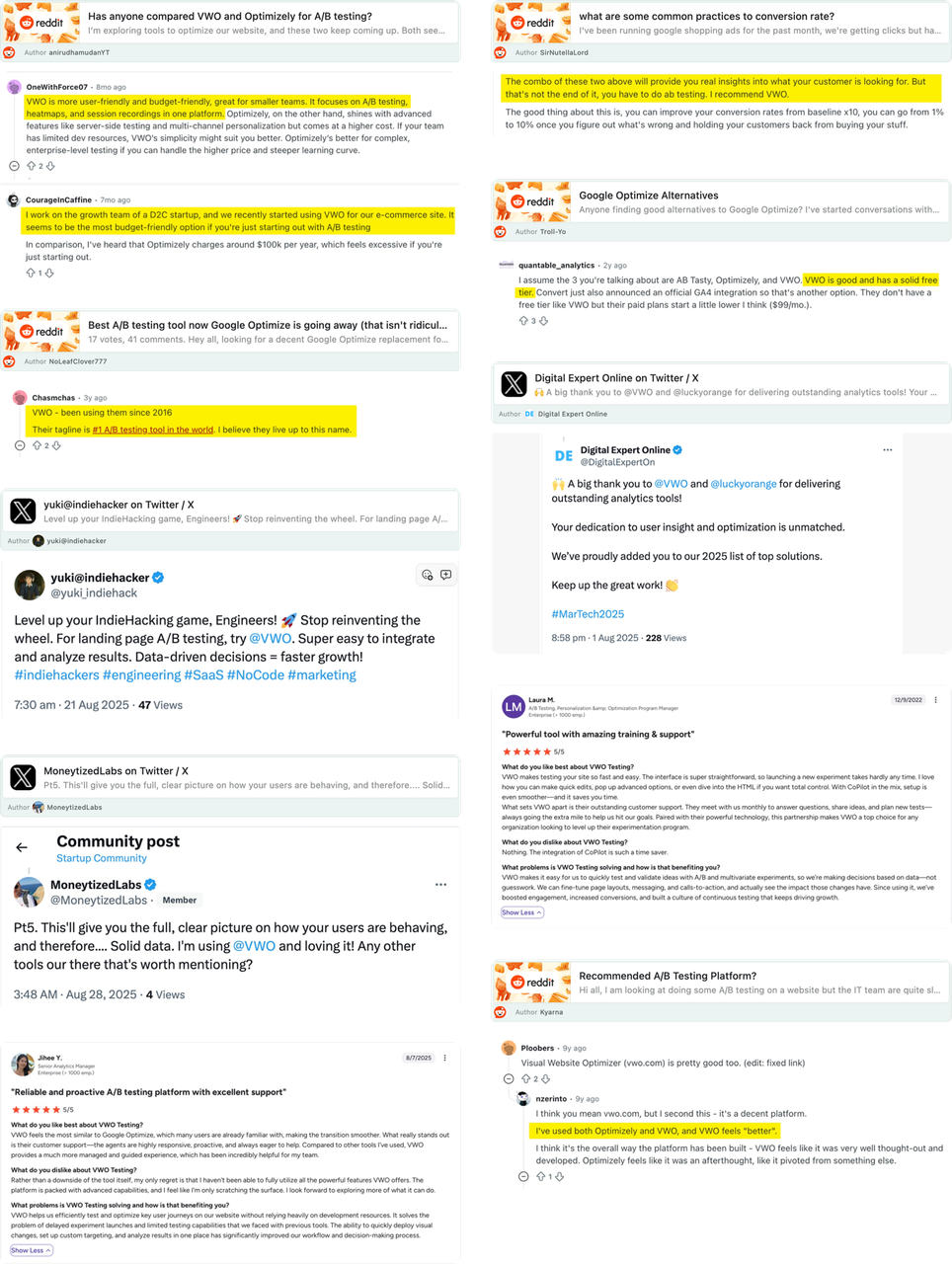
25,000+ marketers and product teams trust Wingify to drive their conversion rate optimization.
Why Wingify:
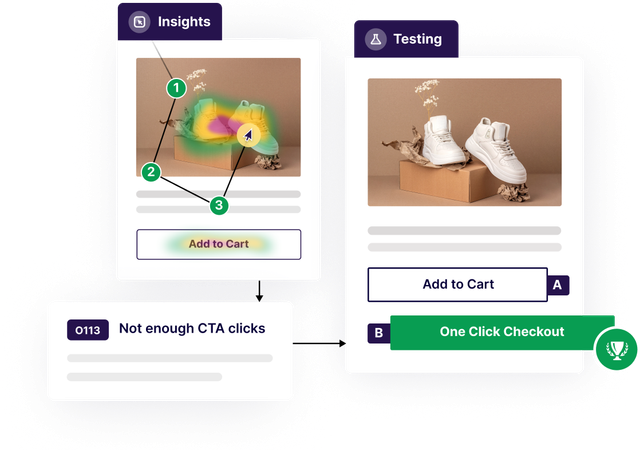
A/B Testing, Heatmaps, Session Recordings, Surveys & Personalization in a single suite.
Scale your experimentation program without the surprising enterprise costs.
Our AI Copilot generates ideas, launches tests, and provides actionable recommendations.
Get expert help with a 45-min average response time and a dedicated account manager.
I'm finding an executive for you
, thank you for sharing your details.
Your dedicated Wingify representative will be in touch shortly to set up a time.
Thank you , your meeting is confirmed.
at
Submitted.
+300%
Increase in Trial activation
Trusted by 4000+ leading brands globally
Why choose Wingify over Optimizely?
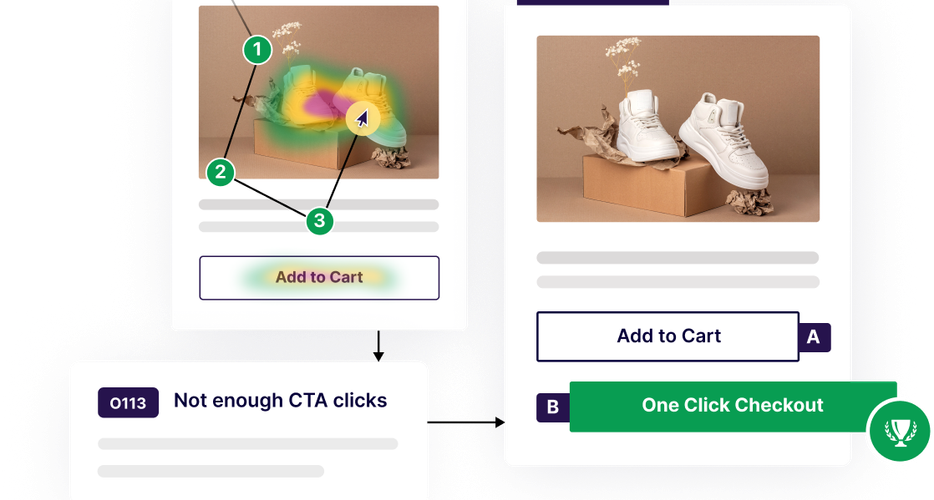
Unify your stack: Testing, heatmaps & session recordings - All in one CRO platform
Run connected experiments and capture user behavior seamlessly across your app and web, eliminating the need for and cost of disparate tools like Hotjar or Fullstory.
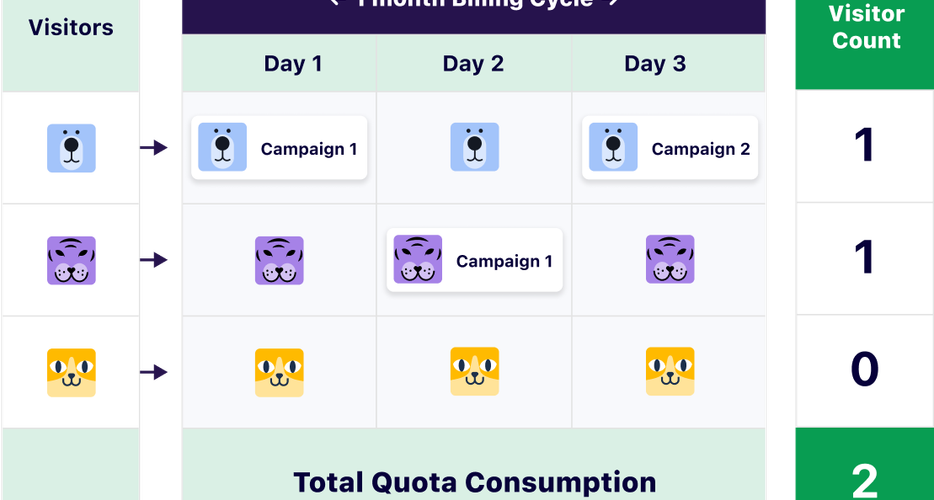
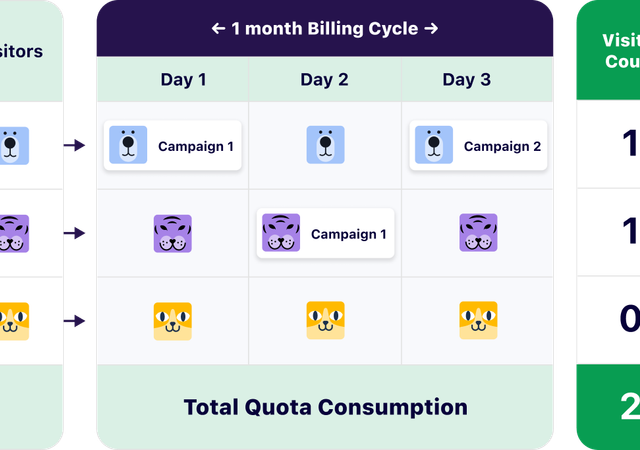
Stop getting punished for growth: Pay per unique visitor
Get unlimited tests on every plan. You're only charged once for a user across all tests, so you're never punished for your own growth.
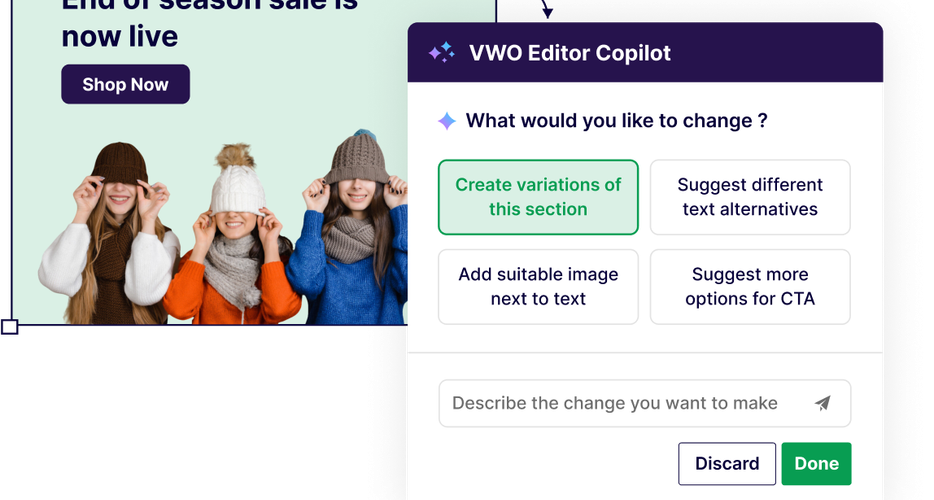
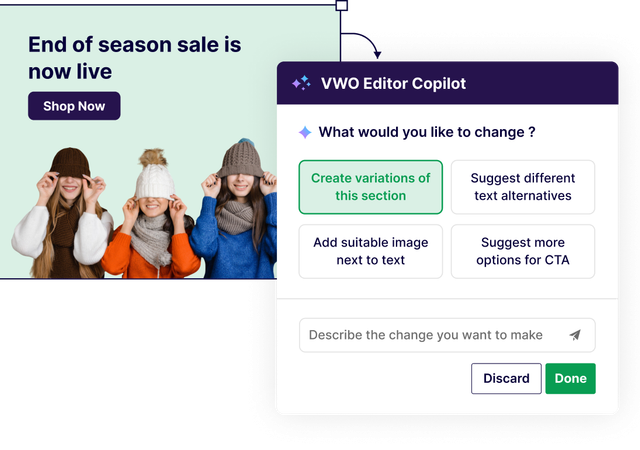
Generate ideas, launch tests, and analyze results with AI Copilot
Use our AI Copilot and Visual Editor to build and analyze sophisticated tests without code, streamlining your entire experimentation workflow from start to finish.
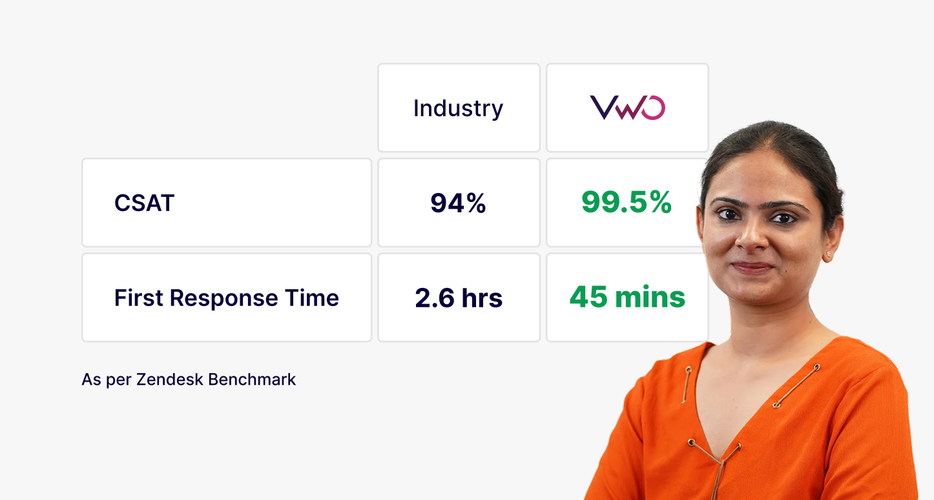
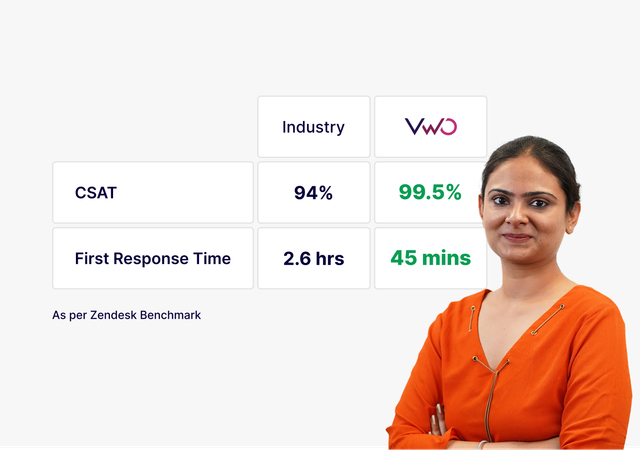
Get a dedicated human expert with a 45-minute avg. response time
From guided onboarding to ongoing optimization, our support team and dedicated account managers provide 24/7 support to ensure your success.
A detailed comparison to understand the essential features required for optimization
Choose the right platform by exploring the features, functionalities, and performance of each platform based on your optimization needs.
Platform &
Account Management
Account Members
Add multiple people to the same account but with varying levels of access.
Sub Accounts
Create sub-accounts for different teams or digital assets. Very handy for large enterprises, and especially agencies!
Internal IP Exclusion
Users who access your website from these IP addresses will not be tracked in VWO.
Pages
Classify your web pages into different categories to quickly create, manage and scale experiments specific to them.
Integrations
Seamlessly integrate with third-party tools.
API Access (rate limit of 60K/month)
Start and pause campaigns programmatically or pull test metrics into other dashboards.
Security & Compliance
Data Storage
All VWO data is stored in one of the two data centers, as configured for the accounts
USA, EU, India
2-Factor Authentication (2FA)
2FA provides an extra layer that protects your data from cybercrime & fraud. VWO offers both account and individual level 2FA.
Activity Monitoring
Review the usage history, including all activities performed by different account members within the account.
GDPR HIPAA, CCPA, ISO 27001:2013, ISO 27701:2019, PCI DSS Compliant
VWO regularly undergoes independent verification of its security, privacy, and compliance controls to meet the customers' needs.
Account Alerts
Set email alerts for account administrators to receive notifications for your VWO account related activities.
Login Restriction
Restrict login into your VWO app to specific city/ region/ country/ IP address.
Single Sign On
Enable single sign-on using any SAML 2.0 identity provider to authenticate members from your organization.
Support
Support Availability
The availability of our support team to respond and resolve your queries irrespective of the timezone.
24 X 7 - Enterprise Plan
First Response Time (working days only)
The time it takes for our support team members to become available in your timezone for query resolution.
4 hrs
Knowledge Base
Search and browse our online knowledge base for answers and documentation.
Email Support
Reach out to support via registered email to give feedback or raise an issue.
Chat Support
Reach out to support via in-app chat to give feedback or raise an issue.
Phone Support
Get on a call with a VWO support member to resolve your queries.
Customer Success
Self Paced Training Videos
Watch our recorded training videos for every feature as per your schedule.
Dedicated Account Manager
A dedicated manager assigned to your account helps you every step of the way toward success.
1-on-1 Onboarding & Training
Avail our end-to-end training programs to leverage your website for better conversions using industry best practices.
Campaign Types
AB Testing
Build and compare variations of your website to analytically determine the better performing version.
Split URL Testing
Compare various versions of your website hosted on multiple URLs by distributing website traffic among them to determine the highest-performing variation.
Multivariate (MVT) Testing
Simultaneously modify multiple variables to test a hypothesis and determine the best-performing combination of variations.
Campaign Editor
No. of Concurrent Campaigns
Total number of tests you can run on your account concurrently.
Unlimited
No. of Variations
Total number of variations you can create for a test.
Unlimited
Visual Editor
Utilize the powerful WYSIWYG point-and-click visual editor to create and edit variations with ease, eliminating the dependency on IT.
Code Editor
Make advanced modifications to any aspect of your website using HTML, JavaScript, CSS, and jQuery.
AI-Based Text Recommendations
Generate alternate text recommendations for the existing copy on your website.
Add/ Edit Elements
Add new or edit UI elements to your webpage.
Preview Variation(s)
Conduct a quality review of the variations by previewing them to verify that all modifications have been applied to the website before going live.
Multi-Page Campaigns
Easily apply the same experience to multiple pages with a single click, eliminating the need for manual duplication of changes across pages.
Selective-Page Campaigns
Apply changes only on the page you edited, even if the campaign includes multiple pages.
Multi-Device Campaigns
Tailor modifications to specific devices or apply them consistently across all devices.
Add Campaign JS
Run a custom code for the entire campaign regardless of which variation the users sees.
Personalized Text
Personalize the text on your webpage with customer-specific behavioral or demographic data.
Campaign Editor Library
Elements Library
Library of customizable pre-designed UI elements like list item, content block, buttons, etc.
Save Modifications to Library
Save and reuse modifications made to web elements to easily apply the same changes to similar elements without having to recreate them.
Save Elements to Library
Use the click-and-save feature to store UI elements, such as text blocks, buttons, banners, and pop-ups, in the library for future reuse.
Widgets Library
Create customizable banners, pop-ups, and other web page elements with images and forms, directly within the VWO Visual Editor, without coding.
Widget Triggers
Control when a widget appears, how often it appears, or does not appear when dismissed.
Campaign Settings
Goals/ Metrics
Configure and track goals in your VWO account.
Y - Unlimited
Traffic Allocation
Allocate the traffic on which you want to run the campaign and distribute the allocated traffic among the various variations created for the test.
Campaign Alerts
Set email alerts for account administrators to receive notifications for your VWO campaign related activities.
Multi-Browser QA
Preview your tests across multiple browsers and validate them before launching the test.
Cross Domain Testing
Run tests on multiple domains within user journey, where user tracking and goals can be on one or more domains.
Campaign Scheduling
Schedule tests at specific time/date or create recurring schedule to run tests.
Multi Arm Bandit
Expose the better performing variation to more users long before the test reaches statistical significance thus reducing the opportunity cost.
Mutually Exclusive Groups
Ensure that a user doesn't participate in two or more running tests to eliminate result noise, bias, and test inter-play.
Upto 10 user groups*
Self Hosting
Host VWO library and campaign setting files on your servers, easing your dependency on VWO servers.
Campaign Version History
View the changes that you’ve made to your campaign over its lifetime.
Campaign Targeting
URL Targeting
Target users based on the URLs they arrive from/land on
Basic Device Targeting
Target users based on the device they use. Basic options like mobile, desktop, tablet available.
Traffic Source Targeting
Target users based on the traffic source (e.g., direct, non-paid, email) that directed them to the test page.
User Type Targeting
Target returning users, accessing your website from the same browser subsequently, and new users, accessing your website for the first time.
Basic Operating System Targeting
Target users based on their desktop OS. Basic options like macOS, Windows and Linux available.
Advanced Device Targeting
Target users based on the device they use. Advanced options like mobile, desktop, tablet, ipad, ipod, iphone, android, google tv etc. available.
Advanced Operating System Targeting
Target users based on their desktop OS. Advanced options like macOS, Windows, Linux, Unix, Windows 8 etc. available.
Browser Targeting
Target users based on their browser.
Screen Resolution Targeting
Target users based on their screen resolution.
User Agent Values Targeting
Target users based on user-agent values.
Geo Targeting
Target users from specific geographies or personalize website content for users from specific locations.
Cookie Based Targeting
Target users based on cookie values. It can be customized based on varying business needs.
Javascript Variable Targeting
Target user groups based on custom events that occur on your website using Javascript variables.
User Intent Targeting
Target users based on their intent of visiting your website using referral URLs.
Query Parameter Targeting
Target users based on their query parameters.
UTM Parameter Targeting
Target users based on UTM parameters such as UTM source, medium, campaign etc.
Time Based Targeting
Target users on your test page based on their arrival time and day of the week.
Saved User Segments
Access previously created user segments for efficient reuse in tests without the need for repeated creation.
Conditional Targeting
Create advanced user segments by combining multiple targeting conditions using AND and OR.
Advanced Targeting Logic
Use brackets to create logic of targeting with multiple conditions. For example - [Users in USA OR Users in India] AND [New Users OR iOS Device]
Behavioral Targeting
Target based on events, user behavior, and actions taken by the user on your website.
IP Based Targeting
Target users based on IP address.
Custom Event Targeting
Target user groups based on custom events that occur on the website.
Attribute List Targeting
Precisely target audience by matching a list of values with cookies, JavaScript variables, or any other identifier.
Campaign Triggers
Basic Page Viewed Trigger
Trigger a campaign when a visitor has viewed at least 1 page in a session.
Basic Time Spent Trigger
Trigger a campaign after a visitor has spent more than10 seconds on the page or 60 seconds in a session.
Basic Page Scroll Trigger
Trigger a campaign after a visitor has scrolled more than 50% of the page.
Basic Exit Intent Trigger
Trigger a campaign when a visitor is trying to close the page.
Advance Page Viewed Trigger
Trigger a campaign immediately or after a visitor has viewed a certain number of pages.
Advance Time Spent Trigger
Trigger a campaign immediately or after a visitor has spent a certain amount of time on a page.
Advance Page Scroll Trigger
Trigger a campaign immediately or after a visitor has scrolled a certain percentage of the page.
Advance Exit Intent Trigger
Trigger a campaign immediately or after a visitor is trying to close the page.
Conditional Triggers
Create advanced triggers by combining multiple trigger conditions using AND and OR.
Saved Triggers
Access previously created triggers for efficient reuse in campaigns without the need for repeated creation.
Click Element Trigger
Trigger a campaign immediately or after a visitor has clicked on an element.
Form Submission Trigger
Trigger a campaign immediately or after a visitor has submitted a form.
Engagement Trigger
Trigger a campaign immediately or after there is engagement on the page.
New Session Trigger
Trigger a campaign immediately or after a new session is created.
Javascript Trigger
Write custom triggers using JavaScript to fire a campaign based on an event or a specific user action.
A/B Test Variation Trigger
Trigger a campaign immediately or after a visitor sees a specific A/B test variation.
Goal Based Trigger
Trigger a campaign immediately or after a particular goal you have configured in VWO is completed.
Event-Based Triggers
Trigger a campaign based on Data360 Events.
Advanced Trigger Logic
Use brackets to create logic of triggers with multiple conditions. For example - [Users in USA OR Users in India] AND [New Users OR iOS Device]
Campaign Activation Trigger
Control activation of campaigns using manual triggers by custom conditions in your website code.
Campaign Reports
Reporting Dashboard
See the results of your experiments on our Bayesian-powered reporting dashboard.
Goal Comparison
Compare multiple goals within the same report.
Download Summary CSV
Download the summary report to see the high level information about your test data.
Share Report
Share report with other VWO account users or even with people without VWO access.
Traffic Source Filters
Filter reports based on where your users came from (e.g. direct, paid, non-paid, email).
Device Filters
Filter reports based on the device your users use.
Operating System Filters
Filter reports based on the operating system your users use.
User Type Filters
Filter reports based on new or returning users differently to study their behavior separately and personalize their experiences.
UTM Parameter Filters
Filter reports based on UTM parameters such as UTM source, medium, campaign etc.
Query Parameter Filter
Filter reports based on query parameters
Geo Filters
Filter reports for specific geographies.
Time Based Filters
Filter reports based on user arrival time or day of the week.
Saved Report Filters
Save your report filter as a segment and you can reuse this to slice reports faster in future .
Compare User Segments
Simultaneously visualize and compare two or more user segments in reports for far more comprehensive insights and decision-making.
Conditional Filters
Filter reports deeply by combining multiple segmentation conditions using AND and OR.
Advanced Reporting Logic
Use brackets to create logic of filtering reports with multiple conditions. For example - [Users in USA OR Users in India] AND [New users OR iOS Device]
Custom Dimension
Make use of visitors' unique attributes to analyze test performance
50
Download Detailed CSV
Download detailed user reports in .csv format with complete segment data, goal completion and custom dimensions.
Goals
No. of Active Goals
The number of goals that you can configure and track in your VWO account.
75
Track Standard Events
Track page visits, clicks, form submits & purchases on your website.
Goal Reporting
Check goal performance over a period of time with goal metrics like total conversions, conversion rate, etc.
Share Report
Share the goal conversion report with other VWO account users or even with people without VWO access.
Track Custom Events
Set up custom triggers on your website to track your events in VWO. For ex - video played, session time > 30 secs, etc.
Funnel Drop-off Filters
Filter reports based on users who dropped off from a funnel.
A/B Test Variation Filters
Filter reports based on users who were part of a test campaign or saw a particular test variation.
Goal Reporting Filters
Filter your reports based on a weekday, time of day, goal URL, goal revenue, etc.
Conversion Heatmaps & Recordings
Check heatmaps and recordings of users who converted or didn't convert for the goal.
Funnels
No. of Active Funnels
The number of funnels that are active and tracking data within your account.
20
Funnel Reporting
Check funnel performance over a period of time to see how users move through the stages of funnels and when they drop-off.
Share Report
Share the funnel conversion report with other VWO account users or even with people without VWO access.
Funnel Drop-off Filters
Filter reports based on users who dropped off from a funnel.
A/B Test Variation Filters
Filter reports based on users who were part of a test campaign or saw a particular test variation.
Funnel Reporting Filters
Filter funnel reports to view data for specific days of the week, hours of the day, funnel revenue value etc.
Drop Off Heatmaps & Recordings
Check heatmaps and recordings of users who drop off from the funnel at any stage.
Heatmaps
No. of Heatmaps
Visualize users clicks with a colored overlay on top of your website page to identify hotspots of engagement.
Unlimited
Clickmap
Track clicks on specific elements and compare them to total clicks on a page or area.
Observations with Heatmap Screenshot
Note observations with automaticaly attached heatmap screenshots to enable easy collaboration.
Multi-Device Heatmaps
View heatmaps for desktop, tablet, or mobile websites.
A/B Test Variation Heatmap
View heatmap of a particular A/B test variation.
Share
Share heatmaps with observations to collaborate with other VWO account users or even with people without VWO access.
Download
Download heatmaps for offline sharing and viewing.
Heatmap Views
Create a heatmap view and quickly access heatmap data for specific pages and user segments without repeating the heatmap configuration.
Schedule Heatmap Views
Schedule data collection for heatmap views.
Scrollmap
Visualize how deep a user scrolls through your page to understand scroll depths.
Tracking dynamic elements in live heatmaps
View heatmaps of different pages, interactive elements(such as popups, modals, and menus), and pages behind logins as you navigate your website.
Funnel Drop-off Filters
Filter heatmaps based on users who dropped off from a funnel.
Click Area
Just click, drag and select multiple areas on the page to directly compare their engagement.
Element List
Displays a list of both visible and hidden elements with their types and show clicks on each from highest to lowest.
Session recordings
No. of Recordings
Number of recordings you can have for your monthly tracked users (MTU).
Unlimited above
10k MTU
Page / Session / User Recordings
Watch recordings of a page, a session or all sessions of a user consisting of multiple pages.
Multi-Device Recordings
View recordings of all user sessions on desktop, tablet, or mobile.
Observations with Recording Moment Link
Note observations with automatically tagged moment in recordings to enable easy collaboration.
Anonymize or Whitelist Elements
Customize what is shown or hidden in recordings, and anonymize key presses by default.
Saved Recordings
The number of recordings you can store in VWO for later viewing.
1000
Asset Snapshoting
Save snapshot of externally loaded style files to prevent breaking of session recordings due to changes in the external files.
Share
Share recordings with observations to collaborate with other VWO account users or even with people without VWO access.
Download
Download recordings for offline sharing and viewing.
Recording Views
Create a recording view and quickly access recordings for specific pages and user segments without repeating the recording configuration.
Schedule Recording Views
Schedule data collection for recording views.
Funnel Drop-off Filters
Filter recordings based on users who dropped off from a funnel.
Session Filters
Filter recordings based on parameters like session duration, # of pages visited, etc.
Page Filters
Filter recordings based on parameters like entry page, exit page, visited page, etc.
Struggle Filters
Filter your recordings based on rage clicks, dead clicks, goal conversions, funnel drop-offs, or other events tracked by VWO.
Form analysis
No. of Active Forms
No. of active forms you can simultaneously track at a given time.
50*
Conversion Report
Track user drop-offs at different stages of form submission, from landing to interaction to submission.
Dropped Field Report
Percentage of users who dropped off on a field without submitting the form.
Share Report
Share form analysis report with other VWO account users or even with people without VWO access.
Total Time Report
Understand how long users stay on each field of a form.
Interaction Time Report
Understand how long users spend on a specific field while actively interacting with it.
Hesitation Time Report
Understand how long users spend on a specific field without actively interacting with it.
Refilled Field Report
Percentage of users who refilled a field on the form.
Ignored Field Report
Percentage of users who did not interact with a form field and submitted the form.
Schedule Form Tracking
Track form during a specific period.
Surveys
No. of Active Surveys
No. of active surveys within your account.
15
No. of Survey Responses
No. of survey responses that you can collect for your survey campaigns. With paid plans, No. of Survey Responses = (No. of Contract Months * MTU).
As per MTU
No. of Questions per Survey
The number of questions you can ask per survey.
Unlimited
Response Types
Design survey with various response types including text, radio, checkboxes, etc.
Survey Report
Check how many users saw, attempted and completed the survey. Get a list of responses by questions and most frequently used words by users.
Question Bank
Choose from a repository of frequently asked questions to select an appropriate question.
Support for Multiple Languages
Ask questions to your users in their native language.
Survey Positioning
Trigger your survey either to the left bottom or right bottom of your page.
Survey Themes
Save time by styling your survey using any of the pre-built themes.
Share Report
Share survey report with other VWO account users or even with people without VWO access.
**NPS®
Run an NPS survey to gauge the likelihood of users recommending the website to others.
Customize Welcome/ Thank you
Add custom messages for users taking the survey before and after completing it.
Custom Survey Themes
Add custom CSS to restyle and resize the surveys per your branding guidelines.
Download CSV
Download and share detailed reports with your stakeholders in .csv format.
Survey Views Per User
Adjust the number of times a user should see the survey before it stops showing.
Schedule Surveys
Schedule surveys to show up during a period.
Remove branding
Replace the VWO logo with your own logo.
Survey Analysis with Recordings
Watch recordings of user sessions in which they responded to a survey to understand why they gave specific responses.
Survey Logic
Make your surveys smarter by asking subsequent questions based on the responses given.
Survey triggers
Basic Page Viewed Trigger
Trigger a survey when a visitor has viewed at least 1 page in a session.
Basic Time spent Trigger
Trigger a survey after a visitor has spent more than 10 seconds on the page or 60 seconds in a session.
Basic Page Scroll Trigger
Trigger a survey after a visitor has scrolled more than 50% of the page.
Basic Exit Intent Trigger
Trigger a survey when a visitor is trying to close the page.
Advance Page Viewed Trigger
Trigger a survey immediately or after a visitor has viewed a certain number of pages.
Advance Time spent Trigger
Trigger a survey immediately or after a visitor has spent a certain amount of time on a page.
Click Element Trigger
Trigger a survey immediately or after a visitor has clicked on an element.
Advanced Trigger Logic
Use brackets to create logic of triggers with multiple conditions. For example - [Users in USA OR Users in India] AND [New Users OR iOS Device]
Conditional Triggers
Create advanced triggers by combining multiple trigger conditions using AND and OR.
Saved Triggers
Access previously created triggers for efficient reuse in campaigns without the need for repeated creation.
Advance Page Scroll Trigger
Trigger a survey immediately or after a visitor has scrolled a certain percentage of the page.
Advance Exit Intent Trigger
Trigger a survey immediately or after a visitor is trying to close the page.
A/B Test Variation Trigger
Trigger a survey immediately or after a visitor sees a specific A/B test variation.
Goal Based Trigger
Trigger a survey immediately or after a particular goal you have configured in VWO is completed.
Form Submission Trigger
Trigger a survey immediately or after a visitor has submitted a form.
Engagement Trigger
Trigger a survey immediately or after there is engagement on the page.
New Session Trigger
Trigger a survey immediately or after a new session is created.
Javascript Trigger
Write custom triggers using JavaScript to fire a survey based on an event or a specific user action.
Event-Based Triggers
Trigger a survey based on Data360 Events.
Behaviour Analytics Segmentation
Segment by URL
Segment users based on the URLs they arrive from/land on.
Segment by Device
Segment users based on devices they use such as mobile, desktops or tablets.
Segment by Traffic Source
Segment users based on the traffic source (e.g. direct, paid, non-paid, email) .
Segment by User Type
Segment new or returning users differently to study their behavior and personalize their experiences.
Segment by Operating System
Segment users who are using a particular operating system such as Windows, Linux, etc.
Segment by Browser
Segment users based on their browser.
Segment by Screen Resolution
Segment users based on their screen resolution.
Segment by User Agent Values
Segment users based on user-agent values.
Segment by Geography
Segment users from specific geographies.
Cookie Based Segmentation
Segment users based on cookie values. It can be customized based on varying business needs.
Javascript Variable Segmentation
Segment user groups based on custom events that occur on your website using Javascript variables.
Query Parameter Segmentation
Segment users based on using query parameters.
UTM Parameter Segmentation
Segment users based on using UTM parameters such as UTM source, medium, campaign etc.
Time Based Segmentation
Segment users based on their arrival time and day of the week.
Saved User Segments
Access previously created user segments for efficient reuse in tests without the need for repeated creation.
Conditional Targeting
Create advanced user segments by combining multiple targeting conditions using AND and OR.
Advanced Targeting Logic
Use brackets to create logic of targeting with multiple conditions. For example - [Users in USA OR Users in India] AND [New Users OR iOS Device]
Behavioral Segmentation
Segment based on events, user behavior, and actions taken by the user on your website.
IP Based Segmentation
Segment users based on IP address(s).
Custom Event Segmentation
Segment user groups based on custom events that occur on the website.
Attribute List Segmentation
Precisely segment audience by matching a list of values with cookies, JavaScript variables, or any other identifier.
Behaviour Analytics Reporting
Device Filters
Filter reports based on what device your users use.
Traffic Source Filters
Filter reports based on where your users came from (e.g. direct, paid, non-paid, email).
Operating System Filters
Filter reports based on what operating system your users use.
User Type Filters
Filter reports based on new or returning users differently to study their behavior separately and personalize their experiences.
UTM Parameter Filters
Filter reports based on using UTM parameters such as UTM source, medium, campaign, etc.
Query Parameter Filter
Filter reports based on using query parameters.
Geo Filters
Filter reports for specific geographies or personalize website content for users from specific locations.
Time-based Filters
Filter reports based on user arrival time or day of the week.
Saved Report Filters
Save your report filter as a segment and you can reuse this to slice reports faster in future .
Conditional Filters
Filter reports deeply by combining multiple segmentation conditions using AND and OR.
Advanced Reporting Logic
Use brackets to create logic of filtering reports with multiple conditions. For example - [Users in USA OR Users in India] AND [New users OR iOS Device]
Custom Dimension
Make use of visitors' unique attributes to analyze test performance.
50
Users recommend Wingify over Optimizely
170Bn +Experiences Optimized
2Mn +Experiments Run
675k +Websites Powered
40,000 +Customers Served
190 +Countries
15 +Years
Discover opportunities to improve your website and app conversions.
Whether Wingify is better for you than Optimizely depends on many factors and, most importantly, your core requirement from the platform. If you need an experimentation product that has minimal impact on page load speed, or if you want a testing product tightly integrated with a built-in behavioral analytics product to understand the buying journey of your users within your experiments, then Wingify is for you. Wingify provides everything Optimizely does and, in addition, gives you a complimentary program management product to enable you to build and manage your experimentation roadmap. Wingify also offers best-in-class support infrastructure with a 98% customer satisfaction rate, so you get all the support to get started with Testing.
Optimizely is priced on the higher side. You cannot access Optimizely for free because they do not offer a free trial, nor do they have a free starter plan. Wingify, on the other hand, provides a 30-day free trial and starter plans for Web Testing and Behavioral Insights.
Wingify offers a suite of products for experience optimization, including Testing (web, server-side, mobile app), Behavioral Insights (web and mobile app), rollout (web and feature), and program management. You also get a dedicated success manager from Wingify to guide you with your CRO program with each product plan you purchase.
No, Optimizely does not have the functionality that allows you to track and understand visitor behavior insights. Wingify, on the other hand, has an in-built behavioral analytics capability built specifically for this, which is tightly integrated with its testing product.
Wingify Insights offers heatmaps, session recordings, on-page surveys, and form analytics to step into your visitors’ shoes and understand their pain points. You can then use the insights you discover to optimize your digital experiences accordingly.
Wingify is a comprehensive CRO platform and the only one you need for all your optimization needs. Right from tracking your key metrics and gathering visitor behavior insights to running front-end, back-end, and feature tests, Wingify allows you to do it all via a single connected platform. You can also plan and manage your optimization pipeline in VWO. Optimizely only offers testing and personalization vs. the whole suite of experience optimization products that Wingify offers. Wingify also has an exceptional customer support and complies with the most important internet laws like HIPAA.
Self-hosting is a very niche feature, which Wingify has also been focusing on. But how we go about it differs slightly from Optimizely and is tailored to suit our customers’ needs. We don’t have integrated setups for various CDNs like Optimizely. Wingify has 10 dynamic CDNs in various geographies that help reduce load time and ensure data security while complying with critical internet laws.
To get started with Wingify, you only need to implement the Wingify SmartCode (implementation snippet). Wingify’s SmartCode is the best in the industry in terms of size and ease of usage.
The various integrations with popular CMSes like WordPress, Joomla, etc., help you set up the Wingify SmartCode quickly and with robustness.
Hi 👋 Let's get you started
Free for 30 days. No credit card required.
We just need a few details
Thank you ,
your meeting is confirmed.
at
Your account is being set up
We've sent a message to yourmail@domain.com with instructions to verify your account.